English
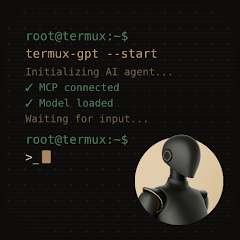
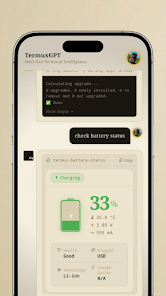
TermuxGPT integrates a GPT-based conversational assistant into the Termux command-line environment, offering contextual help, code generation, and scripting suggestions from within Android. Users receive conversational guidance, sample commands, and automated script templates while working in a familiar shell interface. It streamlines development, debugging, and learning on mobile devices.
TermuxGPT combines a lightweight chat interface with command-line awareness so you can ask about package usage, syntax, or automation strategies without leaving the terminal. The app provides instant code snippets, one-line commands, and multi-step scripts for bash, Python, and other common tooling. Built-in completion suggestions reduce typing, while context-aware prompts adapt to installed packages and your current working directory.
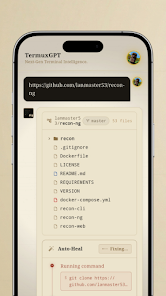
Rather than a generic chatbot, TermuxGPT reads the command history and environment variables (with permission) to offer relevant advice. Ask for debugging tips on a failing script, request an optimized rsync command, or generate a Dockerfile fragment for a small project. Responses aim to be actionable: copyable commands, annotated examples, and concise explanations designed for terminal use.
For developers, TermuxGPT accelerates prototyping by scaffolding scripts and configuration files. It can produce test commands, suggest package installation sequences, and show secure ways to handle credentials. The app supports multi-file templates and can suggest improvements to shell functions, offering alternatives based on POSIX or Bash-specific features.
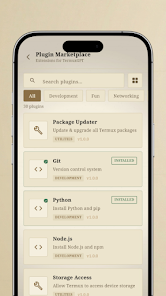
Customize TermuxGPT to match your preferences: choose verbosity levels for responses, toggle inline command previews, and select preferred languages for code output. Plugin support expands capabilities — community plugins add integrations for git workflows, package managers, and cloud CLIs. Each plugin can register intents so the assistant routes requests appropriately.
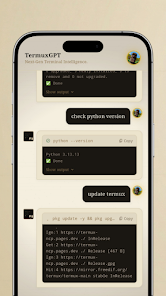
The interface is optimized for small screens and keyboard-driven interactions. Conversations appear in a compact pane while the terminal remains accessible beneath or beside the assistant window. Keyboard shortcuts, command history search, and quick-insert buttons make it simple to paste suggested commands into the shell. Dark and light themes ensure readability in different lighting conditions.
TermuxGPT is designed to run efficiently on a range of Android devices. Most heavy language processing is handled by remote models, so local resource demands remain low. The app minimizes network usage by caching recent prompts and reusing session context when appropriate. Compatible with standard Termux packages and common Android keyboards, it works well across different hardware configurations.
Privacy is handled transparently: TermuxGPT requests only the permissions needed to read shell context or access files when you explicitly enable those features. Sensitive information can be redacted before sending prompts to remote services. The app also includes guidance on avoiding unsafe command execution and flags responses that suggest elevated privileges or destructive operations.
Use TermuxGPT for learning shell scripting, speeding up repetitive admin tasks, or getting quick reminders about less-frequent commands. System administrators can generate monitoring scripts, students can practice command-line concepts, and hobbyists can prototype small automation projects directly from their phones. The assistant is particularly helpful when you need a concise, runnable example fast.
Installation is straightforward: install TermuxGPT alongside Termux, grant optional permissions for enhanced context, and begin with sample prompts like "show a secure wget command" or "create a Python virtualenv and install requests." A guided tour walks through common scenarios, and an in-app help section explains configuration options and available plugins.
People pick TermuxGPT for the way it bridges conversational AI with real terminal workflows. It reduces the friction of switching between web searches and the shell, delivers pragmatic command-oriented answers, and can be tuned to match individual workflows. Regular updates add new plugins and refine context handling to keep advice relevant as packages and best practices evolve.

Colorimeter
Size:5.45M ToolsChatBoost
Size:19.33M ToolsRemote Fire TV
Size:48.04M ToolsgetConf - Hidden Settings
Size:16.66M ToolsTracker Detect Pro
Size:10.39M ToolsWiFi Speed Test Pro
Size:8.11M ToolsGG Mouse Pro 2
Size:45.82M ToolsResource Monitor Mini Pro
Size:3.19M ToolsSmart Keyboard Pro
Size:23.22M ToolsMyScript Math: Solve & Plot
Size:108.76M ToolsText Repeater
Size:11.73M Tools3Dcalc+
Size:12.59M ToolsApril 2024 Clash of Clans Update: Unveiling a Fresh Companion, Enhanced Levels, Chat Tagging, and Be
2024-04-16Arrival of Genshin Impact 4.6 Update: 'Embers of Two Realms, Twilight of Crimson'
2024-04-16V2.2 of the Farlight 84 update introduces an overhauled Season structure, fresh in-game currency, an
2024-04-16Monster Never Cry is now accessible on both Android and iOS mobile devices.
2024-04-18PUBG Mobile Teams Up with Bentley Motors: Luxury Cars, Exclusive Collectibles, and Beyond
2024-04-18March 2024 Free Redemption Codes for Honkai: Star Rail
2024-04-18