English
M.A.P. -MoneyAllocationPlanner is a focused budgeting app that helps users allocate income, track expenses, and plan savings with flexible category rules. It combines simple visual tools with rule-based allocations so you can automate portions of paychecks, monitor budgets, and stay on top of both short-term bills and long-term goals.
This review looks at how M.A.P. -MoneyAllocationPlanner organizes money flow and supports everyday financial decisions. The app targets users who want more control than a spreadsheet but prefer fewer distractions than a full-featured finance suite. It keeps routines predictable by letting you define allocation rules, priority buckets, and automated transfers.
The app centers around three primary systems: allocation rules, category wallets, and scheduled actions. Allocation rules let you specify percentages or fixed amounts for each paycheck. Category wallets act as virtual envelopes for rent, groceries, entertainment, and savings. Scheduled actions allow regular transfers and reminders so budgets stay current without constant manual input.
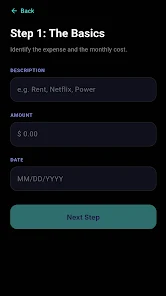
The allocation flow is straightforward. You define an incoming amount, then attach rules that distribute funds across your categories. For example, you might allocate 50% to essentials, 20% to debt repayment, 20% to savings, and 10% to discretionary spending. When a deposit is recorded, M.A.P. -MoneyAllocationPlanner applies those rules and updates each wallet balance immediately.
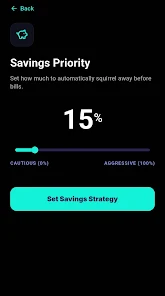
Design choices favor clarity. The main dashboard highlights current balances and upcoming scheduled actions. Controls are intentionally minimal: sliders for percentages, input fields for fixed contributions, and swipe gestures for quick transfers. Performance is snappy on modern devices, and the app minimizes background battery use by limiting sync frequency and offering manual refresh.
Users can label categories, set target amounts, and pin important wallets to the top of the dashboard. The app supports manual import of CSV files for historical data and simple bank sync options for automatic deposits. Integration options are pragmatic rather than comprehensive, focusing on essential connections that reduce setup friction.
A typical workflow starts with creating a set of categories, defining allocation rules for incoming funds, and scheduling at least one recurring transfer. Monthly check-ins let you tweak percentages and rebalance wallets. Notifications prompt you before a scheduled transfer and after allocations occur, keeping the logic transparent and predictable.
Many appreciate M.A.P. -MoneyAllocationPlanner for its balance of automation and simplicity. It reduces decision fatigue by automating routine allocations while still letting users intervene quickly. The visual wallet approach makes abstract savings goals feel tangible, which helps maintain long-term consistency.
Download the app, create an account, and start by adding your primary income source. Next, build three to five categories that reflect immediate needs and savings priorities. Test the allocation rules with a mock deposit before switching to live transactions; this helps catch setup errors early and builds confidence with the system.
For anyone looking to move from reactive spending to proactive planning, M.A.P. -MoneyAllocationPlanner provides practical tools without unnecessary complexity. The balance of rules, visual feedback, and scheduling features makes it a useful companion for steady financial progress.
Cover Letter
Size:11.77M FinanceCV Engineer
Size:16.85M FinanceSimple Invoice Manager
Size:25.30M Finance华融融达期货
Size:109.18M FinanceChurchNest
Size:83.00M FinanceYnotOne
Size:0.00M FinanceMoohan Taekwondo
Size:10.80M FinanceIBOIX
Size:76.00M FinanceMargin Guard: Risk Calculator
Size:69.00M FinanceLP Protidin
Size:47.00M FinanceMON 3
Size:47.00M FinanceExpo Wallet - Consumer
Size:29.10M FinanceApril 2024 Clash of Clans Update: Unveiling a Fresh Companion, Enhanced Levels, Chat Tagging, and Be
2024-04-16Arrival of Genshin Impact 4.6 Update: 'Embers of Two Realms, Twilight of Crimson'
2024-04-16V2.2 of the Farlight 84 update introduces an overhauled Season structure, fresh in-game currency, an
2024-04-16Monster Never Cry is now accessible on both Android and iOS mobile devices.
2024-04-18PUBG Mobile Teams Up with Bentley Motors: Luxury Cars, Exclusive Collectibles, and Beyond
2024-04-18March 2024 Free Redemption Codes for Honkai: Star Rail
2024-04-18