English
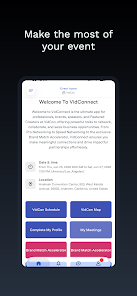
VidConnect is a lightweight video collaboration app that simplifies remote meetings, screen sharing, and content streaming for teams and creators. It pairs fast connectivity with clear audio/video, intuitive controls, and easy calendar integration, making it a practical choice for professionals who want reliable virtual interactions without steep learning curves.
Designed for everyday productivity, VidConnect focuses on dependable communication and straightforward workflows. It balances feature depth with accessibility so users can join calls, host presentations, or record sessions without digging through complex settings. The app supports standard network conditions and adapts video quality to preserve fluid performance across devices.
Getting started is straightforward: create or join a room using a unique link or meeting code. The app negotiates the best connection route available, attempting peer-to-peer where possible and falling back to relay servers when necessary. Users can toggle camera and microphone quickly, mute individual participants when hosting, and pin important video streams for focused viewing.
Hosts get an array of controls to manage sessions efficiently. These include a waiting room feature for admission control, participant muting, and timed meeting options to keep schedules on track. For teams that require privacy, VidConnect offers password-protected rooms and configurable permissions for file transfers and screen control.
VidConnect uses a minimal, responsive interface that prioritizes content over chrome. Large call windows, clear icons, and layered controls help users find functions quickly. The app uses adaptive bitrate streaming to maintain smooth playback even when bandwidth fluctuates, and hardware acceleration helps reduce CPU load on modern devices.
Whether on a smartphone, tablet, or desktop, VidConnect presents a consistent layout and feature set. Touch-friendly controls on mobile switch to mouse-friendly menus on desktop automatically. The compact notifications and background audio handling are optimized so meetings continue without interrupting other tasks.
Beyond basic calls, VidConnect includes tools that support real work. Shared whiteboards let teams sketch ideas in real time. File sharing uses drag-and-drop or built-in upload dialogs, and chat threads preserve links and notes for follow-up. The recording feature generates searchable transcripts when enabled, making it fast to find key moments later.
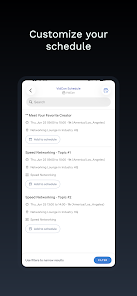
VidConnect integrates with common project management and calendar platforms, enabling automatic meeting creation and one-click join links inside event invites. Single sign-on options and directory syncing simplify user provisioning in organizational deployments, reducing administrative overhead for IT teams.
Teams pick VidConnect for its low-friction setup and consistent performance in mixed environments. The app’s balance of useful collaboration tools and sensible defaults means fewer support tickets and smoother meetings. Administrators appreciate the configurable security settings and logging capabilities that support corporate policies.
Download and install the app, sign in with an email or a supported single sign-on provider, and create your first meeting. Invite participants with a link or calendar invite and explore the recording and screen-sharing options during a trial session. Regular updates add small improvements, keeping the core experience stable while introducing useful enhancements.
VidConnect aims to be a practical communications hub: simple to adopt, well-suited for hybrid teams, and built around everyday productivity needs rather than overwhelming feature lists. Its focus on clarity, performance, and integration makes it a good fit for professionals who want meetings that just work.

LifeUp: Gamified To Do List
Size:17.35M ProductivityVPN Proxy Speed
Size:53.00M ProductivityAI Logo Generator (LogoWiz)
Size:41.50M Productivity3D Logo Maker
Size:39.30M ProductivityAI Chat: Ask AI Chat Anything
Size:42.20M ProductivityStars and Planets
Size:116.42M ProductivityImageMeter
Size:119.22M ProductivityHabitKit
Size:56.87M ProductivityMy Passwords Manager
Size:10.60M ProductivitymiMind
Size:48.30M ProductivityCute Note DDay Todo
Size:15.31M ProductivityCleverType AI Keyboard
Size:33.83M ProductivityApril 2024 Clash of Clans Update: Unveiling a Fresh Companion, Enhanced Levels, Chat Tagging, and Be
2024-04-16Arrival of Genshin Impact 4.6 Update: 'Embers of Two Realms, Twilight of Crimson'
2024-04-16V2.2 of the Farlight 84 update introduces an overhauled Season structure, fresh in-game currency, an
2024-04-16Monster Never Cry is now accessible on both Android and iOS mobile devices.
2024-04-18PUBG Mobile Teams Up with Bentley Motors: Luxury Cars, Exclusive Collectibles, and Beyond
2024-04-18March 2024 Free Redemption Codes for Honkai: Star Rail
2024-04-18