
English
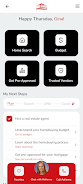
Secure Home Finder is a mobile app designed to centralize the work of buying and owning a home in the Coastal Carolinas, bringing together up-to-date property listings, educational resources, lender connections, and a vetted local services directory into one clean interface. Whether you are a first-time buyer, relocating to the coast, or an experienced homeowner preparing for a sale or renovation, Secure Home Finder guides each step with searchable listings, practical checklists, and direct in-app tools that reduce friction and save time.
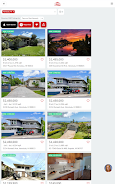
The app combines a map-driven advanced search, saveable filters, and real-time alerts that notify you when new properties match your criteria or when prices change. Search controls are simple: refine results with common filters (beds, baths, price range, neighborhood) and sort by relevance, date listed, or price. Saved searches and favorites act as a lightweight progression system—repeated interactions refine suggestions and make future results more relevant to your preferences.
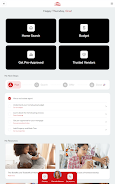
Secure Home Finder includes a library of articles, calculators, and step-by-step checklists that explain each transaction stage and common costs. The educational section functions like modular levels: start with foundational topics such as making an offer and understanding escrow, then progress to deeper modules on inspections, insurance, and closing. Checklists track your progress, allow you to set reminders, and show completed milestones so you and your agent can see what remains to be done.
Messaging and scheduling are built into the app to reduce back-and-forth across platforms. Use simple touch controls to message agents, request showings, or upload photos and notes from an open house. Calendar integration allows you to confirm appointments and receive reminders. The interaction model emphasizes one-handed navigation, clear action buttons, and inline context so you can move from discovery to a scheduled tour without leaving the app.
The vendor directory lists local contractors, inspectors, and service providers with verified profiles and contact information. You can filter vendors by trade, read brief service descriptions, and initiate contact or request quotes from within the app. Trusted lender connections are provided for users who want pre-approval options; those connections are optional and designed to streamline budgeting and offer preparation. Customization options let you control notification frequency, map defaults, and which neighborhoods appear first in your search results.
The app uses a clean, map-forward visual design with clear typography, generous tap targets, and consistent iconography to reduce cognitive load when browsing listings. Accessibility considerations include adjustable text sizes, high-contrast modes, and labeling compatible with screen readers. Onboarding walks new users through the main sections—Search, Learn, Finance, Vendors, and My Home—so essential controls are discoverable and repeatable across sessions.
Secure Home Finder supports limited offline capabilities: favorited listings, saved searches, and downloaded articles are available without an active connection, which is useful during showings in areas with weak service. Because market data is updated when a connection is available, saved offline content will re-sync automatically. The combination of alerts, repeatable checklists, and curated educational content creates long-term replay value—users frequently return to refine searches, re-run affordability calculations, or re-check vendor recommendations as their purchase progresses.
The app is tailored to the Coastal Carolinas market, so coverage and vendor listings outside that region are limited. Some steps in the buying and owning process still require direct coordination with agents, lenders, or contractors outside the app, and listing details depend on local feeds that are updated by broker partners. Secure Home Finder is intended as a practical, region-focused assistant to help you move from search to closing more confidently, while recognizing that some interactions will continue to happen offline or through established professionals.







LifeUp: Gamified To Do List
Size:17.35M ProductivityVPN Proxy Speed
Size:53.00M ProductivityAI Logo Generator (LogoWiz)
Size:41.50M Productivity3D Logo Maker
Size:39.30M ProductivityAI Chat: Ask AI Chat Anything
Size:42.20M ProductivityStars and Planets
Size:116.42M ProductivityImageMeter
Size:119.22M ProductivityHabitKit
Size:56.87M ProductivityMy Passwords Manager
Size:10.60M ProductivitymiMind
Size:48.30M ProductivityCute Note DDay Todo
Size:15.31M ProductivityCleverType AI Keyboard
Size:33.83M ProductivityApril 2024 Clash of Clans Update: Unveiling a Fresh Companion, Enhanced Levels, Chat Tagging, and Be
2024-04-16Arrival of Genshin Impact 4.6 Update: 'Embers of Two Realms, Twilight of Crimson'
2024-04-16V2.2 of the Farlight 84 update introduces an overhauled Season structure, fresh in-game currency, an
2024-04-16Monster Never Cry is now accessible on both Android and iOS mobile devices.
2024-04-18PUBG Mobile Teams Up with Bentley Motors: Luxury Cars, Exclusive Collectibles, and Beyond
2024-04-18March 2024 Free Redemption Codes for Honkai: Star Rail
2024-04-18


















