
English
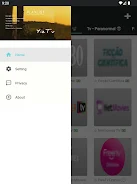
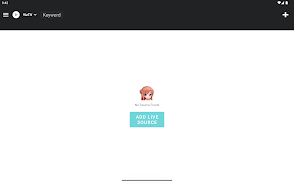
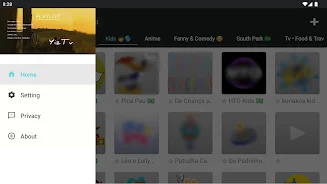
YizTV is a versatile media player built to play Internet TV and local streams using user-provided playlists and direct stream URLs. YizTV presents a lightweight, playlist-centered interface that emphasizes flexibility: you supply M3U, XSPF or similar playlist files and the app focuses on reliable playback and organization rather than providing its own channel lists. For users who need a practical tool to test streams, group channels, or build a custom viewing setup, this description explains how the app handles playback, control, compatibility and everyday maintenance.
The app supports standard playlist formats such as M3U and XSPF and accepts plain stream URLs, so you can point it at a hosted file or a local playlist. YizTV is designed to play a broad range of audio and video file types and common streaming protocols, with an emphasis on stable decoding and minimal conversion. This makes it useful for testers, hobbyists and more advanced users who curate their own sources rather than relying on prebundled content. The core goal is predictable playback and straightforward playlist management.
Playback controls are kept intentionally simple to reduce friction when moving between streams. Standard transport controls—play, pause, stop and seek when supported by the stream—are available, along with options to switch audio tracks or toggle stream quality where the source provides multiple renditions. The interface is optimized for both touch navigation on phones and remote controls on TV devices, so you can quickly browse channels, resume a stream or switch playlists with minimal taps. Buffer behavior and retry logic help maintain continuous playback on fluctuating networks.
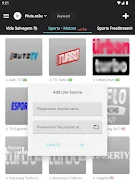
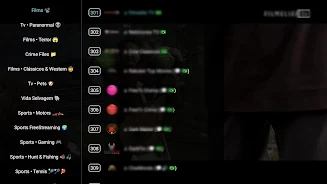
YizTV allows you to open and manage several playlists simultaneously so you can group channels by region, genre or purpose. Playlists can be added from local storage or by entering remote URLs, and you can rename lists and reorder entries to suit your browsing habits. While the app does not include editing tools for playlist file contents within the interface, it is compatible with commonly edited M3U and XSPF structures so editing externally and reloading is straightforward for users who maintain curated channel lists.
The application adopts a lightweight approach that keeps background resource use low while running multiple streams concurrently for preview or monitoring. YizTV focuses on decoding efficiency to reduce battery and memory impact on mobile devices; on larger screens, the same playback engine scales to higher-resolution streams. Compatibility with a wide variety of container types and codecs minimizes the need to transcode files before playback, but like any playlist-centered player it relies on the source streams being encoded in a supported format.
YizTV is designed with straightforward navigation and readable labels to help users with varying levels of experience. While the app requires network access to play online streams, it can also open local media files referenced in playlists for offline viewing where the files exist on device storage. Textual labels and simple control layouts aim to improve discoverability of functions, and basic behaviors such as remembering last-played lists and positions help users return to ongoing viewing quickly.
If a stream fails to load, check the playlist URL or stream address for typos and verify that the source server supports the protocol in use. Because YizTV does not provide built-in channel lists, keeping a small library of vetted playlists or using a reputable source for M3U/XSPF files makes setup faster and more reliable. Users encountering intermittent dropouts can try increasing buffer size in their player settings or switching to a lower-bitrate stream provided by the source. For testing purposes, running multiple streams simultaneously is possible but will increase CPU and network usage.
YizTV delivers flexible playback across diverse playlists and stream types, centralized management of multiple playlists, and a compact interface that favors user-provided content and control. It is particularly useful for people who curate their own channels or need a tool for validating streams. The primary limitations are intentional: the app does not include preloaded media or channel directories and some playlist setup requires basic technical knowledge. With appropriate playlists and a little setup, YizTV becomes a dependable tool for custom streaming workflows.

Compress Video - Resize Video
Size:48.75M Media & VideoMEME Maker: MEME Creator
Size:49.65M Media & VideoInstory Story Video Maker
Size:31.79M Media & VideoDrum Pads 24 - Beats and Music
Size:31.00M Media & VideoRadioTunes
Size:25.30M Media & VideoWiseplay
Size:38.13M Media & VideojetAudio HD Music Player Plus
Size:22.60M Media & VideoTABLA: India Mystical Drums
Size:27.35M Media & VideoOnePlayer
Size:128.00M Media & VideoDeep Bass Booster & Subwoofer
Size:4.30M Media & Videoedjing Mix
Size:70.40M Media & VideoWorld Radio FM Online
Size:24.00M Media & VideoApril 2024 Clash of Clans Update: Unveiling a Fresh Companion, Enhanced Levels, Chat Tagging, and Be
2024-04-16Arrival of Genshin Impact 4.6 Update: 'Embers of Two Realms, Twilight of Crimson'
2024-04-16V2.2 of the Farlight 84 update introduces an overhauled Season structure, fresh in-game currency, an
2024-04-16Monster Never Cry is now accessible on both Android and iOS mobile devices.
2024-04-18PUBG Mobile Teams Up with Bentley Motors: Luxury Cars, Exclusive Collectibles, and Beyond
2024-04-18March 2024 Free Redemption Codes for Honkai: Star Rail
2024-04-18


















