
English
Service Bus Dojo is a compact Android utility designed to simplify message-driven workflows for mobile developers and IT professionals. It provides a focused toolkit for inspecting, routing, and testing messages on enterprise service buses, combining an intuitive interface with practical diagnostic tools that speed debugging and deployment on Android devices.
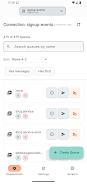
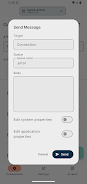
At its heart, Service Bus Dojo offers a set of features tuned for working with messaging infrastructures from a mobile device. Key capabilities include message browsing, content preview, filter-driven routing, and a sandboxed message sender for manual tests. Each tool targets common pain points in development and operations: finding stuck messages, validating payload formats, and replaying traffic scenarios without affecting production systems.
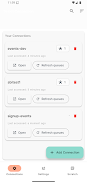
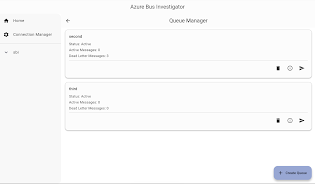
Service Bus Dojo brings a mobile-first interface that keeps essential operations a tap away. The layout groups actions into three zones: inspect, act, and monitor. Inspect lets you open queues and topics quickly; act is where you create or alter messages; monitor surfaces metrics like throughput and backlog. Shortcuts and history lists reduce repetition during iterative testing cycles, while contextual actions adapt depending on the message type.
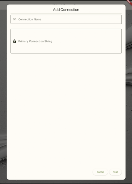
Designed to connect with a broad range of service bus implementations and cloud messaging endpoints, the app supports both secure direct connections and proxy-based access for restricted networks. Authentication options include API tokens, OAuth flows, and certificate pinning. Integration adapters and an exportable configuration profile make it straightforward to move between test, staging, and production endpoints without reconfiguring each time.
Security is a priority: connection credentials can be stored in an encrypted vault and access can be gated by device-level biometric checks. Diagnostic tools assist in uncovering root causes by capturing message traces, recording timestamps across hops, and flagging schema violations. Built-in logging can export compact traces for desktop analysis and can be filtered to show only errors or warnings to speed incident triage.
Service Bus Dojo is optimized to run smoothly on a range of Android hardware. Memory usage is conservative during idle inspection and scales predictably when loading large messages. Network operations use efficient batching and retry strategies to avoid spamming endpoints while maintaining responsiveness. An adjustable refresh cadence lets you balance near-real-time monitoring with battery and bandwidth conservation.
Advanced users will appreciate the ability to script repetitive checks and generate synthetic traffic patterns. Rule templates simplify common scenarios like dead-letter replays or delayed delivery tests. Visual rule editors let operators create routing logic without writing code, while exportable templates enable teams to share standard checks across devices and environments.
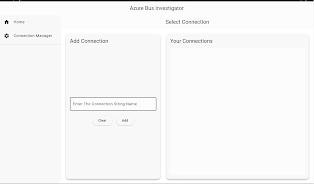
Getting started with Service Bus Dojo takes only a few minutes: install the app, add your first connection using a secure token or certificate, and open a queue to begin inspecting messages. Helpful onboarding tips guide you through creating your first test message and running a routing simulation. For teams, configuration templates can be distributed so every member starts with identical settings.
Service Bus Dojo is useful to developers writing integration code, operations staff troubleshooting live systems, and architects validating message flows. By placing inspection and testing tools on a mobile device, it enables fast, on-the-spot checks during deployments or incident responses. The app’s feature set favors clarity and speed, reducing time-to-diagnosis when issues appear in messaging layers.
With thoughtful design, secure connections, and tools tailored to messaging workflows, Service Bus Dojo provides a practical mobile companion for managing service bus ecosystems from anywhere a phone or tablet is at hand.

Colorimeter
Size:5.45M ToolsChatBoost
Size:19.33M ToolsRemote Fire TV
Size:48.04M ToolsgetConf - Hidden Settings
Size:16.66M ToolsTracker Detect Pro
Size:10.39M ToolsWiFi Speed Test Pro
Size:8.11M ToolsGG Mouse Pro 2
Size:45.82M ToolsResource Monitor Mini Pro
Size:3.19M ToolsSmart Keyboard Pro
Size:23.22M ToolsMyScript Math: Solve & Plot
Size:108.76M ToolsText Repeater
Size:11.73M Tools3Dcalc+
Size:12.59M ToolsApril 2024 Clash of Clans Update: Unveiling a Fresh Companion, Enhanced Levels, Chat Tagging, and Be
2024-04-16Arrival of Genshin Impact 4.6 Update: 'Embers of Two Realms, Twilight of Crimson'
2024-04-16V2.2 of the Farlight 84 update introduces an overhauled Season structure, fresh in-game currency, an
2024-04-16Monster Never Cry is now accessible on both Android and iOS mobile devices.
2024-04-18PUBG Mobile Teams Up with Bentley Motors: Luxury Cars, Exclusive Collectibles, and Beyond
2024-04-18March 2024 Free Redemption Codes for Honkai: Star Rail
2024-04-18


















