
English
YizWeb is a streamlined web management app designed to centralize site monitoring, content edits, and performance tracking into a single mobile interface. It gives administrators quick access to analytics, deployment logs, and user management tools while keeping routine tasks fast and straightforward for on-the-go workflows.
YizWeb bundles essential tools commonly scattered across desktop dashboards into one compact package. Real-time analytics display traffic trends, page load times, and error rates. A built-in file manager allows basic edits and asset uploads. Deployment history and rollback options help reduce downtime, and role-based permissions keep control delegated safely across teams.
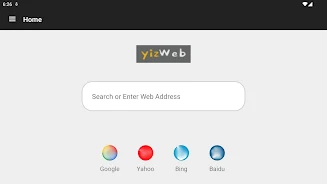
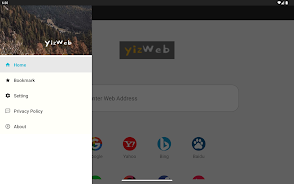
The app presents a clean, card-based layout where each major function—Analytics, Content, Deployments, Users—is reachable within two taps. Visual indicators and concise summaries reduce the need to drill into multiple menus. Menus use clear labels and consistent iconography, which lowers the learning curve for new users while keeping power functions accessible for experienced operators.
YizWeb focuses on speed and repeatability. Saved filters and custom dashboards let you return to frequently used reports instantly. Scheduled tasks can be created and monitored from the same screen where deployments are triggered, reducing context switching. Notifications are configurable so teams receive alerts only for issues that matter to them.
Role-based access in YizWeb allows administrators to create tailored permission sets for editors, developers, and analysts. Activity logs track who made changes and when, which simplifies audits and troubleshooting. Shared notes and comment threads attached to deployments enable lightweight coordination without leaving the app.
YizWeb supports common integrations with analytics providers, CDN services, and version control systems. Built-in connectors enable automatic data import and export, while a simple webhook system lets teams extend functionality by connecting to internal tools or third-party automation platforms. This makes it easy to slot YizWeb into existing development and monitoring stacks.
Security features in YizWeb include two-factor authentication, encrypted data storage, and granular permission controls. Transport-level encryption is enforced for all API calls, and administrators can configure session timeouts to reduce exposure on shared devices. Audit trails and exportable logs assist with compliance reporting and forensic analysis.
The app is optimized for low-latency interaction on mobile networks. Caching strategies minimize repeated data fetches, and incremental sync reduces bandwidth when only small changes occur. Offline viewing of recent dashboards ensures that key metrics remain available even with intermittent connectivity, while background sync ensures updates are applied as soon as a connection is restored.
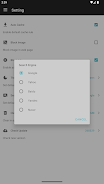
Users can personalize the YizWeb experience by rearranging dashboard widgets, setting theme preferences, and creating notification rules that match their operational priorities. Templates for common tasks—such as quick content patches or emergency rollbacks—help teams respond faster and maintain consistency across actions.
YizWeb is built for modern Android devices and adapts to various screen sizes, from compact phones to large tablets. It is engineered to coexist with enterprise mobility management setups and supports single sign-on (SSO) options common in corporate environments. Regular updates ensure compatibility with the latest Android versions and security patches.
Setting up YizWeb requires an administrator account and API credentials for the services you want to link. The initial setup wizard walks through permissions, integrates core services, and offers guided tours of each major section. For teams, invite links and role templates speed up onboarding.
YizWeb suits small operations looking to consolidate monitoring and quick edits on mobile devices, as well as distributed teams that need lightweight coordination without constant desktop access. The app is useful for site owners, operations engineers, content managers, and anyone who needs instant visibility into site health and deployments.
Key takeaways: YizWeb centralizes web operations into a compact, mobile-first interface, balancing simplicity with enough depth to handle real incidents. Its combination of integrations, security features, and performance optimizations make it a productive companion for managing web services while away from the desk.







LifeUp: Gamified To Do List
Size:17.35M ProductivityVPN Proxy Speed
Size:53.00M ProductivityAI Logo Generator (LogoWiz)
Size:41.50M Productivity3D Logo Maker
Size:39.30M ProductivityAI Chat: Ask AI Chat Anything
Size:42.20M ProductivityStars and Planets
Size:116.42M ProductivityImageMeter
Size:119.22M ProductivityHabitKit
Size:56.87M ProductivityMy Passwords Manager
Size:10.60M ProductivitymiMind
Size:48.30M ProductivityCute Note DDay Todo
Size:15.31M ProductivityCleverType AI Keyboard
Size:33.83M ProductivityApril 2024 Clash of Clans Update: Unveiling a Fresh Companion, Enhanced Levels, Chat Tagging, and Be
2024-04-16Arrival of Genshin Impact 4.6 Update: 'Embers of Two Realms, Twilight of Crimson'
2024-04-16V2.2 of the Farlight 84 update introduces an overhauled Season structure, fresh in-game currency, an
2024-04-16Monster Never Cry is now accessible on both Android and iOS mobile devices.
2024-04-18PUBG Mobile Teams Up with Bentley Motors: Luxury Cars, Exclusive Collectibles, and Beyond
2024-04-18March 2024 Free Redemption Codes for Honkai: Star Rail
2024-04-18


















