
English
PulseHRM is a Human Resources and business productivity app designed for small to medium-sized companies that need reliable mobile workforce management. PulseHRM consolidates attendance, leave, payroll preparation, and personnel records into a lightweight mobile interface so managers and employees can complete routine HR tasks from a phone or tablet. The app type is Human Resources / Business productivity, and the description below explains core features, controls, configuration, and expected user workflows.
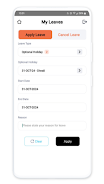
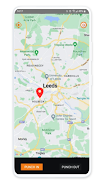
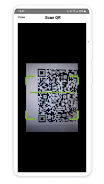
PulseHRM replaces fragmented spreadsheets and paper sign-ins with automated time capture and a central employee directory. Clock-ins and clock-outs can be recorded with optional GPS verification and biometric support where devices allow, and the captured data feeds into export-ready timesheets for payroll. Leave requests flow through configurable approval paths and employees can check their balances and payslips without contacting HR. The app is intended to make everyday HR operations more transparent and reduce repetitive administrative work.
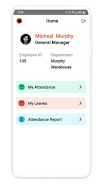
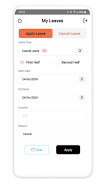
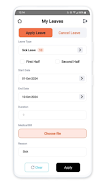
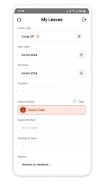
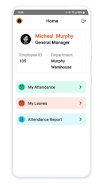
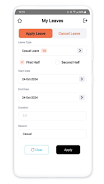
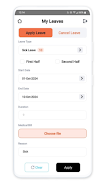
The app interface focuses on simple, touch-first controls so core actions are reachable quickly. Common tasks such as recording attendance, submitting or approving leave, and viewing a shift roster are accessible via clear buttons and an organized dashboard. Color-coded indicators identify pending approvals, exceptions, and late arrivals, while swipe and tap gestures move users between sections. Notifications inform managers and staff of status changes; action confirmations and concise in-screen help reduce the need for training references.
Rather than game-style progression, PulseHRM uses role-based access and permission levels to structure how users unlock functionality. Administrators configure permission tiers that determine who can edit employee records, approve leave, or access payroll exports. New users typically begin in a pilot group to validate shift patterns and approval workflows, then expand to additional teams as administrators apply templates and permission settings. This staged onboarding creates predictable progression in adoption across locations.
Functionally the app is organized into modules such as Time & Attendance, Leave Management, Payroll Exports, Employee Directory, and Reports. Each module presents a focused view with visual summaries and drill-down lists. The visual style favors clarity: readable fonts, high-contrast labels, and color-coded status markers to highlight exceptions and approvals. Multi-site deployments are handled as separate locations within the same account, allowing consistent templates while keeping local schedules and policies distinct.
Administrators can define shift patterns, overtime calculations, rounding rules, blackout dates, and custom leave categories to reflect company policy. Permission-level controls let organizations restrict editing rights or require multi-level approvals for sensitive leave types. Templates accelerate onboarding of new teams or locations, and configurable notifications let each organization balance information flow with noise. These settings allow PulseHRM to be tailored to varied operational needs without changing core app behavior.
Reporting tools convert attendance logs into actionable summaries for payroll and operations. Users can generate absenteeism reports, overtime trend summaries, and headcount change analyses. Visual charts and CSV exports support reconciliation with finance systems and make it straightforward to identify labor-cost drivers. Scheduled reports can be emailed to stakeholders on a regular cadence to automate recurring reconciliation tasks.
Security is enforced with role-based access, encrypted storage, and audit trails that record edits and approvals to support compliance. Administrators can set data retention rules and manage sessions to align with internal governance and local labor regulations. The app includes mechanisms to surface conflicts or anomalies, such as overlapping shifts or missing timesheets, so managers can resolve attendance challenges before payroll processing.
PulseHRM is built for intermittent connectivity: core functions remain available offline and entries sync automatically when a device reconnects. Background syncing and efficient push notifications are optimized to conserve battery life while ensuring timely alerts. Accessibility considerations include readable text sizes, clear contrast, and straightforward navigation for users with varying familiarity. Built-in help prompts and contextual guidance reduce the learning curve for non-technical staff.
Deployment typically begins with account setup, a pilot team to validate shift templates, and a short manager training session. Practical tips include using the audit log to teach approval workflows, scheduling automatic reports to minimize month-end reconciliation, and enabling GPS verification selectively to balance privacy and attendance integrity. PulseHRM aims to deliver a compact, adaptable HR toolset that scales from a handful of employees to multi-site operations while minimizing disruption during rollout.
LifeUp: Gamified To Do List
Size:17.35M ProductivityVPN Proxy Speed
Size:53.00M ProductivityAI Logo Generator (LogoWiz)
Size:41.50M Productivity3D Logo Maker
Size:39.30M ProductivityAI Chat: Ask AI Chat Anything
Size:42.20M ProductivityStars and Planets
Size:116.42M ProductivityImageMeter
Size:119.22M ProductivityHabitKit
Size:56.87M ProductivityMy Passwords Manager
Size:10.60M ProductivitymiMind
Size:48.30M ProductivityCute Note DDay Todo
Size:15.31M ProductivityCleverType AI Keyboard
Size:33.83M ProductivityApril 2024 Clash of Clans Update: Unveiling a Fresh Companion, Enhanced Levels, Chat Tagging, and Be
2024-04-16Arrival of Genshin Impact 4.6 Update: 'Embers of Two Realms, Twilight of Crimson'
2024-04-16V2.2 of the Farlight 84 update introduces an overhauled Season structure, fresh in-game currency, an
2024-04-16Monster Never Cry is now accessible on both Android and iOS mobile devices.
2024-04-18PUBG Mobile Teams Up with Bentley Motors: Luxury Cars, Exclusive Collectibles, and Beyond
2024-04-18March 2024 Free Redemption Codes for Honkai: Star Rail
2024-04-18


















