English
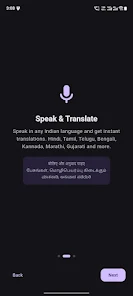
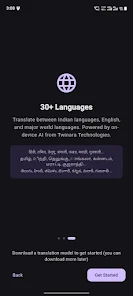
Twinara Translator brings fast, on-device translation and intuitive language tools to Android users. It supports text, voice, and image translation across dozens of languages with offline capabilities, real-time conversation mode, and a clean interface that prioritizes accuracy and speed for travelers, students, and professionals.
Twinara Translator positions itself as a compact but powerful language assistant for everyday use. The app focuses on practical translation tasks: translating phrases on the fly, capturing text from photos, and facilitating bilingual conversations without forcing users to juggle multiple utilities. It aims to be lightweight while still delivering features expected from modern translators.
Navigation is organized around a few core workflows: text translation, voice-to-voice conversation, and camera-based detection. Each workflow loads quickly and keeps recent translations accessible, which reduces friction in repeated interactions. For people who travel frequently or need quick translation at work, the workflows are tuned to get accurate results with minimal steps.
The app combines cloud-based models when online with optimized on-device engines for offline use. When a network connection is present, Twinara Translator leverages remote language models to improve nuance and context. Offline, it switches to compact neural models that prioritize essential vocabulary and grammar rules. This hybrid system balances speed, accuracy, and data efficiency.
Translations often come with suggested alternatives or a brief context hint to reduce misunderstanding. Users can tap words to view synonyms or tweak the phrasing manually. The correction mechanism is useful for technical terms and names that automated systems sometimes misinterpret.
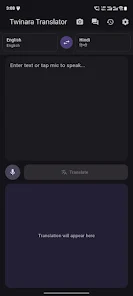
The UI is intentionally minimal: large buttons for voice and camera, a clear text input, and a persistent history panel. Typical translations appear in under a second on modern devices when online, and within a couple of seconds offline. Memory use is modest, and background processes limit battery drain, making it suitable for all-day use on mobile hardware.
Typography and contrast are tuned for readability in bright outdoor conditions. The camera viewfinder provides on-screen indicators for detected text areas and lets you tap corrections without leaving the live view. Small touches like a pronunciation guide and adjustable speech speed improve accessibility.
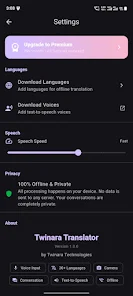
Installing Twinara Translator is straightforward: grant microphone and camera permissions to enable voice and image features. The first-run experience prompts you to select preferred languages and offers to download offline packs. Privacy-conscious users can limit cloud usage in settings, keeping translations strictly local when desired.
People choose Twinara Translator for its balance of functionality and simplicity. It packs advanced features without a steep learning curve, making it a practical companion for travel, study, and daily communication. Regular updates refine translation models and add convenience features, which keeps the app competitive and responsive to user feedback.
For anyone who needs a capable translator on an Android device, Twinara Translator delivers a useful mix of speed, offline readiness, and conversational tools. Its clear interface and focused toolset make it a solid option when reliable, on-the-go translation is a priority.


Colorimeter
Size:5.45M ToolsChatBoost
Size:19.33M ToolsRemote Fire TV
Size:48.04M ToolsgetConf - Hidden Settings
Size:16.66M ToolsTracker Detect Pro
Size:10.39M ToolsWiFi Speed Test Pro
Size:8.11M ToolsGG Mouse Pro 2
Size:45.82M ToolsResource Monitor Mini Pro
Size:3.19M ToolsSmart Keyboard Pro
Size:23.22M ToolsMyScript Math: Solve & Plot
Size:108.76M ToolsText Repeater
Size:11.73M Tools3Dcalc+
Size:12.59M ToolsApril 2024 Clash of Clans Update: Unveiling a Fresh Companion, Enhanced Levels, Chat Tagging, and Be
2024-04-16Arrival of Genshin Impact 4.6 Update: 'Embers of Two Realms, Twilight of Crimson'
2024-04-16V2.2 of the Farlight 84 update introduces an overhauled Season structure, fresh in-game currency, an
2024-04-16Monster Never Cry is now accessible on both Android and iOS mobile devices.
2024-04-18PUBG Mobile Teams Up with Bentley Motors: Luxury Cars, Exclusive Collectibles, and Beyond
2024-04-18March 2024 Free Redemption Codes for Honkai: Star Rail
2024-04-18