
English
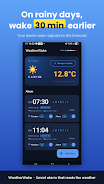
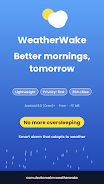
WeatherWake is a smart alarm and weather companion that adjusts wake-up times and morning routines using live forecasts and local conditions. The app combines meteorological insight with flexible alarms and notifications to help users wake prepared, comfortable, and punctual, whether you're commuting, caring for family, or working from home.
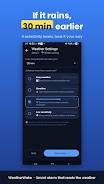
Designed for people who want their alarm to do more than beep, WeatherWake links real-time weather data to scheduling decisions. Instead of rigid wake times, it offers context-aware adjustments: a heavy rain alert might nudge your alarm earlier to allow extra travel time, while a clear forecast could keep your usual routine intact.
WeatherWake pulls forecast information from trusted providers and combines it with your settings. You define priorities—such as avoiding late alarms or ensuring extra commute time—and the app evaluates conditions the night before and the morning of. When thresholds are met, WeatherWake modifies the alarm and sends a clear message explaining the reason for the change.
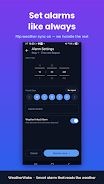
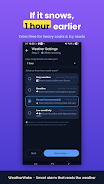
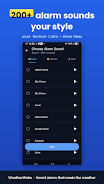
The app puts customization front and center. Users can assign different profiles to respond to rain, snow, fog, or temperature extremes. Sounds, snooze behavior, and gradual wake sequences are configurable. You can also set exceptions so that certain alarms remain fixed regardless of weather changes.
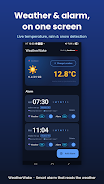
WeatherWake uses a clean, card-based interface that emphasizes readability. Forecast cards, upcoming alarms, and recent alerts are presented with minimal clutter. The app is optimized to run quietly in the background, syncing only when necessary to preserve battery life while keeping information current.
Commuters will appreciate preemptive time adjustments and transit-related tips. Parents can schedule buffer time for morning routines when inclement weather is predicted. Remote workers gain reassurance that extreme conditions won't disrupt virtual meetings because WeatherWake can recommend time shifts or prep alerts.
Notifications from WeatherWake explain why an alarm changed, offering a one-tap option to accept or revert adjustments. This transparency helps build trust and makes the automated decisions feel less intrusive. Detailed logs let you review past changes and the corresponding forecast triggers.
Getting started is straightforward. Install the app, grant the minimum permissions needed for weather and time functionality, and create a default alarm. From there, explore profiles, connect to favorite weather data sources if available, and tune the sensitivity of forecast triggers to match your lifestyle.
WeatherWake strikes a balance between automation and user control, helping users begin their day with fewer surprises. With tactical customization and clear explanations for every adjustment, it feels like an intelligent assistant focused on practical morning decisions rather than gimmicks.
Colorimeter
Size:5.45M ToolsChatBoost
Size:19.33M ToolsRemote Fire TV
Size:48.04M ToolsgetConf - Hidden Settings
Size:16.66M ToolsTracker Detect Pro
Size:10.39M ToolsWiFi Speed Test Pro
Size:8.11M ToolsGG Mouse Pro 2
Size:45.82M ToolsResource Monitor Mini Pro
Size:3.19M ToolsSmart Keyboard Pro
Size:23.22M ToolsMyScript Math: Solve & Plot
Size:108.76M ToolsText Repeater
Size:11.73M Tools3Dcalc+
Size:12.59M ToolsApril 2024 Clash of Clans Update: Unveiling a Fresh Companion, Enhanced Levels, Chat Tagging, and Be
2024-04-16Arrival of Genshin Impact 4.6 Update: 'Embers of Two Realms, Twilight of Crimson'
2024-04-16V2.2 of the Farlight 84 update introduces an overhauled Season structure, fresh in-game currency, an
2024-04-16Monster Never Cry is now accessible on both Android and iOS mobile devices.
2024-04-18PUBG Mobile Teams Up with Bentley Motors: Luxury Cars, Exclusive Collectibles, and Beyond
2024-04-18March 2024 Free Redemption Codes for Honkai: Star Rail
2024-04-18


















