English
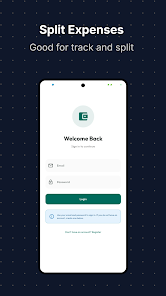
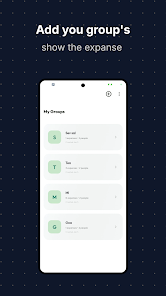
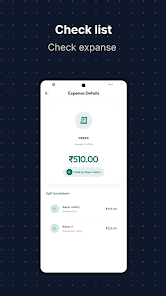
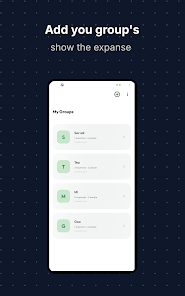
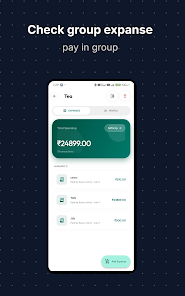
Split Expenses helps groups share costs without awkward conversations by tracking who paid, calculating who owes whom, and letting members settle up directly inside the app. With Split Expenses you can create focused groups for a trip, a household, an office team or a family budget and immediately see clear balances, recent activity and outstanding settlements. The app balances simplicity with accuracy, using an automated split engine that handles equal or uneven contributions and precise fractional math so totals remain correct down to the last rupee.
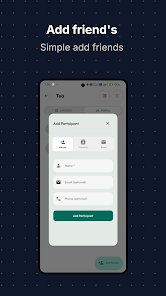
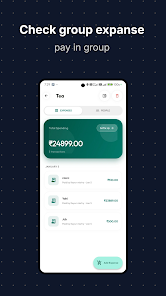
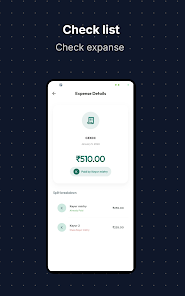
The core workflow in Split Expenses is intentionally simple: create a group, add members, record an expense with a description, amount and date, and apply the split method that matches your situation. The app supports equal splits as well as weighted or custom shares, and it recalculates liabilities instantly so everyone can see their portion. Add a short note to each settlement to record who paid on behalf of the group and why, and consult a complete, group-specific transaction history whenever you need context for past payments.
Split Expenses focuses on practical controls that reduce friction: quick-add expense buttons, auto-complete for member names, and simple selectors for the split type. Entry fields are designed for fast typing and clear confirmation of totals before you save. Progression in the app is measured by group clarity rather than levels: over time groups accumulate a transparent ledger of receivables, payables and settled items so you can close out trips, rotate payments among roommates, or reconcile recurring contributions for an event without manual spreadsheets.
The interface keeps visual clutter to a minimum and emphasizes readable balances and chronological activity. Group views display a concise overview of who owes what, followed by a timeline of transactions and settlement notes for easy scanning. You can name groups, label expenses, and filter histories by date or member to find the entries you need quickly. These lightweight customization options help Split Expenses adapt to different use cases — from one-off weekend trips to ongoing shared housing finances.
Because expenses recur in everyday life, Split Expenses delivers ongoing value: it replaces ad-hoc calculations and awkward follow-ups with a shared record everyone can consult. The app is designed for frequent reuse — add small daily costs as easily as larger trip totals — and its history and reminder features encourage timely settlements so balances don’t snowball into disputes. Repeated use improves group clarity and trust, which is the practical replay value the app aims for.
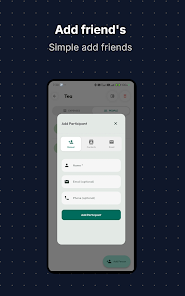
Split Expenses aims to be broadly accessible: large text for balances, clear contrast for essential information and straightforward tap targets for common actions. Push reminders notify group members about pending settlements when notifications are enabled on their devices, and the app requests access to contacts only to speed up adding people to groups; granting that permission is optional. Notifications and reminder cadence are configurable so teams can choose how persistent the prompts should be.
The app uses cloud-backed, real-time syncing to keep all members up to date across devices; this ensures each group sees the same balances and history as soon as changes are saved. Because real-time updates require an internet connection, some features like instant push reminders and live cross-device updates are not available while offline. When connectivity is restored, recent changes sync to the group so records stay consistent — users should expect the most reliable, current view when connected to the internet.
Split Expenses stores group data to provide shared ledgers and syncing, and it only requests permissions that simplify common tasks such as inviting contacts. The main limitations to know up front are the dependency on network connectivity for real-time updates and the need for notifications to be enabled to receive reminders reliably. These trade-offs allow the app to maintain accurate, shared records and reduce manual reconciliation work for groups who split costs frequently.
Cover Letter
Size:11.77M FinanceCV Engineer
Size:16.85M FinanceSimple Invoice Manager
Size:25.30M Finance华融融达期货
Size:109.18M FinanceChurchNest
Size:83.00M FinanceYnotOne
Size:0.00M FinanceMoohan Taekwondo
Size:10.80M FinanceIBOIX
Size:76.00M FinanceMargin Guard: Risk Calculator
Size:69.00M FinanceLP Protidin
Size:47.00M FinanceMON 3
Size:47.00M FinanceExpo Wallet - Consumer
Size:29.10M FinanceApril 2024 Clash of Clans Update: Unveiling a Fresh Companion, Enhanced Levels, Chat Tagging, and Be
2024-04-16Arrival of Genshin Impact 4.6 Update: 'Embers of Two Realms, Twilight of Crimson'
2024-04-16V2.2 of the Farlight 84 update introduces an overhauled Season structure, fresh in-game currency, an
2024-04-16Monster Never Cry is now accessible on both Android and iOS mobile devices.
2024-04-18PUBG Mobile Teams Up with Bentley Motors: Luxury Cars, Exclusive Collectibles, and Beyond
2024-04-18March 2024 Free Redemption Codes for Honkai: Star Rail
2024-04-18