
English
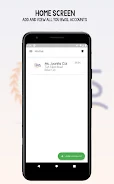
The BWS App is a streamlined productivity tool designed to simplify project tracking, communication, and task automation for small teams and individual professionals. With a clear layout and task-centric features, BWS App centralizes workflows, reduces administrative overhead, and helps users stay focused on priorities across devices.
BWS App targets people who need a lightweight but capable workspace: freelancers, project managers, and small businesses. It combines task lists, timelines, and communication threads into one environment so teams can move faster without switching between multiple services or losing context.
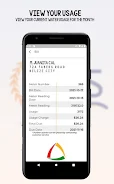
BWS App organizes work around projects and boards. Each project contains tasks that can be viewed as a list, card on a kanban-style board, or items on a timeline. This flexible approach supports both deadline-driven and iterative workflows. The app’s notification center surfaces important updates without overwhelming the inbox.
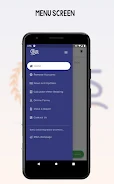
The interface favors clarity: a neutral color palette, readable typography, and consistent iconography reduce cognitive load. Performance is responsive on modern Android devices — lists load quickly and drag-and-drop reordering feels smooth. The app caches recent data so users experience minimal lag when switching between offline and online states.
BWS App provides several built-in tools designed to cut down routine work:
Users can tailor boards, color-code priorities, and create custom fields to match domain-specific needs. Integration options include calendar sync and common cloud storage providers, enabling documents and deadlines to remain aligned. For teams that depend on external tools, API endpoints allow basic automation and data exchange.
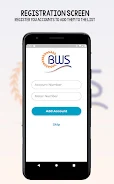
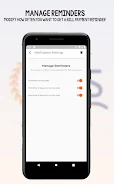
Getting started with BWS App is straightforward. New users can import CSV templates or replicate sample projects to speed setup. The initial walkthrough highlights creating tasks, inviting collaborators, and setting up a rule for automated reminders. For teams, administrative controls let owners manage permissions and visibility.
Collaboration features are focused and contextual. Comments attach to tasks so conversations remain relevant and searchable. Presence indicators and recent activity logs help team members catch up quickly. The app balances communication and task-tracking to prevent message threads from becoming disconnected from work items.
Teams appreciate BWS App for its mix of simplicity and power. It replaces scattered to-do lists and fragmented chats with a single source of truth for ongoing work. The app’s modest learning curve and practical automation features deliver noticeable time savings without demanding a large-scale process overhaul.
For best results, define naming conventions and tag schemes before migrating projects. Allocate a short trial period for team members to adapt and surface any missing integrations. With a few customized templates and notification rules in place, BWS App can become the central hub that keeps projects aligned and teams accountable.
LifeUp: Gamified To Do List
Size:17.35M ProductivityVPN Proxy Speed
Size:53.00M ProductivityAI Logo Generator (LogoWiz)
Size:41.50M Productivity3D Logo Maker
Size:39.30M ProductivityAI Chat: Ask AI Chat Anything
Size:42.20M ProductivityStars and Planets
Size:116.42M ProductivityImageMeter
Size:119.22M ProductivityHabitKit
Size:56.87M ProductivityMy Passwords Manager
Size:10.60M ProductivitymiMind
Size:48.30M ProductivityCute Note DDay Todo
Size:15.31M ProductivityCleverType AI Keyboard
Size:33.83M ProductivityApril 2024 Clash of Clans Update: Unveiling a Fresh Companion, Enhanced Levels, Chat Tagging, and Be
2024-04-16Arrival of Genshin Impact 4.6 Update: 'Embers of Two Realms, Twilight of Crimson'
2024-04-16V2.2 of the Farlight 84 update introduces an overhauled Season structure, fresh in-game currency, an
2024-04-16Monster Never Cry is now accessible on both Android and iOS mobile devices.
2024-04-18PUBG Mobile Teams Up with Bentley Motors: Luxury Cars, Exclusive Collectibles, and Beyond
2024-04-18March 2024 Free Redemption Codes for Honkai: Star Rail
2024-04-18


















