English
PS Remote turns your Android phone or tablet into a wireless controller and streaming client for PS4 and PS5 consoles, letting you play or stream games without an extra physical gamepad. The app offers two modes — stream directly to your device or use a virtual gamepad to control gameplay on your TV — along with customizable button mapping, themes and easy pairing. If you want fast remote access, a compact controller alternative for guests, or the ability to tailor controls on the fly, PS Remote delivers a practical solution when you have a strong Wi‑Fi connection.
⭐ PS Remote provides a full on-screen controller modeled on the DualShock/DualSense layout, including buttons, joysticks and triggers.
⭐ Dual modes let you switch between screen mode to stream and play on your phone and gamepad mode to control the console on your TV.
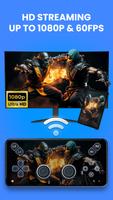
⭐ Seamless streaming with low-latency performance and support for 1080p at 60 FPS where applicable for smoother remote play.
⭐ Custom button mapping with saveable control profiles so you can remap inputs to your preference.
⭐ Import/export settings to back up custom layouts and quickly restore them on other devices.
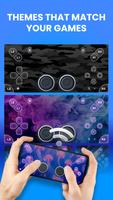
⭐ Skins, themes and light/dark interface options plus easy pairing via auto-detect or PIN for fast setup.
✅ Play without a physical PS controller — a handy option for quick sessions or extra players.
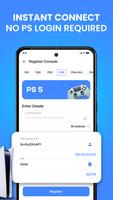
✅ Fast pairing and setup with no PlayStation account login required for basic operation, improving privacy.
✅ Customizable controls and profiles make it simple to adapt the interface to different games or users.
✅ Low-latency streaming and 1080p@60fps support provide a responsive remote play experience when network conditions allow.
✅ Cross-device import/export keeps your PS Remote layouts consistent across phones and tablets.
❎ Requires the console's official Remote Play feature to be enabled; the app does not stream games on its own.
❎ Performance depends on console firmware, device capability and Wi‑Fi quality; a 5 GHz network is recommended for best results.
❎ Not affiliated with or endorsed by Sony, so functionality may change with system updates.
This utility is developed by an independent third-party developer and offered as a companion tool for official console remote play. The team provides direct support by email and maintains a privacy policy; trademarks and product names remain the property of their respective owners and are used for identification only.





Colorimeter
Size:5.45M ToolsChatBoost
Size:19.33M ToolsRemote Fire TV
Size:48.04M ToolsgetConf - Hidden Settings
Size:16.66M ToolsTracker Detect Pro
Size:10.39M ToolsWiFi Speed Test Pro
Size:8.11M ToolsGG Mouse Pro 2
Size:45.82M ToolsResource Monitor Mini Pro
Size:3.19M ToolsSmart Keyboard Pro
Size:23.22M ToolsMyScript Math: Solve & Plot
Size:108.76M ToolsText Repeater
Size:11.73M Tools3Dcalc+
Size:12.59M ToolsApril 2024 Clash of Clans Update: Unveiling a Fresh Companion, Enhanced Levels, Chat Tagging, and Be
2024-04-16Arrival of Genshin Impact 4.6 Update: 'Embers of Two Realms, Twilight of Crimson'
2024-04-16V2.2 of the Farlight 84 update introduces an overhauled Season structure, fresh in-game currency, an
2024-04-16Monster Never Cry is now accessible on both Android and iOS mobile devices.
2024-04-18PUBG Mobile Teams Up with Bentley Motors: Luxury Cars, Exclusive Collectibles, and Beyond
2024-04-18March 2024 Free Redemption Codes for Honkai: Star Rail
2024-04-18