
English
Dont Touch My Phone Anti-Theft delivers a compact, offline security utility that sounds a loud alarm when your device is moved, making it easy to protect a phone left on a table or counter. Dont Touch My Phone Anti-Theft starts with a one-tap workflow so you can arm monitoring in seconds and relies on the device’s motion sensors to detect lifting or shifting; the immediate audible and visual alerts are designed to get attention quickly while keeping control simple. The app name also appears throughout the interface and help text so settings and profiles remain clear to repeat users.
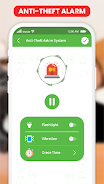
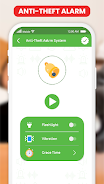
The app continuously reads motion sensor input when a monitoring session is active and compares movement to an adjustable sensitivity threshold. When that threshold is exceeded, the selected alarm sequence plays and optional vibration and flashlight blinking begin. Tones include a range of short and long sounds — from chimes to sirens to playful cues — and each session lets you set volume and duration. Secure deactivation requires a PIN, password or biometric confirmation so a casual handler cannot silence the alarm without authorization.
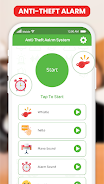
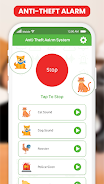
Controls are deliberately minimal: a prominent START button arms monitoring with one tap and an authenticated STOP path disarms it. A brief countdown gives you time to set the device down before monitoring begins, and a Test mode runs a short verification routine so you can confirm volume, sensitivity and flashlight behavior without leaving the phone unattended. The interface is organized around these core actions to reduce accidental configuration steps and make the app useful even when you are in a hurry.
Customize alerts and sensor behavior to match different locations and risk levels. Create, name and store profiles that combine tone, volume, sensitivity, delay and flashlight options so switching from a quiet cafe profile to a busy transit profile is instant. Profiles act like lightweight progression: as you fine-tune settings during repeated use, the presets adapt to your preferred combinations and speed re-arming in familiar places without re-tuning each time.
The motion detection system offers both sensitivity and delay sliders to balance responsiveness against false alarms caused by nearby vibrations or unstable surfaces. Start with conservative defaults and perform short calibration tests on the surfaces where you normally place the phone. The delay option lets you prevent alerts from brief nudges, while validation tests and on-screen guidance help you find the best compromise between detection accuracy and practical reliability.
The app emphasizes clarity with large tappable controls, clear labels and a neutral visual style that focuses on legibility rather than decoration. For accessibility, it supports combined cues: strong vibration and flashlight blinking accompany audio alarms, and the interface works well with system-level accessibility services. Biometric unlock integrates with the device so users who prefer fingerprint or face unlock can disarm the alarm quickly without typing.
With no account required, the app runs entirely offline and limits permission requests to what is necessary for motion sensing and secure deactivation. Monitoring is active only while a session runs and the app presents a persistent status indicator so you always know when protection is armed. To minimize battery impact, the app recommends short monitoring sessions for brief unattended moments and provides tips on reducing background wakeups and managing audio volume for energy-efficient alerts.
Dont Touch My Phone Anti-Theft is intended as a deterrent to casual handling rather than a device recovery solution; it deliberately does not include remote tracking, remote wipe or network-based recovery features. For best results, place the device on a stable surface, verify your chosen profile in test mode, and be cautious in highly unstable or extremely crowded environments where repeated false alarms are likely. The app lists required permissions and explains why each is needed to operate motion detection and secure disarm.
Designed for frequent short sessions, the app fits into routines such as coffee breaks, shared workspaces and incidental public use. Regular testing and profile refinement reward repeated use by improving reliability, while the simple controls and quick profile switching keep the day-to-day experience fast and predictable. If you need a focused, offline deterrent with secure deactivation and clear controls, Dont Touch My Phone Anti-Theft provides an approachable option that stays out of the way until you need it.
Colorimeter
Size:5.45M ToolsChatBoost
Size:19.33M ToolsRemote Fire TV
Size:48.04M ToolsgetConf - Hidden Settings
Size:16.66M ToolsTracker Detect Pro
Size:10.39M ToolsWiFi Speed Test Pro
Size:8.11M ToolsGG Mouse Pro 2
Size:45.82M ToolsResource Monitor Mini Pro
Size:3.19M ToolsSmart Keyboard Pro
Size:23.22M ToolsMyScript Math: Solve & Plot
Size:108.76M ToolsText Repeater
Size:11.73M Tools3Dcalc+
Size:12.59M ToolsApril 2024 Clash of Clans Update: Unveiling a Fresh Companion, Enhanced Levels, Chat Tagging, and Be
2024-04-16Arrival of Genshin Impact 4.6 Update: 'Embers of Two Realms, Twilight of Crimson'
2024-04-16V2.2 of the Farlight 84 update introduces an overhauled Season structure, fresh in-game currency, an
2024-04-16Monster Never Cry is now accessible on both Android and iOS mobile devices.
2024-04-18PUBG Mobile Teams Up with Bentley Motors: Luxury Cars, Exclusive Collectibles, and Beyond
2024-04-18March 2024 Free Redemption Codes for Honkai: Star Rail
2024-04-18


















