English
MP3 Player is a lightweight, privacy-minded music app designed for people who keep most of their songs on the device but still want the option to discover fresh tracks from independent artists when connected to WiFi. MP3 Player focuses on quick, local playback, simple playlist creation, and easy browsing by song, album or artist, all presented in a clean interface that stays out of the way of listening. Whether you keep a carefully curated library or a large collection of files, MP3 Player helps you play music without unnecessary complexity or constant data use.
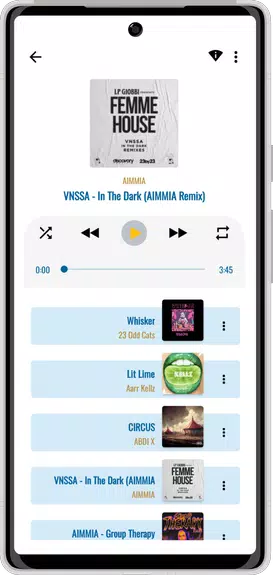
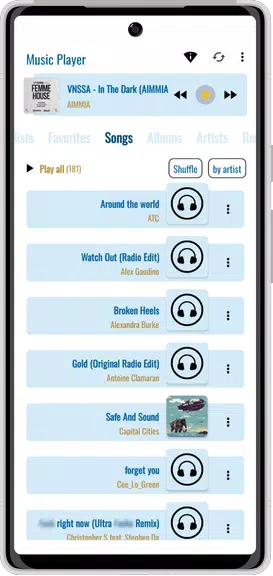
The core of MP3 Player is straightforward: robust offline playback of files stored on your phone or tablet, plus optional streaming from a complimentary online library of independent creators when you choose to connect via WiFi. The app supports basic playback controls such as play/pause, skip forward and back, and seek within tracks, along with shuffle and repeat modes so you can tailor listening sessions for workouts, study, or relaxed background play. Fast search indexes local files and the streaming catalog so you can find songs by title, album name or artist quickly without digging through folders.
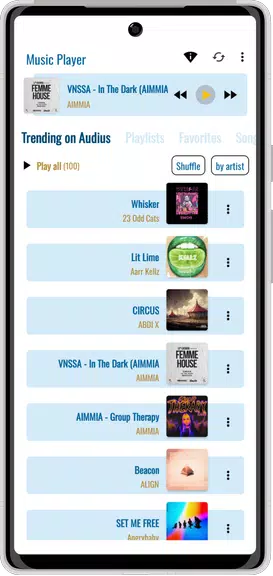
Navigation in MP3 Player is designed for one-handed use and minimal friction: a persistent now-playing view gives immediate access to the most-used controls, while library screens let you drill down from artist to album to individual tracks. Creating and editing a playlist is handled in-line from the library screens; long-press or use the add-to-playlist option to assemble custom mixes for running, commuting or work. The interface keeps common actions visible and groups management options under clearly labeled menus to reduce accidental changes.
MP3 Player presents your music in a familiar hierarchical structure—artists, albums, then tracks—so browsing feels natural whether your collection is small or extensive. As you add files to the device over time your library grows, and the app’s sorting and search tools help you maintain a usable collection without manual file management. Playlist creation functions as a kind of progression system: over weeks and months you can build specialized playlists, refine their order, and keep a few rotating mixes that reflect your listening habits and goals.
The app offers a selection of colorful themes and simple layout choices so you can adjust the look to match your taste or to improve readability in different lighting conditions. Theme changes affect primary accents and background tones rather than cluttering the interface, which preserves the player’s lightweight feel. You can choose default sort orders and playback preferences so the app behaves the way you expect when you open it each time.
One of MP3 Player’s main advantages is true offline playback: songs stored on your device play without consuming mobile data. Streaming from the independent artist library is optional and requires a WiFi connection, making it easy to discover new music when you have internet access while keeping data usage under control the rest of the time. Note that MP3 Player is not a downloader; streamed tracks are not saved to your device for permanent offline use, and streaming features are intentionally limited to preserve artist rights and reduce storage confusion.
Replay value comes from two places: your own local collection and the streaming catalog of independent artists. Local collections reward repeated listening as you refine playlists and uncover lesser-known tracks, while the optional streaming library offers occasional discoveries that keep your rotation fresh. The app emphasizes low friction listening—fast load times, clear labels and predictable behavior—so you spend more time listening and less time managing files.
MP3 Player aims to be accessible with high-contrast theme options, large touch targets, and straightforward navigation that reduces cognitive load. For best results, organize music into albums and named playlists so search and sort features return predictable results. Use WiFi to explore the streaming library and switch back to offline mode for data-free listening. Remember that MP3 Player is intended for local playback and casual discovery of independent music, not for downloading or cloud-based library synchronization.
If you prefer a lightweight, no-nonsense audio experience that keeps your local files central while offering a tasteful way to discover independent artists, give MP3 Player a try and tailor its themes and playlists to match your daily routine.
Compress Video - Resize Video
Size:48.75M Media & VideoMEME Maker: MEME Creator
Size:49.65M Media & VideoInstory Story Video Maker
Size:31.79M Media & VideoDrum Pads 24 - Beats and Music
Size:31.00M Media & VideoRadioTunes
Size:25.30M Media & VideoWiseplay
Size:38.13M Media & VideojetAudio HD Music Player Plus
Size:22.60M Media & VideoTABLA: India Mystical Drums
Size:27.35M Media & VideoOnePlayer
Size:128.00M Media & VideoDeep Bass Booster & Subwoofer
Size:4.30M Media & Videoedjing Mix
Size:70.40M Media & VideoWorld Radio FM Online
Size:24.00M Media & VideoApril 2024 Clash of Clans Update: Unveiling a Fresh Companion, Enhanced Levels, Chat Tagging, and Be
2024-04-16Arrival of Genshin Impact 4.6 Update: 'Embers of Two Realms, Twilight of Crimson'
2024-04-16V2.2 of the Farlight 84 update introduces an overhauled Season structure, fresh in-game currency, an
2024-04-16Monster Never Cry is now accessible on both Android and iOS mobile devices.
2024-04-18PUBG Mobile Teams Up with Bentley Motors: Luxury Cars, Exclusive Collectibles, and Beyond
2024-04-18March 2024 Free Redemption Codes for Honkai: Star Rail
2024-04-18