English
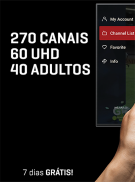
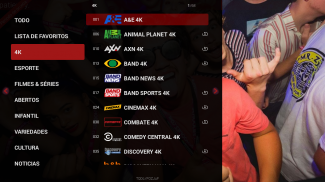
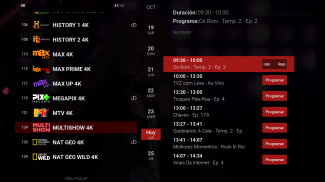
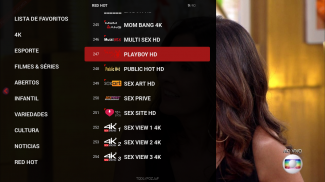
RedPlay Live(for Android tv-box) is a compact, remote-first live streaming app created for Android TV boxes and tuned for comfortable 10-foot viewing. The interface focuses on clear channel navigation, quick access to scheduled programs and simple setup flow so you can add M3U playlists or enter service credentials without digging through deep menus. Designed for living-room use, RedPlay Live(for Android tv-box) combines a leanback layout with practical features such as Xtream Codes API support, an integrated EPG, local recording and flexible playback options so a TV box behaves like a versatile media hub.
The player supports widely used streaming formats including HLS and handles adaptive bitrate switching to maintain steady playback across variable network conditions. When available, hardware acceleration is used to reduce CPU load and improve smoothness on compatible devices. Multiple audio tracks and subtitle streams are recognized and selectable during playback, and an option to hand off to an external player is offered for specialized codecs. Playback settings expose buffer and cache preferences so users who prefer faster starts or more stable streaming can tune the tradeoffs to match their connection.
The interface is optimized for directional pads and typical Android TV remotes to minimize unnecessary cursor movement and group related functions into reachable zones. Channel lists, the EPG grid and transport controls are arranged so common actions—changing channels, jumping to live, starting or stopping recordings—take very few button presses. Voice-enabled remotes are supported where the platform provides voice input and key shortcuts can be used for one-press access to favorites, the guide or recording. The design aims to reduce cognitive load across the room: larger focus areas, clear labels and predictable focus order simplify repeated tasks.
Rather than levels or missions, the app organizes content into channels, categories and custom lists that help viewers progress toward what they want to watch. You can create and reorder favorites, build themed categories for sports, news or kids programming and the app remembers recent streams so resuming playback is immediate. Profiles keep each household member’s favorites, watched state, and preferred guide layout separate so users find their content quickly. RedPlay Live(for Android tv-box) also saves recently tuned channels and provides resume points for recorded programs, making it simple to pick up where you left off or discover new shows in a predictable way.
Integrated DVR tools let you schedule one-off or recurring recordings directly from the EPG, with options to store to internal, external or network-attached storage depending on the device. When a source supports catch-up the player enables rewinding live TV and resuming earlier programs; otherwise recorded files provide reliable offline playback. Recordings can be protected with PIN-based encryption to limit access on shared devices, and the app lists storage health and capacity information so you can manage recordings without surprise space issues.
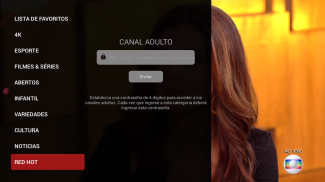
Advanced settings allow users to tune decoder preferences, adjust buffer lengths and increase logging detail for troubleshooting. Multiple user profiles preserve personalization and parental controls can restrict channels or individual streams behind a PIN. Accessibility options include larger text in the leanback layout, clear subtitle rendering, multiple audio track support for alternate language or descriptive audio and high-contrast interface choices for easier reading across the room.
The visual style emphasizes legibility: large artwork tiles, a clean EPG grid and subtle playback overlays that keep the focus on content. Small animations and clear feedback communicate loading states, reconnection attempts and recording progress. For reliable HD viewing a stable broadband connection of 5 Mbps or higher is recommended and wired Ethernet usually provides the most consistent performance. The app targets ARM and x86 Android TV boxes running Android 6.0 or later and exposes a few power-conserving settings to reduce CPU load on lower-powered devices.
Installing the APK on your Android TV box is straightforward: open the app, follow the guided setup to add playlists or service credentials and then scan for channels and configure recording paths. For best results enable hardware acceleration when supported, schedule recordings a few minutes early to avoid missing program starts, and organize favorites into categories to speed access from the home screen. Troubleshooting tips in the help section explain common terms like M3U, EPG and DVR, recommend when to switch to an external player for troublesome codecs and show how to manage storage for long recording archives.

Compress Video - Resize Video
Size:48.75M Media & VideoMEME Maker: MEME Creator
Size:49.65M Media & VideoInstory Story Video Maker
Size:31.79M Media & VideoDrum Pads 24 - Beats and Music
Size:31.00M Media & VideoRadioTunes
Size:25.30M Media & VideoWiseplay
Size:38.13M Media & VideojetAudio HD Music Player Plus
Size:22.60M Media & VideoTABLA: India Mystical Drums
Size:27.35M Media & VideoOnePlayer
Size:128.00M Media & VideoDeep Bass Booster & Subwoofer
Size:4.30M Media & Videoedjing Mix
Size:70.40M Media & VideoWorld Radio FM Online
Size:24.00M Media & VideoApril 2024 Clash of Clans Update: Unveiling a Fresh Companion, Enhanced Levels, Chat Tagging, and Be
2024-04-16Arrival of Genshin Impact 4.6 Update: 'Embers of Two Realms, Twilight of Crimson'
2024-04-16V2.2 of the Farlight 84 update introduces an overhauled Season structure, fresh in-game currency, an
2024-04-16Monster Never Cry is now accessible on both Android and iOS mobile devices.
2024-04-18PUBG Mobile Teams Up with Bentley Motors: Luxury Cars, Exclusive Collectibles, and Beyond
2024-04-18March 2024 Free Redemption Codes for Honkai: Star Rail
2024-04-18