
English
Google Podcasts is a streamlined podcast player that helps you discover, subscribe to, and listen to shows across devices with clear playback controls and automatic episode management. It offers personalized recommendations, offline downloads, and cross-device progress syncing so you can pick up where you left off without friction.
As a lightweight subscription and playback tool, Google Podcasts focuses on practical listening features rather than complex social layers. Browse trending programs, follow hosts, and let the app curate suggestions based on your listening habits. The app integrates basic discovery tools with options to download episodes for offline use and manage episode queues efficiently.
The feature set balances simplicity and usefulness. Key items include:
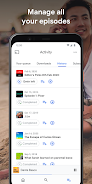
The design is uncluttered and straightforward. A bottom navigation bar organizes Explore, Activity, and Library sections so users can move from discovery to listening with minimal taps. Individual podcast pages present episode lists, descriptions, and episode lengths in a readable layout, while player controls remain accessible during playback.
Discovery centers on a mix of algorithmic recommendations and curated lists. The app suggests shows related to your subscriptions and frequently surfaced genres. Use search filters to find specific episodes or hosts, and rely on automatic suggestions to expand your interests without manual browsing.
Playback is responsive and consistent. Variable speed from 0.5x to 2x helps you consume content faster or more carefully, and a skip forward/back feature with user-adjustable durations speeds navigation through long interviews. The sleep timer is useful for bedtime listening, and downloaded files are prioritized to reduce buffering in low-signal areas.
Library organization places subscribed shows, recent episodes, and downloads into clearly labeled sections. Queue management lets you reorder upcoming episodes and remove items without affecting subscriptions. Automatic episode cleanup removes older downloads after playback to reclaim space, and manual controls are available for users who prefer hands-on management.
Google Podcasts performs well on a wide range of Android devices, from budget phones to modern flagships. The app is optimized to use modest memory and battery while running background playback. Integration with system-level media controls and Android Auto enables seamless use with connected devices and car dashboards.
The app requires minimal permissions for playback and downloads. Background data usage is primarily tied to streaming and downloading episodes; users who prefer to control data can restrict downloads to Wi-Fi and rely on offline mode to avoid cellular usage. Account features tie listening progress to a Google account for cross-device sync, subject to your account settings.
Begin by searching for a few favorite shows or browsing categories you enjoy. Subscribe to shows that fit your schedule, set download preferences, and customize playback speed and skip lengths. Explore curated lists to discover new hosts, and enable notifications to stay informed about new episodes. The straightforward setup makes it quick to add the app to your daily routine.
Users appreciate the uncluttered experience, reliable syncing, and practical feature set that focuses on listening without distractions. For those who want a dependable, easy-to-use podcast player that integrates with Android and Google services, Google Podcasts presents a balanced option that covers the essentials while remaining lightweight.




MEME Maker: MEME Creator
Size:49.65M Media & VideoInstory Story Video Maker
Size:31.79M Media & VideoDrum Pads 24 - Beats and Music
Size:31.00M Media & VideoRadioTunes
Size:25.30M Media & VideoWiseplay
Size:38.13M Media & VideojetAudio HD Music Player Plus
Size:22.60M Media & VideoTABLA: India Mystical Drums
Size:27.35M Media & VideoOnePlayer
Size:128.00M Media & VideoDeep Bass Booster & Subwoofer
Size:4.30M Media & Videoedjing Mix
Size:70.40M Media & VideoWorld Radio FM Online
Size:24.00M Media & VideoPianoMeter – Piano Tuner
Size:9.42M Media & VideoApril 2024 Clash of Clans Update: Unveiling a Fresh Companion, Enhanced Levels, Chat Tagging, and Be
2024-04-16Arrival of Genshin Impact 4.6 Update: 'Embers of Two Realms, Twilight of Crimson'
2024-04-16V2.2 of the Farlight 84 update introduces an overhauled Season structure, fresh in-game currency, an
2024-04-16Monster Never Cry is now accessible on both Android and iOS mobile devices.
2024-04-18PUBG Mobile Teams Up with Bentley Motors: Luxury Cars, Exclusive Collectibles, and Beyond
2024-04-18March 2024 Free Redemption Codes for Honkai: Star Rail
2024-04-18


















