English
Ultimate IPTV Playlist Loader simplifies managing live TV and VOD playlists on Android devices. The app imports M3U files and remote URLs, provides scheduling with EPG integration, and offers quick filtering, favorites, and external player support for a seamless viewing workflow across phones, tablets, and TV boxes.
Ultimate IPTV Playlist Loader is a focused utility for people who rely on IPTV streams. It acts as a central hub for playlist management, linking channel lists to electronic program guides, mapping categories and logos, and enabling fast switching between streams without complex setup. Whether you use an Android phone or a media box, the app brings order to large channel libraries.
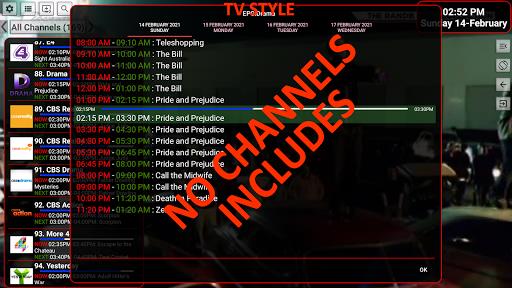
After adding a playlist, Ultimate IPTV Playlist Loader parses entries and displays channels with thumbnails and metadata. Users can map EPG sources so program names and start times appear alongside channel icons. The app verifies stream URLs and highlights entries that fail to connect, making maintenance straightforward. Filtering and search tools reduce the time spent hunting for a specific channel in large lists.
The design prioritizes speed and clarity. A compact list view presents channels and categories, while a detail screen reveals stream properties, bitrate, and available resolutions. Context menus let you mark favorites, edit channel names, or assign logos. Settings offer refresh intervals for remote playlists and options to automatically reattempt failed links.
Customization is a strong point. Rename channels, hide entries, and create personalized groups for sports, news, or kids’ programming. Ultimate IPTV Playlist Loader supports custom logos and manual EPG mapping so the guide aligns with your channels even when metadata is incomplete. Export and backup features let you save your configuration and restore it on another device.
The app is optimized for a range of Android hardware. It caches channel lists to reduce loading time and uses lightweight parsing to avoid CPU spikes on older devices. For playback, you can use the app’s built-in player or hand off streams to external apps that handle advanced codecs. It also supports Android TV layouts for remote-friendly navigation.
Begin by tapping Add Playlist and choosing Local File or Remote URL. If you use a remote provider, paste the M3U link and set a refresh interval so the list stays current. Next, attach an XMLTV file under EPG settings or map channels manually. Finally, pick a default player in Playback options and test links from the channel detail screen.
Use these practical tips to keep playlists tidy and stable. Validate new M3U files before importing to avoid broken entries. Keep large playlists in local storage if your network is inconsistent. Map EPG sources soon after import to ensure programs display correctly. If you see buffering, try switching to an external player or lowering resolution preferences for the stream.
Ultimate IPTV Playlist Loader is built for users who want control over their IPTV collections without unnecessary complexity. With focused tools for importing, organizing, and testing playlists, it streamlines the routine tasks that come with managing live and on-demand streams on Android devices.

MEME Maker: MEME Creator
Size:49.65M Media & VideoInstory Story Video Maker
Size:31.79M Media & VideoDrum Pads 24 - Beats and Music
Size:31.00M Media & VideoRadioTunes
Size:25.30M Media & VideoWiseplay
Size:38.13M Media & VideojetAudio HD Music Player Plus
Size:22.60M Media & VideoTABLA: India Mystical Drums
Size:27.35M Media & VideoOnePlayer
Size:128.00M Media & VideoDeep Bass Booster & Subwoofer
Size:4.30M Media & Videoedjing Mix
Size:70.40M Media & VideoWorld Radio FM Online
Size:24.00M Media & VideoPianoMeter – Piano Tuner
Size:9.42M Media & VideoApril 2024 Clash of Clans Update: Unveiling a Fresh Companion, Enhanced Levels, Chat Tagging, and Be
2024-04-16Arrival of Genshin Impact 4.6 Update: 'Embers of Two Realms, Twilight of Crimson'
2024-04-16V2.2 of the Farlight 84 update introduces an overhauled Season structure, fresh in-game currency, an
2024-04-16Monster Never Cry is now accessible on both Android and iOS mobile devices.
2024-04-18PUBG Mobile Teams Up with Bentley Motors: Luxury Cars, Exclusive Collectibles, and Beyond
2024-04-18March 2024 Free Redemption Codes for Honkai: Star Rail
2024-04-18