English
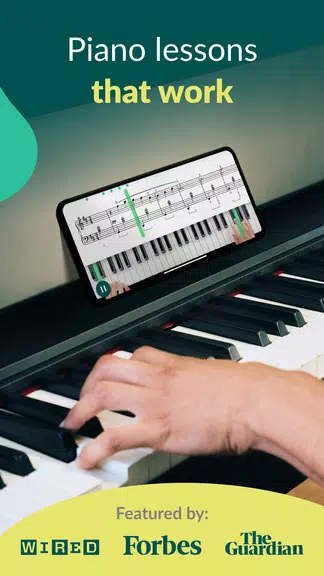
Skoove: Learn Piano teaches piano fundamentals through interactive lessons, real-time feedback, and a growing song library designed for all skill levels. The app combines step-by-step exercises, MIDI and microphone support, and theory modules to build technique, sight-reading, and musicality in a guided, practice-focused workflow.
Skoove: Learn Piano delivers a toolkit that balances instruction and hands-on practice. Lessons cover chords, scales, rhythms, and chord progressions while short exercises emphasize hand position and timing. The app integrates a curated song catalog to reinforce concepts, and its modular structure lets you return to topics as skills develop.
Each lesson is designed as a sequence of small, measurable steps. Video or animated demonstrations introduce new ideas, followed by interactive exercises that track accuracy and tempo. Lessons often include brief theory explanations so learners understand the musical purpose behind each practice item rather than relying solely on repetition.
Real-time feedback is a standout element: the app listens via your device microphone or connects to a MIDI keyboard to evaluate correctness and timing. Visual cues highlight missed notes and timing discrepancies, and progress indicators let you monitor improvements across sessions. Built-in metronome and tempo controls support steady, incremental gains.
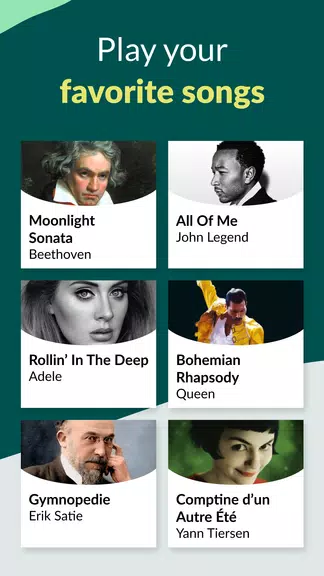
The content library blends classical studies, pop arrangements, and original exercises to keep practice engaging. Lessons range from short warm-ups to multi-part units that target sight-reading, improvisation, and chord vocabulary. Regular content updates expand the song selection and add topical mini-lessons tied to popular tracks.
The interface puts lesson steps and feedback front and center so users can focus on playing. Navigation is organized by skill area and recommended progressions, with clear labels for practice length and difficulty. Playlists and bookmarking help learners craft a practice routine tailored to available time and goals.
Skoove: Learn Piano supports a broad set of devices and input methods. It works with on-screen keyboards, external MIDI controllers, and acoustically through the microphone on most Android devices. Performance is optimized to keep latency low during note detection, but using a MIDI connection will usually provide the most accurate timing and responsiveness.
The app adapts to individual progress by recommending lessons based on recent performance and areas of weakness. Users can set practice goals, choose focused drills, or follow a guided curriculum that sequences topics from fundamentals to more advanced technique. The adaptive logic helps maintain steady momentum without overwhelming the player.
Basic access includes a selection of introductory lessons and some free tracks, while a subscription unlocks the full lesson catalog, additional practice modes, and premium features like extended song arrangements and advanced theory modules. Pricing tiers typically vary by duration and content access, with trial options often available for new users.
Getting started is straightforward: create an account, select your experience level, and choose either microphone or MIDI input. The initial assessment will place you on a path suited to your present abilities. Short daily sessions are encouraged; the app is structured to produce visible improvement with consistent, focused practice.
Use the metronome to build steady rhythm, repeat tricky measures at reduced tempo, and review feedback highlights after each session. Pair app lessons with occasional sight-reading or playing along with songs to apply technique in musical contexts. For best results, connect a MIDI keyboard when possible to minimize detection errors and keep latency negligible.
Users often cite Skoove: Learn Piano for its clear lesson progression, actionable feedback, and varied song selection that keeps motivation high. The balance of theory and practical drills supports a well-rounded approach to piano study, making it a practical tool for hobbyists and those pursuing more structured improvement alike.

LifeUp: Gamified To Do List
Size:17.35M ProductivityVPN Proxy Speed
Size:53.00M ProductivityAI Logo Generator (LogoWiz)
Size:41.50M Productivity3D Logo Maker
Size:39.30M ProductivityAI Chat: Ask AI Chat Anything
Size:42.20M ProductivityStars and Planets
Size:116.42M ProductivityImageMeter
Size:119.22M ProductivityHabitKit
Size:56.87M ProductivityMy Passwords Manager
Size:10.60M ProductivitymiMind
Size:48.30M ProductivityCute Note DDay Todo
Size:15.31M ProductivityCleverType AI Keyboard
Size:33.83M ProductivityApril 2024 Clash of Clans Update: Unveiling a Fresh Companion, Enhanced Levels, Chat Tagging, and Be
2024-04-16Arrival of Genshin Impact 4.6 Update: 'Embers of Two Realms, Twilight of Crimson'
2024-04-16V2.2 of the Farlight 84 update introduces an overhauled Season structure, fresh in-game currency, an
2024-04-16Monster Never Cry is now accessible on both Android and iOS mobile devices.
2024-04-18PUBG Mobile Teams Up with Bentley Motors: Luxury Cars, Exclusive Collectibles, and Beyond
2024-04-18March 2024 Free Redemption Codes for Honkai: Star Rail
2024-04-18