English
Sprinklr Extend is a centralized content hub and employee advocacy tool that gives staff fast access to the latest blog posts, company news, and curated materials ready for sharing. The app is designed for communications and marketing professionals who need to amplify corporate messaging while preserving a clear review workflow and consistent brand voice. Sprinklr Extend combines discovery, simple sharing, and a lightweight editor so teams can find, personalize, and schedule content without switching between multiple tools.
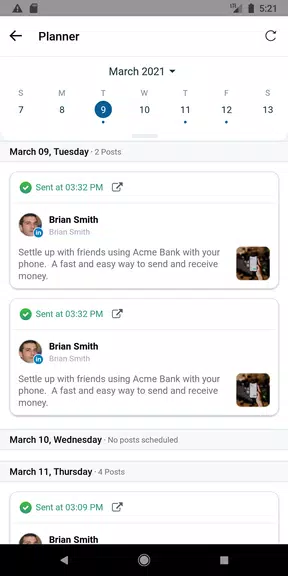
Sprinklr Extend organizes company content into a single, searchable feed that surfaces the latest blog posts, press announcements, and marketing assets. Items are tagged by topic and campaign to make it easy to filter by audience or priority, and a built-in preview shows how a post will appear when shared to common social platforms. The app supports composing short captions, attaching suggested hashtags, and selecting multiple social accounts for cross-posting in a single action. Scheduled posts can be placed on a calendar view, edited before publishing, and saved as drafts for later review or approval.
The workflow in Sprinklr Extend is straightforward: discover curated items or uploads, customize the message in the in-app editor, choose target social accounts, and either share immediately or schedule for a best-practice time. Contributors upload original content into a submission queue where designated approvers can review and feature selected pieces on the company site. Connection to corporate social accounts and personal sharing profiles is handled through a guided setup that explains permissions and which accounts will be posted to, keeping user control and privacy in mind.
Controls in the app are intentionally simple to reduce friction for non-technical users: tap to open content, edit text inline, tap a share button, and confirm the destination accounts. Permission levels separate contributors, approvers, and administrators so each role sees only the tools required for their responsibilities. As staff become regular contributors, organizations commonly elevate contributors to reviewer roles, creating a natural progression within the editorial workflow without introducing gamified or competitive systems. Progression is about responsibility and access rather than points or leaderboards.
Users can personalize their experience by following topics, saving favorite sources, and creating reusable caption templates or signatures for faster posting. Campaign filters let teams view only content related to a given initiative, and calendar filters help plan cross-channel rollout windows. Administrators can tailor visible sources and approval rules to match corporate policy, while individual users control which of their personal or managed accounts are active for sharing.
Sprinklr Extend presents a clean, professional interface optimized for quick scanning and one-handed operation on phones. Text sizing supports system accessibility settings and the app is structured to work well with screen readers and basic navigation controls. For field staff who need access offline, the app caches recent posts and approved assets so users can read and prepare captions without an active connection, synchronizing scheduled items once connectivity is restored.
Day-to-day value comes from regular content refreshes and predictable editorial cycles: weekly blog posts, campaign pushes, and timely company announcements give staff reasons to return. The ability to save drafts, reuse caption templates, and see how content will appear across different social platforms reduces friction and encourages consistent sharing. For communications teams, that repeatable process increases reach while keeping the company voice consistent.
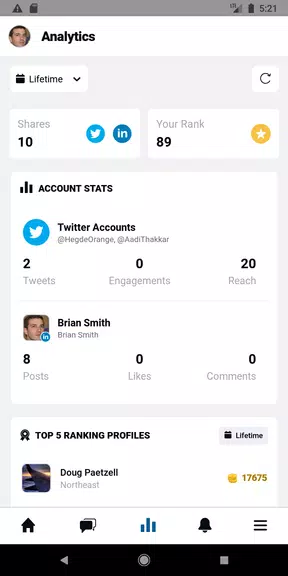
Sprinklr Extend requires a company email address to sign in and is intended for organizational use rather than general public access. Sharing features require connection to social accounts, which some users may choose not to enable; account linking is optional and clearly explained during setup. The app focuses on content discovery, sharing, and editorial workflows and does not include external analytics or social listening features within this interface, so organizations that need advanced measurement may integrate with separate analytics tools.


Cover Letter
Size:11.77M FinanceCV Engineer
Size:16.85M FinanceSimple Invoice Manager
Size:25.30M Finance华融融达期货
Size:109.18M FinanceChurchNest
Size:83.00M FinanceYnotOne
Size:0.00M FinanceMoohan Taekwondo
Size:10.80M FinanceIBOIX
Size:76.00M FinanceMargin Guard: Risk Calculator
Size:69.00M FinanceLP Protidin
Size:47.00M FinanceMON 3
Size:47.00M FinanceExpo Wallet - Consumer
Size:29.10M FinanceApril 2024 Clash of Clans Update: Unveiling a Fresh Companion, Enhanced Levels, Chat Tagging, and Be
2024-04-16Arrival of Genshin Impact 4.6 Update: 'Embers of Two Realms, Twilight of Crimson'
2024-04-16V2.2 of the Farlight 84 update introduces an overhauled Season structure, fresh in-game currency, an
2024-04-16Monster Never Cry is now accessible on both Android and iOS mobile devices.
2024-04-18PUBG Mobile Teams Up with Bentley Motors: Luxury Cars, Exclusive Collectibles, and Beyond
2024-04-18March 2024 Free Redemption Codes for Honkai: Star Rail
2024-04-18