English
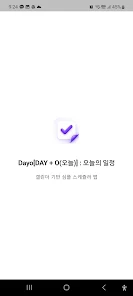
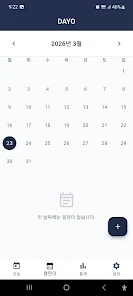
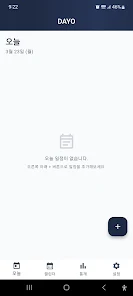
Dayo is a streamlined daily planner and habit-tracking app that helps users organize tasks, set routines, and monitor progress with minimal friction. Designed for quick setup and flexible scheduling, Dayo centralizes to-dos, reminders, and insights so professionals and students can stay productive throughout each day.
At its core, Dayo focuses on simple, powerful functionality that reduces decision fatigue. The app provides a consolidated task list, recurring habits, a visual streak tracker, and time-blocking options. Notifications are intelligent: they suggest optimal times based on your past behavior and calendar availability. A lightweight analytics panel highlights completion rates and habit consistency so you can spot trends quickly.
Dayo organizes your day around actionable items rather than long lists. Tasks get scheduled into time blocks or a priority queue, while habits live on a separate timeline to encourage daily repetition. When a habit or task is completed, Dayo updates your consistency metrics and offers brief micro-feedback—encouraging nudges instead of overwhelming statistics. This design keeps engagement high without creating pressure.
To fit into a busy schedule, Dayo supports calendar integration and simple task import from common formats. Link your Google or local calendars to view appointments alongside planned focus sessions. Importing a CSV of tasks or syncing with a third-party to-do list takes only a few taps, making it easier to migrate from another system. For teams, shared lists and task delegation are available so responsibilities are visible and trackable.
Customization is subtle but effective. Choose between compact and spacious list views, pick which metrics appear on your dashboard, and set habit difficulty levels that influence how streaks are calculated. Theme options provide light and dark modes plus a handful of accent colors. Users can set weekday-specific routines, create flexible deadlines, and define recurring patterns like "every second Tuesday" or "three times per week." Dayo adapts to the way you work rather than forcing a one-size-fits-all routine.
The interface favors clarity: large tap targets, minimal animations, and fast screen transitions. Adding a task is streamlined with a quick-entry field and contextual suggestions like estimated duration and suggested time slots. Swiping gestures let you complete, snooze, or reschedule items without opening extra menus. These small interactions add up to a snappy, low-friction experience that keeps the focus on getting things done.
Dayo is optimized for battery life and runs smoothly on a wide range of Android devices. Background sync is efficient, syncing only changed records to conserve data. The app also offers offline support so you can check your schedule and mark progress when connectivity is limited; changes sync automatically when you reconnect. Compatibility extends across modern Android versions to ensure long-term reliability.
Begin by entering a handful of recurring habits and a short task list for today. Allow Dayo access to your calendar for better scheduling suggestions, then try the time-blocking mode for one focused work session. In a few days you'll see meaningful data in the insights panel, helping you adjust routines and discover what actually boosts productivity. With modest setup time, Dayo can become a practical daily companion that encourages steady improvement.
LifeUp: Gamified To Do List
Size:17.35M ProductivityVPN Proxy Speed
Size:53.00M ProductivityAI Logo Generator (LogoWiz)
Size:41.50M Productivity3D Logo Maker
Size:39.30M ProductivityAI Chat: Ask AI Chat Anything
Size:42.20M ProductivityStars and Planets
Size:116.42M ProductivityImageMeter
Size:119.22M ProductivityHabitKit
Size:56.87M ProductivityMy Passwords Manager
Size:10.60M ProductivitymiMind
Size:48.30M ProductivityCute Note DDay Todo
Size:15.31M ProductivityCleverType AI Keyboard
Size:33.83M ProductivityApril 2024 Clash of Clans Update: Unveiling a Fresh Companion, Enhanced Levels, Chat Tagging, and Be
2024-04-16Arrival of Genshin Impact 4.6 Update: 'Embers of Two Realms, Twilight of Crimson'
2024-04-16V2.2 of the Farlight 84 update introduces an overhauled Season structure, fresh in-game currency, an
2024-04-16Monster Never Cry is now accessible on both Android and iOS mobile devices.
2024-04-18PUBG Mobile Teams Up with Bentley Motors: Luxury Cars, Exclusive Collectibles, and Beyond
2024-04-18March 2024 Free Redemption Codes for Honkai: Star Rail
2024-04-18