English
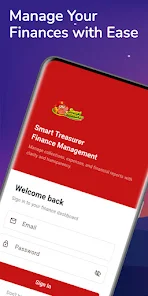
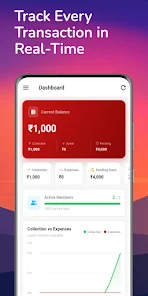
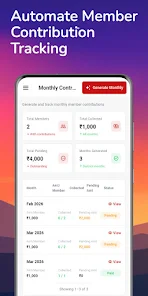
Smart Treasurer is a mobile finance manager that consolidates budgets, expenses and bills into a single streamlined dashboard. It helps users track spending, set savings goals and automate recurring transactions with clear charts and quick entry tools designed for everyday money management on Android devices.
Smart Treasurer focuses on practical money organization rather than overly complex accounting. The design emphasizes fast data entry, clear visual summaries and the ability to categorize transactions in seconds. For individuals and small households seeking a lightweight financial companion, the app brings essential bookkeeping features without steep learning curves.
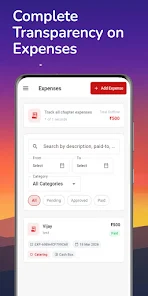
Begin a session by quickly entering expenses using either freeform text or category shortcuts. The app uses intuitive tags and an optional receipt scanner to reduce manual typing. As transactions accumulate, Smart Treasurer updates visual reports so you can see where money flows. Regular syncing options ensure data is preserved across devices.
The interface balances clarity with functionality. Buttons and forms are sized for comfortable one-handed use, while color-coded categories improve readability. Animations are subtle and serve purpose: confirming saves, highlighting alerts, and revealing deeper detail panes. Performance is smooth on a wide range of hardware thanks to optimized local databases and minimal background processes.
Protecting financial data is central. Smart Treasurer supports PIN or biometric locking, encrypted local storage, and optional cloud backup for cross-device continuity. The app requests only necessary permissions, and export features let users generate encrypted backups before transferring or deleting data.
Users can tailor the app to personal habits. Customize categories, set preferred currency formats, and create repeating transaction templates to capture paychecks or rent in a single tap. Smart Treasurer also offers adjustable notification settings so reminders arrive only when useful.
For users migrating from spreadsheets, the import tools let you bring in CSV files and map columns to Smart Treasurer’s categories. This lowers the friction for those moving away from manual systems and speeds up initial setup.
Smart Treasurer strikes a balance between necessary features and usability. It avoids feature bloat while still providing robust tools for analysis, automation and control. The app suits people who want actionable insights without wading through complicated accounting terms.
Installation is straightforward: download, create an account or use local mode, and follow the guided setup to add initial accounts and budgets. The onboarding walkthrough highlights entry shortcuts and backup settings so new users can start tracking within minutes. Regular updates refine performance and add incremental features based on user feedback.
If you need a focused, practical finance manager that keeps everyday money tasks simple and secure, Smart Treasurer delivers a compact toolkit with a thoughtful interface and sensible automation options.

Cover Letter
Size:11.77M FinanceCV Engineer
Size:16.85M FinanceSimple Invoice Manager
Size:25.30M Finance华融融达期货
Size:109.18M FinanceChurchNest
Size:83.00M FinanceYnotOne
Size:0.00M FinanceMoohan Taekwondo
Size:10.80M FinanceIBOIX
Size:76.00M FinanceMargin Guard: Risk Calculator
Size:69.00M FinanceLP Protidin
Size:47.00M FinanceMON 3
Size:47.00M FinanceExpo Wallet - Consumer
Size:29.10M FinanceApril 2024 Clash of Clans Update: Unveiling a Fresh Companion, Enhanced Levels, Chat Tagging, and Be
2024-04-16Arrival of Genshin Impact 4.6 Update: 'Embers of Two Realms, Twilight of Crimson'
2024-04-16V2.2 of the Farlight 84 update introduces an overhauled Season structure, fresh in-game currency, an
2024-04-16Monster Never Cry is now accessible on both Android and iOS mobile devices.
2024-04-18PUBG Mobile Teams Up with Bentley Motors: Luxury Cars, Exclusive Collectibles, and Beyond
2024-04-18March 2024 Free Redemption Codes for Honkai: Star Rail
2024-04-18