English
PayRam Business is a compact payments and invoicing app designed for small and medium enterprises, combining payment processing, client invoicing and expense tracking into a single interface. It aims to reduce administrative time while providing transparent transaction records and simple reconciliation tools for everyday operations.
Built for owners and managers who need practical financial tools without complex setup, PayRam Business focuses on core workflows: creating invoices, accepting payments, monitoring cash flow and generating basic reports. The app prioritizes speed and clarity over feature bloat, making routine tasks faster and easier to audit.
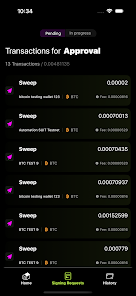
The workflow is straightforward: add client details, generate an invoice template, and send the bill by email or link. When a customer pays, PayRam Business reconciles the payment automatically against the outstanding invoice. The interface highlights pending and paid items so managers can prioritize follow-up actions.
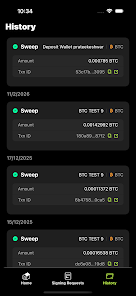
Rather than toggling between multiple systems, users maintain customer histories, payment logs and receipt images inside the app. This single-source approach makes monthly closes and tax preparation less error-prone and faster to complete.
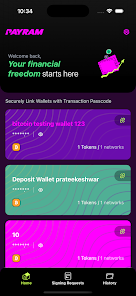
PayRam Business presents a clean dashboard with key metrics up front: outstanding invoices, recent transactions and cash flow trends. The app is optimized for mobile use so you can issue receipts on the go and check transaction status quickly. Animations are minimal, and screens load responsively even on lower-end devices.
Handling money requires solid safeguards. PayRam Business uses encrypted communications and tokenized payment flows to protect card data. Role-based access limits sensitive actions to authorized users, and exportable audit logs help support compliance for small businesses operating under regional tax rules.
The app supports scheduled backups and CSV exports so financial data can be archived or imported into accounting software. Administrators can set retention policies and manage user permissions from the settings panel.
To reduce manual entry, PayRam Business connects with common bookkeeping and CRM platforms through APIs and export formats. Automation rules let users create recurring invoices, schedule reminders for overdue payments and trigger simple bookkeeping entries when transactions clear.
Start by importing your client list and testing payment flows with a small invoice to verify gateway settings. Customize invoice templates with your branding and default tax settings to avoid repetitive edits. Use automation for recurring customers to free up time for client work rather than administration.
PayRam Business appeals to teams that need reliable finance tools without a steep learning curve. Its combination of clear dashboards, essential automation and straightforward integrations helps reduce bookkeeping drudgery and improves cash collection times. Small businesses moving away from spreadsheets often find the organized transaction history particularly valuable.
Installation takes minutes: sign up, configure your payment provider, import clients and send the first invoice. Support resources and a concise help center guide common setup steps so onboarding remains practical for busy owners.
For teams seeking a compact, functional billing and payment hub, PayRam Business provides the core features required to manage invoices and incoming payments while keeping the interface uncluttered and predictable.
Cover Letter
Size:11.77M FinanceCV Engineer
Size:16.85M FinanceSimple Invoice Manager
Size:25.30M Finance华融融达期货
Size:109.18M FinanceChurchNest
Size:83.00M FinanceYnotOne
Size:0.00M FinanceMoohan Taekwondo
Size:10.80M FinanceIBOIX
Size:76.00M FinanceMargin Guard: Risk Calculator
Size:69.00M FinanceLP Protidin
Size:47.00M FinanceMON 3
Size:47.00M FinanceExpo Wallet - Consumer
Size:29.10M FinanceApril 2024 Clash of Clans Update: Unveiling a Fresh Companion, Enhanced Levels, Chat Tagging, and Be
2024-04-16Arrival of Genshin Impact 4.6 Update: 'Embers of Two Realms, Twilight of Crimson'
2024-04-16V2.2 of the Farlight 84 update introduces an overhauled Season structure, fresh in-game currency, an
2024-04-16Monster Never Cry is now accessible on both Android and iOS mobile devices.
2024-04-18PUBG Mobile Teams Up with Bentley Motors: Luxury Cars, Exclusive Collectibles, and Beyond
2024-04-18March 2024 Free Redemption Codes for Honkai: Star Rail
2024-04-18