English
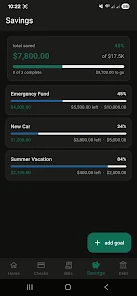
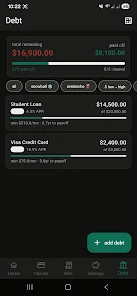
WageWise helps hourly workers track earnings, calculate take-home pay, and manage shift schedules with simple tools and clear reports. It centralizes timesheets, overtime rules, tips, and taxes so users can see accurate pay estimates, set savings targets, and export statements for budgeting or payroll.
WageWise is a compact payroll companion designed for employees, freelancers, and small-business owners who need fast, reliable calculations without spreadsheet hassle. The app focuses on practicality: enter hours, add pay rates and allowances, and immediately view net pay after deductions. Built for real-world pay setups, WageWise supports multiple jobs, custom overtime settings, and tip allocation, making it useful for service workers and hourly contractors.
At its core, the app removes ambiguity from paychecks. Instead of waiting for payroll or juggling receipts, WageWise offers on-device estimates, a history of past periods, and basic forecasting for upcoming weeks. The tool also simplifies tax adjustments and provides breakdowns that clarify how gross earnings translate to what lands in your bank account.
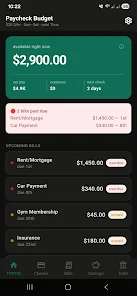
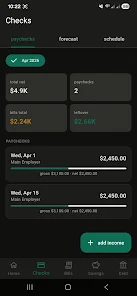
Getting a realistic paycheck estimate takes only a few entries: choose the job, input hours, and confirm pay rate. WageWise immediately applies overtime and deductions and displays a detailed payout summary. Users can correct past periods, add one-off bonuses or tip pools, and compare several pay periods to spot trends or payroll errors. Notifications remind you to log shifts or review pending entries, helping avoid gaps in records.
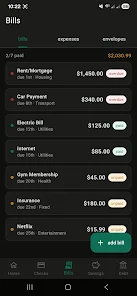
The interface emphasizes clarity: bold numbers for totals, expandable sections for breakdowns, and color cues to highlight overtime or deductions. Performance is lightweight; calculations happen locally so the app runs smoothly on older Android devices. Visual charts are minimal but informative, focused on earnings versus deductions rather than flashy animations.
Installation and initial setup are straightforward. After installing WageWise, create a profile, add your primary job with its regular hourly rate, and input any recurring deductions. For users with multiple positions, repeat the process for each role. The app offers step-by-step prompts for overtime rules and tax settings, so you don’t need payroll expertise to get accurate estimates.
Start by logging a couple of recent pay periods to confirm settings. Use the notes field to track tips or one-time deductions so your history stays clear. If you find discrepancies, adjust overtime rules or deduction presets until your estimates match actual paychecks. Regularly export data if you manage taxes or reimbursements through another service.
Users appreciate WageWise for its straightforward approach and focus on the essentials of hourly pay. It removes guesswork, makes paycheck conversations easier, and helps plan cash flow between paydays. The balance of simplicity and configurability is attractive: you can tailor rules without needing complex accounting knowledge.
Whether you're tracking multiple side gigs, validating employer calculations, or planning household budgets, WageWise offers a compact, dependable toolkit. The app's clear summaries and export options make it a practical addition for anyone who relies on hourly wages and wants accurate, accessible pay insights.
Cover Letter
Size:11.77M FinanceCV Engineer
Size:16.85M FinanceSimple Invoice Manager
Size:25.30M Finance华融融达期货
Size:109.18M FinanceChurchNest
Size:83.00M FinanceYnotOne
Size:0.00M FinanceMoohan Taekwondo
Size:10.80M FinanceIBOIX
Size:76.00M FinanceMargin Guard: Risk Calculator
Size:69.00M FinanceLP Protidin
Size:47.00M FinanceMON 3
Size:47.00M FinanceExpo Wallet - Consumer
Size:29.10M FinanceApril 2024 Clash of Clans Update: Unveiling a Fresh Companion, Enhanced Levels, Chat Tagging, and Be
2024-04-16Arrival of Genshin Impact 4.6 Update: 'Embers of Two Realms, Twilight of Crimson'
2024-04-16V2.2 of the Farlight 84 update introduces an overhauled Season structure, fresh in-game currency, an
2024-04-16Monster Never Cry is now accessible on both Android and iOS mobile devices.
2024-04-18PUBG Mobile Teams Up with Bentley Motors: Luxury Cars, Exclusive Collectibles, and Beyond
2024-04-18March 2024 Free Redemption Codes for Honkai: Star Rail
2024-04-18