English
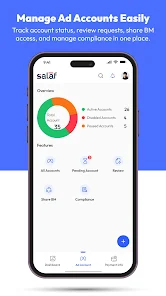
Salaf Global is a smart, consolidated app designed to bring ad account management into a single, easy-to-use dashboard for advertisers, agencies and marketing teams; Salaf Global helps you monitor balances, perform quick top-ups, and track deposits and withdrawals without constantly switching tools. The first paragraph of your onboarding experience introduces account status and notifications so teams can see which ad accounts need attention at a glance, and it clearly lists connections to Business Manager to make permissions and relationships visible. This editor-style introduction explains how the app reduces interruptions, improves visibility into account activity and speeds routine operations for users who juggle multiple client accounts or internal campaigns.
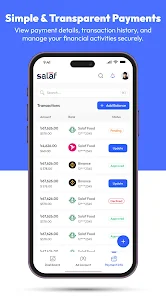
The app centralizes common tasks so you can complete actions from one place: viewing real-time account balances, initiating fast top-ups, and reviewing recent deposits and withdrawals all appear in the same timeline. Compliance and review alerts arrive in-context with the affected account so you can address issues without hunting through separate systems. A consolidated activity feed records recent changes and notifications, while lightweight filters let you focus on accounts by status, client, or balance threshold. The interface supports quick switching between accounts and keeps session state so you resume work where you left off.
Navigation is driven by a straightforward tab-based layout combined with contextual menus for each account. Primary actions such as top-ups and balance checks are accessible with a short sequence of taps, and secondary tasks like reviewing deposit history or adjusting connections are available from the account details screen. An onboarding progression guides new users through connecting Business Manager accounts and authorizing access, and a stepwise checklist highlights any pending compliance items or missing payment details so teams can reach full operational status quickly. The app keeps a clear record of each step in the setup flow to simplify handoffs between administrators.
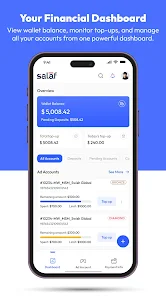
The dashboard focuses on clarity: compact cards show balances and recent activity, while color-coded indicators mark accounts that require attention. You can customize which widgets are visible on your main screen, rearrange account cards to match priority clients, and choose between compact and expanded views depending on how much detail you want at a glance. Visual consistency across screens reduces cognitive load when managing many accounts, and the design favors readable text, clear icons, and concise status labels so information is easy to scan during busy workdays.
Salaf Global supports managing multiple ad accounts under grouped views for agencies and teams. Accounts can be organized by client, region or campaign type to match your internal structure, and Business Manager connections are displayed alongside each account to show which permissions and page relationships are active. Administrators can review connections and revoke or reassign access from the same interface used for financial operations, making it simpler to keep permissions aligned with team responsibilities and client agreements.
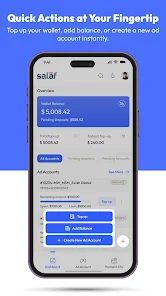
Operational workflows focus on minimizing interruptions: quick-topup flows are designed to finish in a few steps, and deposit or withdrawal histories are retained for transparent reconciliation. The app caches recent account data to allow read-only access when connectivity is limited, so you can review balances and recent alerts offline and complete transactions once connectivity returns. Push notifications and in-app alerts deliver compliance flags and review notices promptly; each notification links directly to the relevant account details so you can act efficiently. The app name is referenced in notifications and help content to ensure clarity when multiple tools are in use.
Salaf Global aims to reduce routine friction through understandable controls and predictable behavior that teams can repeat daily. Accessibility considerations include scalable text, high-contrast modes and clear focus order for keyboard navigation on supported devices, which help make the app usable for a wider range of team members. Repetitive tasks such as routine balance checks, scheduled reviews and deposit reconciliation can be completed quickly, and audit-style logs help track who made changes and when. Together these elements increase operational reliability, lower the risk of account interruptions, and make account administration faster and less error-prone over time.
Cover Letter
Size:11.77M FinanceCV Engineer
Size:16.85M FinanceSimple Invoice Manager
Size:25.30M Finance华融融达期货
Size:109.18M FinanceChurchNest
Size:83.00M FinanceYnotOne
Size:0.00M FinanceMoohan Taekwondo
Size:10.80M FinanceIBOIX
Size:76.00M FinanceMargin Guard: Risk Calculator
Size:69.00M FinanceLP Protidin
Size:47.00M FinanceMON 3
Size:47.00M FinanceExpo Wallet - Consumer
Size:29.10M FinanceApril 2024 Clash of Clans Update: Unveiling a Fresh Companion, Enhanced Levels, Chat Tagging, and Be
2024-04-16Arrival of Genshin Impact 4.6 Update: 'Embers of Two Realms, Twilight of Crimson'
2024-04-16V2.2 of the Farlight 84 update introduces an overhauled Season structure, fresh in-game currency, an
2024-04-16Monster Never Cry is now accessible on both Android and iOS mobile devices.
2024-04-18PUBG Mobile Teams Up with Bentley Motors: Luxury Cars, Exclusive Collectibles, and Beyond
2024-04-18March 2024 Free Redemption Codes for Honkai: Star Rail
2024-04-18