English
ZestSSH is a modern, secure SSH client designed to put a full-featured terminal and practical server management tools on your Android device. ZestSSH starts with a true xterm-256color emulator and adds hardware-backed key storage, a streamlined connections manager and optional Pro features such as SFTP file browsing, reusable command snippets and encrypted cloud sync. The app is intended for system administrators, developers and technically minded users who need reliable remote access and a predictable workflow when they are away from a desktop.
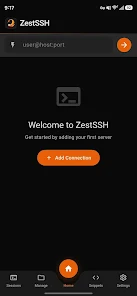
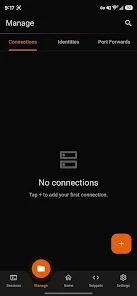
The terminal in ZestSSH supports UTF-8, emoji rendering and precise color handling thanks to xterm-256color emulation, and it preserves common terminal behaviors so scripts and interactive tools behave as expected. You can generate or import Ed25519, ECDSA and RSA keys on the device and keep private material protected with hardware-backed encryption. The connections manager lets you save an unlimited number of hosts, organize them into color-coded groups, and use a quick-connect bar to reach frequent servers fast. Connection health indicators and automatic reconnect on network changes reduce interruptions while you work.
Controls are focused on efficient typing and terminal navigation on small screens. ZestSSH supports a custom top keyboard row for commonly used keys, pinch-to-zoom font scaling for readability, and compatibility with hardware keyboards so you can use function keys and shortcuts when an external keyboard is attached. Command snippets provide one-tap execution of saved commands and support variable substitution so you can quickly run context-aware tasks without retyping complex command lines. These controls aim to make repetitive maintenance tasks faster and less error-prone.
The app exposes settings for font size, line spacing and cursor style to help you match your preferred terminal appearance; because the emulator supports 256 colors, prompt themes and ANSI color schemes render accurately. Connections are presented in a structured manager where you can create groups, tag entries and add notes that describe purpose or access location. Saved identities and reusable keys simplify connecting to multiple servers that share credentials. The combination of visual organization and terminal customization helps you maintain clarity when switching between different systems.
Rather than a game-like progression, ZestSSH provides a productivity progression: as you add hosts, create snippets and refine templates, common operations become faster and less error-prone. Snippets and organized connection groups serve as a lightweight automation layer, increasing replay value for routine tasks such as deployments, log checks and maintenance scripts. The app preserves session settings so workflows repeat consistently across sessions, and optional encrypted cloud sync can mirror your configuration to other devices when purchased.
Advanced functionality is available as one-time purchases. The SFTP file browser offers browsing, upload, download and resume-capable transfers without requiring a separate app, and port forwarding tools let you configure local, remote or dynamic SOCKS5 tunnels with saved rules and visual tunnel status. These features are presented as tools you can combine with the terminal: copy a remote path from the file browser into a snippet, or pin a port-forward rule to an entry in your connections manager for repeatable access patterns.
Security defaults focus on modern algorithms and hardware protections: Ed25519 keys, ChaCha20 and AES-256-GCM protect communications and stored keys where available. App lock via PIN or biometric authentication and hardware-encrypted key storage reduce exposure if a device is lost. Offline behavior is explicit: while you can manage keys and edit saved connections without a network, actual SSH sessions and SFTP transfers require connectivity; cached connection metadata helps you prepare commands and snippets while offline.
ZestSSH includes accessibility-minded options such as enlarged fonts, high-contrast terminal rendering and clear status messages to help users diagnose connection problems. Connection health indicators, detailed error reporting and automatic reconnect logic make it easier to recover from transient network changes. The developer frequently updates the app based on real-world server administration experience to address edge cases and improve stability.
The lead developer of ZestSSH is a practicing sysadmin who built the app to address practical, day-to-day operational needs rather than to be a generic terminal wrapper. The app uses a one-time purchase model for Pro features and offers an optional zero-knowledge encrypted cloud sync as a separate add-on; there are no recurring subscriptions for core functionality. This model keeps the app predictable in cost while allowing advanced capabilities to be unlocked when needed.
Remote Fire TV
Size:48.04M ToolsgetConf - Hidden Settings
Size:16.66M ToolsTracker Detect Pro
Size:10.39M ToolsWiFi Speed Test Pro
Size:8.11M ToolsGG Mouse Pro 2
Size:45.82M ToolsResource Monitor Mini Pro
Size:3.19M ToolsSmart Keyboard Pro
Size:23.22M ToolsMyScript Math: Solve & Plot
Size:108.76M ToolsText Repeater
Size:11.73M Tools3Dcalc+
Size:12.59M ToolsMyScoreTracker
Size:80.28M ToolsPanda Touch Pro
Size:18.13M ToolsApril 2024 Clash of Clans Update: Unveiling a Fresh Companion, Enhanced Levels, Chat Tagging, and Be
2024-04-16Arrival of Genshin Impact 4.6 Update: 'Embers of Two Realms, Twilight of Crimson'
2024-04-16V2.2 of the Farlight 84 update introduces an overhauled Season structure, fresh in-game currency, an
2024-04-16Monster Never Cry is now accessible on both Android and iOS mobile devices.
2024-04-18PUBG Mobile Teams Up with Bentley Motors: Luxury Cars, Exclusive Collectibles, and Beyond
2024-04-18March 2024 Free Redemption Codes for Honkai: Star Rail
2024-04-18