English
Web3 Sender Wallet streamlines crypto transfers and multi-chain management with a clean interface and focused tools. Designed for sending tokens, monitoring balances, and managing permissions, it balances convenience and security for both newcomers and experienced users who need fast, reliable on-chain operations across Ethereum-compatible networks.
At its core, Web3 Sender Wallet is a utility-focused wallet that prioritizes sending and approval flows. Rather than providing a broad suite of dApps or trading features, it narrows attention to reliable transaction construction, gas optimization, and clear permission handling so users can move assets across supported networks with fewer steps and fewer surprises.
The app reduces friction for routine tasks like batch sends, contract approvals, and address book management. By exposing clear confirmations and estimated fees, Web3 Sender Wallet helps reduce mistakes that commonly occur when juggling multiple tokens and chains.
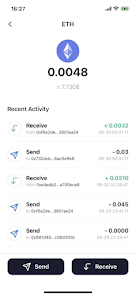
Sending a token follows a clear step-by-step sequence: pick network, select asset, enter recipients, preview fees and impacts, then confirm. The preview screen summarizes gas, total spend in fiat, and the exact on-chain call that will be executed. This transparency helps users double-check transactions before signing.
Security is handled through local key storage and standard cryptographic signing. The wallet encourages best practices such as hardware wallet pairing and mnemonic backups. Web3 Sender Wallet also provides a permissions dashboard that surfaces active approvals so users can quickly identify contracts that hold token allowances and revoke them if needed.
Network queries are limited to necessary endpoints and the app offers options to route RPCs through custom nodes. There are no built-in analytics required for basic operations, and users can opt out of optional telemetry to minimize data sharing.
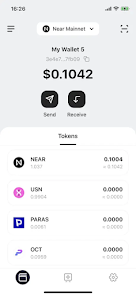
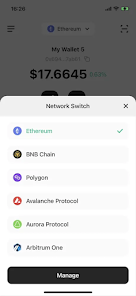
The interface focuses on clarity: large transaction summaries, prominent confirm buttons, and context-aware warnings reduce errors. Performance is tuned for speed — network switching and balance queries are optimized to avoid long waits, even with multiple tokens tracked simultaneously.
Color-coded confirmations and simple icons make it straightforward to identify token types and networks. The layout balances compactness and readability so power users can complete a sequence quickly while newcomers aren’t overwhelmed.
Power users can leverage batch sending to distribute funds across multiple addresses, or use custom RPC endpoints for private nodes and private relays. Developers will appreciate the clear transaction previews that outline calldata when preparing complex interactions, making the wallet suitable for scripted payment flows or treasury distributions.
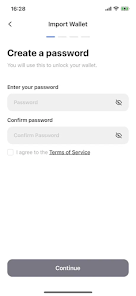
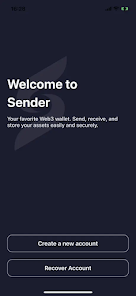
Installation is straightforward: download from your preferred store, create or import a wallet, and back up the seed phrase immediately. If you plan to use advanced security, pair a hardware device during setup. The onboarding walkthrough in Web3 Sender Wallet explains common actions like sending, approving, and revoking in plain language.
Overall, this wallet is tailored for users who prioritize reliable sending and permission control over an expansive dApp ecosystem. It offers focused tools, transparent transaction previews, and practical safeguards that fit both everyday transfers and more structured payment operations.
LifeUp: Gamified To Do List
Size:17.35M ProductivityVPN Proxy Speed
Size:53.00M ProductivityAI Logo Generator (LogoWiz)
Size:41.50M Productivity3D Logo Maker
Size:39.30M ProductivityAI Chat: Ask AI Chat Anything
Size:42.20M ProductivityStars and Planets
Size:116.42M ProductivityImageMeter
Size:119.22M ProductivityHabitKit
Size:56.87M ProductivityMy Passwords Manager
Size:10.60M ProductivitymiMind
Size:48.30M ProductivityCute Note DDay Todo
Size:15.31M ProductivityCleverType AI Keyboard
Size:33.83M ProductivityApril 2024 Clash of Clans Update: Unveiling a Fresh Companion, Enhanced Levels, Chat Tagging, and Be
2024-04-16Arrival of Genshin Impact 4.6 Update: 'Embers of Two Realms, Twilight of Crimson'
2024-04-16V2.2 of the Farlight 84 update introduces an overhauled Season structure, fresh in-game currency, an
2024-04-16Monster Never Cry is now accessible on both Android and iOS mobile devices.
2024-04-18PUBG Mobile Teams Up with Bentley Motors: Luxury Cars, Exclusive Collectibles, and Beyond
2024-04-18March 2024 Free Redemption Codes for Honkai: Star Rail
2024-04-18