English
WeLedger - Spending Tracker is a focused personal finance app that makes daily expense logging fast and unintimidating while providing clear summaries to help you plan and adjust. Designed for phones and tablets, WeLedger - Spending Tracker uses quick entry controls and sensible defaults so you can capture transactions in a few seconds and review progress without wading through menus. Whether you are managing a household budget or tracking irregular freelance income, the app emphasizes repeatable routines and readable data to support better money habits over time.
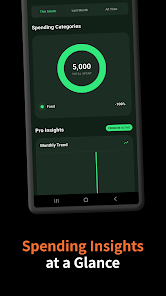
This app centers on the practical tasks people perform every month: record income, log purchases, and compare actual spending against targets. Instead of a cluttered feature set, the interface highlights a running transaction list, an easily accessible quick-add control, and a summary panel that updates as you enter items. The result is a simple workflow for spotting trends, identifying one-off costs, and testing small adjustments to a budgeted plan. Visual summaries make it straightforward to answer common questions like which categories are growing, whether bills are arriving on schedule, and how this month compares with the last.
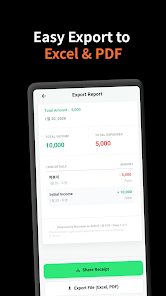
Core tools include instant transaction entry with auto-suggestions for payees and categories, flexible recurring entries for regular bills and paydays, and CSV export for backups or spreadsheet analysis. Budgets are built around periods you choose, with clear remaining-amount indicators and configurable alerts as you approach limits. Color-coded categories and optional tags keep related expenses grouped while allowing different organizational approaches. Export and local backup options let you keep full control of your records without forcing a particular cloud workflow.
The app uses familiar mobile patterns to keep the learning curve low: a prominent quick-add button for new transactions, tap-to-edit details, and swipe gestures to archive or remove entries. Large touch targets and concise dialogs support one-handed use and quick corrections. Frequent categories can be pinned to the home view and auto-suggestions adapt after a few entries so routine logging becomes faster. Navigation follows Android conventions so the app feels natural alongside other system apps.
Budgeting in WeLedger - Spending Tracker is designed as an ongoing process with immediate feedback. Progress bars show how much of each budget remains and update in real time as you add expenses. You can set target amounts for any period and review period-to-period comparisons to see whether small behavior changes are taking effect. For personal accountability, use simple goals such as trimming weekend dining spending or reducing subscription overlap; the app surfaces timing patterns and category shares so you can design focused experiments rather than guesswork.
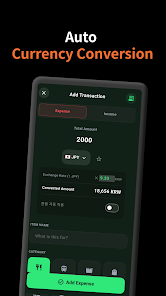
The visual approach favors clarity: flat layouts, legible typography, and muted accents that make charts and categories easy to scan. Personalization options include default currency selection, light and dark themes, the choice to display or hide cents in lists, and the ability to reorder or rename categories to match your habits. Small preferences like week-start day, reminder times, and whether to show compact or expanded list rows let the interface adapt to regional conventions and personal workflow without unnecessary options.
WeLedger - Spending Tracker takes a local-first approach so records remain on your device by default. Optional cloud synchronization and encrypted backups are available for users who want cross-device access, and CSV export provides a simple, portable archive. Standard Android backup integration helps migrate to a new device, and explicit permission prompts explain when any data leaves the phone. Offline operation is fully supported so basic use, entry, and reporting work without connectivity.
The app is optimized to stay responsive with long transaction histories while keeping battery and memory use low. Accessibility features include large touch targets, high contrast options, and adjustable font sizes for easier readability. Tablet layouts make better use of wide screens so power users can review summaries and make edits comfortably on larger devices. Getting started is straightforward: enter a few recent transactions, set one or two budgets, and enable reminders for recurring bills. Regular short check-ins and weekly reviews of the summary charts are recommended to keep categories accurate and to catch irregular activity early.
WeLedger - Spending Tracker aims to reward consistent small actions rather than infrequent bookkeeping sessions, offering a compact set of tools that support long-term habit building without unnecessary complexity.

Cover Letter
Size:11.77M FinanceCV Engineer
Size:16.85M FinanceSimple Invoice Manager
Size:25.30M Finance华融融达期货
Size:109.18M FinanceChurchNest
Size:83.00M FinanceYnotOne
Size:0.00M FinanceMoohan Taekwondo
Size:10.80M FinanceIBOIX
Size:76.00M FinanceMargin Guard: Risk Calculator
Size:69.00M FinanceLP Protidin
Size:47.00M FinanceMON 3
Size:47.00M FinanceExpo Wallet - Consumer
Size:29.10M FinanceApril 2024 Clash of Clans Update: Unveiling a Fresh Companion, Enhanced Levels, Chat Tagging, and Be
2024-04-16Arrival of Genshin Impact 4.6 Update: 'Embers of Two Realms, Twilight of Crimson'
2024-04-16V2.2 of the Farlight 84 update introduces an overhauled Season structure, fresh in-game currency, an
2024-04-16Monster Never Cry is now accessible on both Android and iOS mobile devices.
2024-04-18PUBG Mobile Teams Up with Bentley Motors: Luxury Cars, Exclusive Collectibles, and Beyond
2024-04-18March 2024 Free Redemption Codes for Honkai: Star Rail
2024-04-18