English
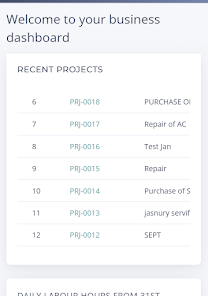
PME ERP is a mobile enterprise resource planning application that centralizes inventory, sales, purchase and financial workflows for small-to-medium businesses. It provides real-time dashboards, role-based access and offline sync so teams can manage operations, invoicing and stock movements from a single Android device with minimal setup.
PME ERP delivers a compact set of modules designed for practical day-to-day management. The app integrates stock control, customer orders, supplier management, basic accounting entries and reporting. Each module communicates through a common data model so transactions are reflected across the system instantly. Built-in search and filters help you locate records quickly and reduce manual reconciliation.
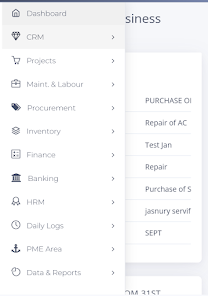
The interface focuses on clarity and speed. Menus are organized by module with clear icons and contextual actions that reduce taps. Lists support sorting and quick actions, while detail screens display recent related transactions to give immediate context. PME ERP places common workflows up front to shorten task completion times and minimize training for new users.
Automation in PME ERP is aimed at lowering repetitive tasks. You can configure default tax rules, auto-generate sequential invoices, and define reorder points to trigger purchase suggestions. Approval workflows allow managers to sign off on high-value orders or discount approvals from their mobile device, keeping processes moving without unnecessary delays.
Inventory controls include stock location tracking, batch numbers and simple adjustments. Sales features include customer profiles, price lists, discounts and invoice generation. The application supports partial shipments and backorders so sales teams can commit to customers while the warehouse fulfills in stages. Stock movements update available quantities immediately to avoid overselling.
Security is managed through role-based permissions and secure authentication. Administrators assign module access, data editing rights and export privileges. PME ERP also supports encrypted local storage for cached data and integrates with company-wide authentication schemes when required. Audit logs record key actions, helping maintain regulatory and internal compliance.
PME ERP is optimized for mobile performance with compact data payloads and background sync operations to reduce battery and bandwidth usage. An offline mode lets users continue entering transactions without connectivity; changes synchronize automatically when the device reconnects. The app targets a broad range of Android devices and adapts to different screen sizes for phones and tablets.
Reporting tools provide concise summaries and configurable dashboards. Built-in templates include sales summaries, stock valuation and profit margin snapshots. Reports can be filtered by date ranges, customers or product categories and exported as CSV for deeper analysis in desktop tools. Dashboards give managers a quick sense of cash flow and inventory health at a glance.
Data exchange options allow PME ERP to fit into existing ecosystems. Standard export formats and API endpoints make it possible to synchronize master data with accounting systems, e-commerce platforms and third-party logistics providers. Import wizards help migrate basic catalogs and customer lists during initial setup.
Onboarding with PME ERP begins with a guided setup that walks through company profile, tax settings and the first product catalog. Default templates speed up common configurations so teams can start processing orders quickly. Training resources and in-app tips reduce the learning curve for administrators and operational staff.
Support is available through documentation and contact channels embedded in the app. Regular updates deliver security patches and feature improvements. PME ERP emphasizes backward-compatible changes so existing workflows remain stable while incremental enhancements arrive.
For smaller organizations seeking a lean, mobile-first ERP, PME ERP offers practical coverage of essential business functions without the complexity of large enterprise suites. The focus on straightforward workflows, offline capability and rapid deployment makes it a useful tool for teams that need dependable operational control on Android devices.
Cover Letter
Size:11.77M FinanceCV Engineer
Size:16.85M FinanceSimple Invoice Manager
Size:25.30M Finance华融融达期货
Size:109.18M FinanceChurchNest
Size:83.00M FinanceYnotOne
Size:0.00M FinanceMoohan Taekwondo
Size:10.80M FinanceIBOIX
Size:76.00M FinanceMargin Guard: Risk Calculator
Size:69.00M FinanceLP Protidin
Size:47.00M FinanceMON 3
Size:47.00M FinanceExpo Wallet - Consumer
Size:29.10M FinanceApril 2024 Clash of Clans Update: Unveiling a Fresh Companion, Enhanced Levels, Chat Tagging, and Be
2024-04-16Arrival of Genshin Impact 4.6 Update: 'Embers of Two Realms, Twilight of Crimson'
2024-04-16V2.2 of the Farlight 84 update introduces an overhauled Season structure, fresh in-game currency, an
2024-04-16Monster Never Cry is now accessible on both Android and iOS mobile devices.
2024-04-18PUBG Mobile Teams Up with Bentley Motors: Luxury Cars, Exclusive Collectibles, and Beyond
2024-04-18March 2024 Free Redemption Codes for Honkai: Star Rail
2024-04-18