English
Image to PDF Converter simplifies turning photos and scans into searchable, shareable PDF files. With a lightweight interface and quick conversion steps, the app targets users who need reliable document creation on the go. It supports multiple image formats and offers basic editing before exporting final PDFs.
Image to PDF Converter converts single or multiple images into a single PDF document, preserving layout and image quality. It is built for professionals, students, and anyone handling receipts, notes, whiteboard snaps, or printed pages. The app balances speed and control: default settings work instantly while adjustable options let you refine the output.
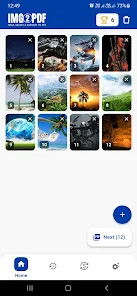
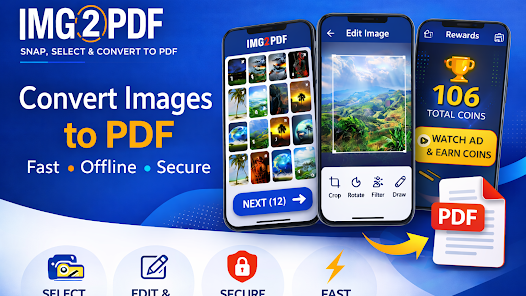
The interface prioritizes clarity. A thumbnail strip displays pages in the current document. Tap to preview, pinch to zoom, and long-press to move or delete items. Image to PDF Converter keeps the conversion flow to three main steps: select images, arrange and edit, then export. That minimal workflow makes routine tasks fast while still exposing useful controls for advanced needs.
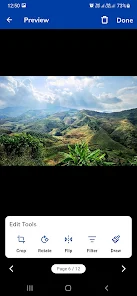
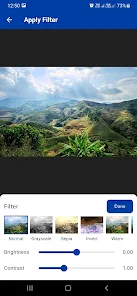
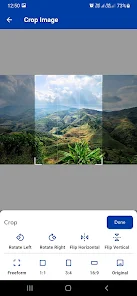
Before you export, the app provides cropping, rotation, brightness and contrast adjustments. There is also an auto-detect crop feature that isolates the document area in photographs. For multi-page PDFs you can add blank pages, insert new images between existing pages, or change the paper orientation for specific pages. These editing tools reduce the need to switch apps mid-process.
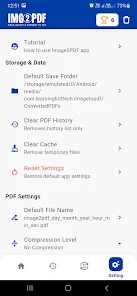
On modern Android devices the converter completes typical jobs in seconds. Performance scales with image count and original resolution. Higher compression reduces file size but can soften text and graphics; the app offers previews so you can compare settings before saving. Output PDFs are compatible with standard viewers and retain embedded images at the chosen quality level.
When handling personal or sensitive documents, encryption and local-only processing are important. The app gives options to process images locally and apply password protection to exported files. Users should verify whether OCR or cloud export routes data through external servers if privacy is a priority.
Installation is straightforward from the store. After granting required permissions for storage and camera access, try converting a small set of images to see the default settings in action. Toggle advanced options progressively to learn how each affects quality and file size. For regular workflows, explore templates or presets to automate routine exports.
Image to PDF Converter is a practical utility for anyone who needs quick, dependable document creation on Android. It combines essential editing, reliable conversion, and sensible export options into a compact package that streamlines paperwork and archiving tasks without steep learning curves.

LifeUp: Gamified To Do List
Size:17.35M ProductivityVPN Proxy Speed
Size:53.00M ProductivityAI Logo Generator (LogoWiz)
Size:41.50M Productivity3D Logo Maker
Size:39.30M ProductivityAI Chat: Ask AI Chat Anything
Size:42.20M ProductivityStars and Planets
Size:116.42M ProductivityImageMeter
Size:119.22M ProductivityHabitKit
Size:56.87M ProductivityMy Passwords Manager
Size:10.60M ProductivitymiMind
Size:48.30M ProductivityCute Note DDay Todo
Size:15.31M ProductivityCleverType AI Keyboard
Size:33.83M ProductivityApril 2024 Clash of Clans Update: Unveiling a Fresh Companion, Enhanced Levels, Chat Tagging, and Be
2024-04-16Arrival of Genshin Impact 4.6 Update: 'Embers of Two Realms, Twilight of Crimson'
2024-04-16V2.2 of the Farlight 84 update introduces an overhauled Season structure, fresh in-game currency, an
2024-04-16Monster Never Cry is now accessible on both Android and iOS mobile devices.
2024-04-18PUBG Mobile Teams Up with Bentley Motors: Luxury Cars, Exclusive Collectibles, and Beyond
2024-04-18March 2024 Free Redemption Codes for Honkai: Star Rail
2024-04-18