English
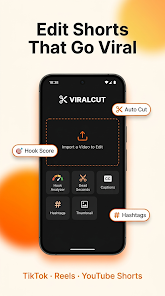
ViralCut - AI Shorts Editor is an AI-assisted short-form video editor designed to help creators convert raw footage into polished, platform-ready clips. ViralCut - AI Shorts Editor analyzes the opening seconds of a clip to score engagement potential, suggests precise cuts to remove low-energy moments, and proposes caption styles and thumbnail choices so your content begins stronger and keeps viewers watching. The app combines automatic and manual controls so you can speed up routine tasks while keeping creative control over final output.
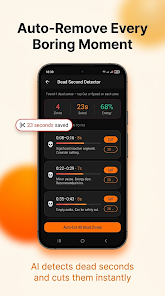
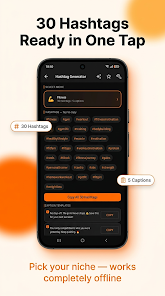
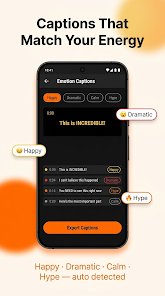
The app offers an AI Hook Analyzer that reviews the first few seconds of a clip, highlights weak openings and provides concrete editing suggestions plus a library of proven hook templates to try. A Dead Second Detector identifies slow or bland frames and either flags them for manual removal or applies an Auto-Cut operation to tighten pacing across the timeline. Captions are generated with selectable emotion styles — for example Happy, Dramatic, Calm or Hype — and are exported as standard SRT files for reuse in other editors. The AI Thumbnail Picker evaluates frames for visual impact and explains its choice so you can understand what makes a cover effective. Hashtag suggestions and caption templates are generated for specific niches and can be used offline, and export presets make it easy to save correctly formatted videos for multiple social platforms. Pro subscribers gain expanded export formats, higher import limits and watermark-free output.
ViralCut - AI Shorts Editor presents a timeline-based interface familiar to mobile editors: a scrubber for precise frame selection, drag-to-trim handles, and tap-to-mark points for in and out. AI suggestions appear inline as optional edits so you can accept, refine or discard each change; automated cuts are grouped into a single action to simplify undoing or reapplying changes. Caption controls let you adjust font, timing and position, while thumbnail choices are shown as selectable stills with a short rationale for the pick. Export settings are organized by destination (vertical, square, landscape) and include presets for common social platforms; you can create and save custom presets for repeated workflows.
Projects in ViralCut - AI Shorts Editor are organized into editable sessions so you can iterate on a clip over several passes. The recommended progression starts with an AI scan to identify hook issues and dead seconds, then move to caption styling and thumbnail selection, before final exporting. Each stage can be revisited; edits are non-destructive which encourages experimentation and makes it easy to A/B test different hooks or captions. For creators who publish frequently, saved presets and template libraries shorten the setup time and create a predictable progression from raw footage to published asset.
You can customize caption styles, subtitle placement and thumbnail overlays to match your brand or a specific visual language. The emotion-based caption generator lets you apply consistent tonal choices across videos, while the thumbnail rationale promotes visual learning about what works for your audience. Because edits are reversible and settings can be saved as templates, the app supports repeated refinement and experimentation, increasing replay value as you test different hooks and track which approaches perform best over time.
ViralCut - AI Shorts Editor is designed for on-device performance with core tools available offline: the Dead Second Detector, basic caption generation and the hashtag suggestion engine work without a continuous internet connection. Interface controls are optimized for touch and include adjustable timeline zoom and clear visual markers for caption timing to aid precision editing. The app aims to be responsive on mid-range devices, though complex AI scans and higher-resolution exports will take longer and may benefit from a faster device or Pro export options.
Some advanced capabilities such as unlimited imports, additional export targets and the removal of watermarks require a Pro subscription. The free tier includes ads and limits that may prompt frequent creators to upgrade for higher throughput. Automated edits and AI recommendations accelerate production, but complex storytelling or highly stylized projects may still require manual adjustment and creative judgment. Expect a short learning curve as you adopt the AI suggestions into your own editing style, after which the app can substantially reduce repetitive tasks and speed up publishing.
Start by running the AI Hook Analyzer on your most-viewed videos to learn which opening patterns perform best for your niche, then build a small library of hook and caption templates in ViralCut - AI Shorts Editor to reuse across future projects. Use the export presets to maintain consistent aspect ratios and file sizes for each platform you publish to, and keep SRT exports if you plan to fine-tune subtitles in a desktop editor. Regularly revisit thumbnail picks and test alternative covers to see which visuals drive higher click-through rates, and take advantage of offline hashtag suggestions when filming or editing on the go.


MEME Maker: MEME Creator
Size:49.65M Media & VideoInstory Story Video Maker
Size:31.79M Media & VideoDrum Pads 24 - Beats and Music
Size:31.00M Media & VideoRadioTunes
Size:25.30M Media & VideoWiseplay
Size:38.13M Media & VideojetAudio HD Music Player Plus
Size:22.60M Media & VideoTABLA: India Mystical Drums
Size:27.35M Media & VideoOnePlayer
Size:128.00M Media & VideoDeep Bass Booster & Subwoofer
Size:4.30M Media & Videoedjing Mix
Size:70.40M Media & VideoWorld Radio FM Online
Size:24.00M Media & VideoPianoMeter – Piano Tuner
Size:9.42M Media & VideoApril 2024 Clash of Clans Update: Unveiling a Fresh Companion, Enhanced Levels, Chat Tagging, and Be
2024-04-16Arrival of Genshin Impact 4.6 Update: 'Embers of Two Realms, Twilight of Crimson'
2024-04-16V2.2 of the Farlight 84 update introduces an overhauled Season structure, fresh in-game currency, an
2024-04-16Monster Never Cry is now accessible on both Android and iOS mobile devices.
2024-04-18PUBG Mobile Teams Up with Bentley Motors: Luxury Cars, Exclusive Collectibles, and Beyond
2024-04-18March 2024 Free Redemption Codes for Honkai: Star Rail
2024-04-18