English
Smart Facilities is a mobile platform designed to simplify building operations and maintenance by centralizing requests, schedules, and asset records into one intuitive interface. It helps facility managers and staff reduce response times, track maintenance history, and coordinate teams from a single Android device with clear dashboards and task flows.
At its heart, Smart Facilities provides ticketing, asset management, preventive maintenance scheduling, and real-time notifications. Users can create work orders, attach photos and notes, assign tasks to technicians, and monitor progress through status updates. The app stores equipment histories and warranties to help prioritize repairs and plan budgets more effectively.
Smart Facilities replaces fragmented spreadsheets and ad-hoc communication with a structured workflow. Automated reminders keep recurring inspections on schedule while an inbox-style task list helps technicians focus on high-priority issues. Managers gain visibility into resource allocation, enabling faster decision-making and fewer missed service windows.
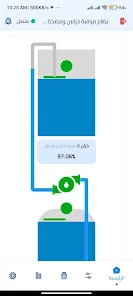
The interface favors clarity: a customizable dashboard surfaces pending tasks, urgent alerts, and upcoming preventive jobs. Navigation is organized into clear tabs for work orders, assets, calendar, and reports. Forms are optimized for mobile input, with quick buttons to capture images, voice notes, or scan barcodes directly from an Android camera.
Every facility has unique needs, and Smart Facilities supports configurable fields, permission levels, and job categories. It integrates with common calendar services for schedule syncing and can export CSV reports for accounting or further analysis. Integration hooks and open APIs allow connection to building management systems or third-party analytics platforms.
Built-in push notifications and in-app messaging keep teams aligned. Technicians receive assignment alerts and can update status in real time, while managers get escalation notices for overdue or high-severity tasks. Comment threads on work orders preserve communication history so context is never lost.
Smart Facilities is optimized for mid-range Android devices and is mindful of data usage. It supports offline mode so technicians can capture work details in low-connectivity areas; entries synchronize automatically when a connection is restored. The app aims for smooth performance even with extensive asset catalogs and large photo attachments.
Data protection is a priority: role-based access controls, encrypted transit, and secure local storage help safeguard sensitive facility information. Audit logs track changes to work orders and asset records, facilitating compliance and internal reviews. Administrators can configure retention policies to align with company requirements.
Getting started with Smart Facilities typically begins with importing asset lists and setting user roles. The app provides guided setup screens and sample templates for preventive maintenance plans. Small teams can be up and running in a few hours, while larger organizations benefit from staged rollouts and bulk user provisioning features.
Actionable reporting tools turn raw data into operational insight. Standard dashboards show response times, completed jobs by category, and recurring failure points. Custom report builders allow managers to combine filters and export visuals for stakeholder meetings or budgeting cycles.
Facilities teams adopt Smart Facilities because it blends practical tools with straightforward workflows. The app reduces administrative overhead, improves accountability, and centralizes documentation that would otherwise be scattered across email and paper records. Its modular approach suits both single-site operations and multi-site portfolios.
To maximize value, start with a pilot project focusing on one building or asset type, refine templates and notification rules, then expand. Regularly review asset histories and preventive schedules to catch trends early. With consistent use, Smart Facilities can become the system of record for maintenance activities and operational readiness.



Colorimeter
Size:5.45M ToolsChatBoost
Size:19.33M ToolsRemote Fire TV
Size:48.04M ToolsgetConf - Hidden Settings
Size:16.66M ToolsTracker Detect Pro
Size:10.39M ToolsWiFi Speed Test Pro
Size:8.11M ToolsGG Mouse Pro 2
Size:45.82M ToolsResource Monitor Mini Pro
Size:3.19M ToolsSmart Keyboard Pro
Size:23.22M ToolsMyScript Math: Solve & Plot
Size:108.76M ToolsText Repeater
Size:11.73M Tools3Dcalc+
Size:12.59M ToolsApril 2024 Clash of Clans Update: Unveiling a Fresh Companion, Enhanced Levels, Chat Tagging, and Be
2024-04-16Arrival of Genshin Impact 4.6 Update: 'Embers of Two Realms, Twilight of Crimson'
2024-04-16V2.2 of the Farlight 84 update introduces an overhauled Season structure, fresh in-game currency, an
2024-04-16Monster Never Cry is now accessible on both Android and iOS mobile devices.
2024-04-18PUBG Mobile Teams Up with Bentley Motors: Luxury Cars, Exclusive Collectibles, and Beyond
2024-04-18March 2024 Free Redemption Codes for Honkai: Star Rail
2024-04-18