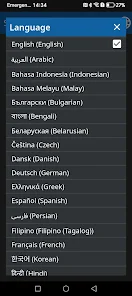
English
Notify My Client for Business is a streamlined appointment booking and client notification platform designed to help service providers reduce no-shows, stay organized and communicate clearly with customers. The app combines a calendar-first workflow with automated reminders, configurable notification templates and role-based access so front-desk staff, managers and service providers see the right information at a glance. Notify My Client for Business is suitable for a wide range of appointment-driven operations and emphasizes clarity, reliability and simple setup.
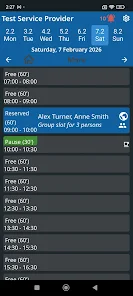
The core feature set centers on a clean calendar interface with day, week and month views, automated push and email reminders, and configurable time-slot rules to prevent double-bookings. Built-in confirmation tracking records client responses and visible status markers distinguish confirmed, pending and canceled appointments. Administrators can set language preferences and control what each user role can view or edit, while service categories and color-coding help teams quickly identify types of bookings and staff assignments.
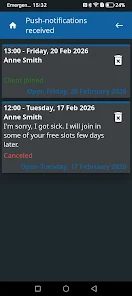
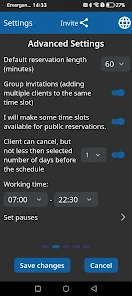
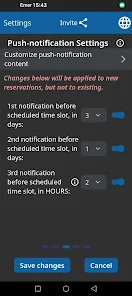
Scheduling follows a straightforward flow: create service types with durations and buffer times, open availability windows for staff or locations, and accept bookings through the calendar. Notifications are linked to appointments and dispatched according to configurable schedules — for example, a reminder 48 hours and another 2 hours before a visit. The system logs confirmations and cancellations so staff can prioritize follow-ups, and a short activity history attached to each booking helps resolve timing or client preference questions without sifting through email threads.
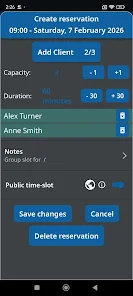
The app emphasizes direct manipulation controls: tap to add or edit an appointment, drag to move a slot within the day view, and pinch or switch views to change the visible range. Administrators can compose custom reminder templates, insert dynamic fields like client name and service details, and set separate reminder cadences per service type. Availability blocks can be repeated or adjusted on the fly, and soft rules prevent booking outside permitted windows while allowing managers to override when needed.
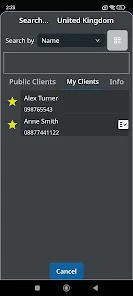
Onboarding is staged so businesses of any size can get started without heavy configuration. A guided setup walks administrators through creating services, adding team members and importing a basic schedule from a CSV file or calendar feed. As practices grow, role and permission management supports delegation: junior staff can add appointments while managers retain edit or audit privileges. The app records basic usage metrics that help teams refine reminder timings and identify bottlenecks in daily scheduling.
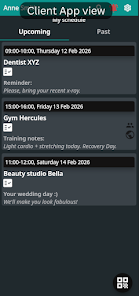
The visual design favors legibility and quick scanning: compact day and week layouts show dense schedules clearly, color-coded service categories separate appointment types visually, and icons indicate special conditions such as travel time, required equipment or prep steps. Visual indicators prioritize urgent changes and open gaps in availability, helping receptionists and managers spot opportunities for follow-up bookings or necessary schedule adjustments at a glance.
Recurring appointments can be created with flexible recurrence rules and exceptions, which reduces repetitive setup for regular clients. Service-specific templates and saved client profiles allow staff to reuse past bookings and notes, preserving preferences and reducing friction during high-volume periods. These features increase operational efficiency and provide steady replay value for businesses that depend on repeat customers, annual memberships or subscription-style bookings.
Notify My Client for Business was built with accessibility in mind: adjustable text sizes, clear contrast for key UI elements and support for common assistive technologies reduce training time and make the app approachable for diverse teams. Simple workflows minimize the number of taps needed for common tasks, and contextual help prompts guide new users through less frequent operations such as bulk edits and exporting schedules.
The app continues to provide value in environments with patchy connectivity by caching recent schedule data for local reference and queuing outgoing notifications to be sent once a network connection is restored. Status indicators show whether data is fully synchronized or pending, so staff know when to confirm changes manually. Because real-time push delivery depends on network access at the client end, the platform includes fallbacks such as additional reminder windows to help ensure messages reach recipients.
Practical limits include the dependency on accurate client contact information and occasional initial setup time for complex multi-staff schedules. The app mitigates these challenges with confirmation tracking, reminder cadence options and import tools to consolidate contact lists, but reliable outcomes still depend on maintaining up-to-date client channels and appropriate team practices for managing exceptions.
Secure account management, role-based permissions and audit logs help protect client data and support operational accountability. Managers can restrict access to sensitive fields while enabling reception staff to create and update bookings. Notify My Client for Business is particularly well suited to salons, clinics, studios, consultants and other appointment-driven services that need a dependable, configurable way to reduce no-shows and keep teams synchronized without adding administrative overhead.
CV Engineer
Size:16.85M FinanceSimple Invoice Manager
Size:25.30M Finance华融融达期货
Size:109.18M FinanceChurchNest
Size:83.00M FinanceYnotOne
Size:0.00M FinanceMoohan Taekwondo
Size:10.80M FinanceIBOIX
Size:76.00M FinanceMargin Guard: Risk Calculator
Size:69.00M FinanceLP Protidin
Size:47.00M FinanceMON 3
Size:47.00M FinanceExpo Wallet - Consumer
Size:29.10M FinanceKassly POS
Size:59.00M FinanceApril 2024 Clash of Clans Update: Unveiling a Fresh Companion, Enhanced Levels, Chat Tagging, and Be
2024-04-16Arrival of Genshin Impact 4.6 Update: 'Embers of Two Realms, Twilight of Crimson'
2024-04-16V2.2 of the Farlight 84 update introduces an overhauled Season structure, fresh in-game currency, an
2024-04-16Monster Never Cry is now accessible on both Android and iOS mobile devices.
2024-04-18PUBG Mobile Teams Up with Bentley Motors: Luxury Cars, Exclusive Collectibles, and Beyond
2024-04-18March 2024 Free Redemption Codes for Honkai: Star Rail
2024-04-18