English
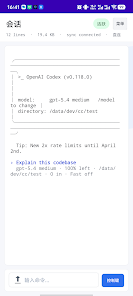
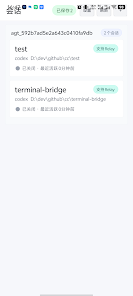
PocketCoder is an AI-powered mobile coding assistant that brings your AI coding sessions to your phone so you can continue work away from a computer. The app focuses on keeping iterative coding conversations, model outputs, and task controls available in a compact, touch-friendly interface so developers can triage issues, test small changes, and manage long-running sessions while on the move. It is designed for people who need to maintain momentum on ideas and code review tasks without being tied to a desktop machine.
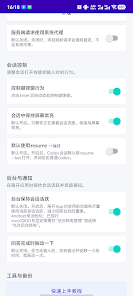
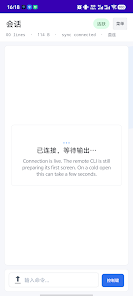
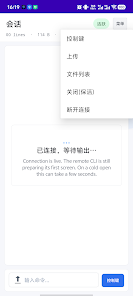
Key features of PocketCoder include session resumption that restores the context of ongoing conversations and running tasks, clear connection and execution status indicators so you know when a model response or a remote run has completed, and a set of quick operations to reduce repetitive typing on mobile. The app supports uploading and attaching files to a session, viewing code snippets and logs, and returning to previous entry points in a conversation. Its lightweight design removes unnecessary clutter so essential actions are always within reach.
Instead of treating each message as an isolated exchange, the app models session progression: you can track a task from initial prompt through subsequent refinements, treat intermediate replies as checkpoints, and step backward or forward through the conversation history. This approach acts as a practical progression system for iterative development: you can branch a line of inquiry, fork a prompt into multiple attempts, or promote a promising response into a follow-up task. For longer workflows, sessions are persisted so you can pick up where you left off without reconstructing context.
In PocketCoder, controls are optimized for touch interaction and brief keyboard input. A compact command bar exposes common actions such as rerun, refine, or insert a follow-up prompt, and familiar gestures allow quick navigation between messages and attachments. For users who pair a hardware keyboard, commonly used shortcuts and quick-apply snippets help accelerate edits. Attention to concise affordances and reduced typing means the app favors fast corrective iterations over heavy code editing on the phone.
The visual style emphasizes readable code previews and clear status cues. Code blocks are rendered with monospaced fonts and adjustable text size to improve readability on small screens, and a choice of light and dark themes helps maintain contrast in different lighting. Inline diffs and collapsed sections let you expand only the parts of a conversation you need, and simple layout options let you prioritize either chat context, file previews, or command controls according to personal workflow preferences.
File handling is focused on convenience rather than replacing a full IDE: you can upload source files or small patches to attach to a conversation, download snippets for offline editing, and share session links or exported transcripts with teammates. These features support asynchronous collaboration by making it straightforward to hand off a session or provide context during code review without requiring everyone to be online at the same time.
PocketCoder caches recent conversation history and last-viewed outputs so you can re-read model replies and drafts when connectivity is intermittent. While new model responses require a network connection, drafts and cached results remain accessible for reference. Accessibility considerations include adjustable font sizes, clear contrast, and layout choices that work well with screen readers and larger touch targets to accommodate a range of device users.
This app is not a full development environment. Heavy refactoring, complex debugging sessions and extensive file management are still best done on a desktop with a full IDE. Model inference and execution status shown in the app reflect remote processing and are dependent on an active connection to the backend service. Use the app primarily to review outputs, iterate prompts, manage task queues, and perform light edits or triage; it is intended to reduce friction between desktop sessions rather than replace them.
For developers who need to maintain momentum away from their workstation, PocketCoder provides a focused mobile companion that preserves context, accelerates routine follow-ups, and keeps the essentials of AI-assisted coding within easy reach on a phone.
Remote Fire TV
Size:48.04M ToolsgetConf - Hidden Settings
Size:16.66M ToolsTracker Detect Pro
Size:10.39M ToolsWiFi Speed Test Pro
Size:8.11M ToolsGG Mouse Pro 2
Size:45.82M ToolsResource Monitor Mini Pro
Size:3.19M ToolsSmart Keyboard Pro
Size:23.22M ToolsMyScript Math: Solve & Plot
Size:108.76M ToolsText Repeater
Size:11.73M Tools3Dcalc+
Size:12.59M ToolsMyScoreTracker
Size:80.28M ToolsPanda Touch Pro
Size:18.13M ToolsApril 2024 Clash of Clans Update: Unveiling a Fresh Companion, Enhanced Levels, Chat Tagging, and Be
2024-04-16Arrival of Genshin Impact 4.6 Update: 'Embers of Two Realms, Twilight of Crimson'
2024-04-16V2.2 of the Farlight 84 update introduces an overhauled Season structure, fresh in-game currency, an
2024-04-16Monster Never Cry is now accessible on both Android and iOS mobile devices.
2024-04-18PUBG Mobile Teams Up with Bentley Motors: Luxury Cars, Exclusive Collectibles, and Beyond
2024-04-18March 2024 Free Redemption Codes for Honkai: Star Rail
2024-04-18