English
3D Modeling App brings desktop-grade modeling tools to your Android device, letting creators sculpt, edit meshes, and prepare models for rendering or 3D printing. It combines intuitive touch controls, layered workflows, and common export formats, making it practical for designers, hobbyists, and students who need on-the-go 3D creation.
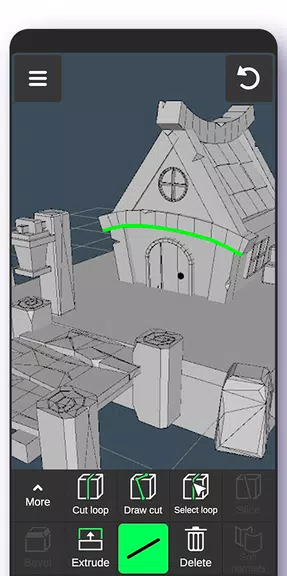
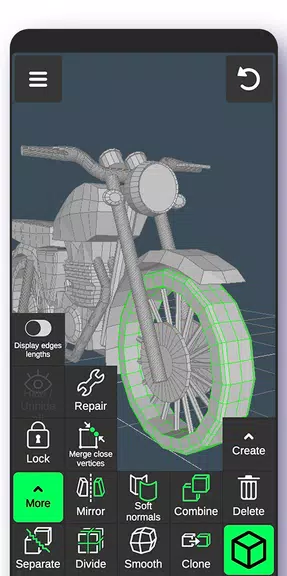
The 3D Modeling App provides a compact but powerful toolset built around polygon modeling, subdivision surfaces, and basic sculpting. Users get access to selection and transform tools, edge-loop operations, extrusion, boolean functions, and symmetry options. A built-in material editor covers simple PBR workflows and UV unpacking features to streamline texturing tasks.
Designed for touchscreens, the interface balances accessibility with depth. Gesture-based navigation allows orbit, pan, and zoom with multi-touch gestures while context-sensitive menus keep commonly used commands within reach. The viewport supports wireframe, shaded, and texture preview modes, and a layered scene panel helps organize complex models and manage visibility or locking of parts.
Compatibility is a priority. The app reads and writes popular industry formats such as OBJ, STL, and FBX allowing direct transfer to renderers, game engines, or 3D printers. Export presets let you choose polygon decimation, axis orientation, and unit scale—useful when preparing files for printing or real-time engines.
Performance is optimized for mobile hardware with options for level-of-detail display, GPU-accelerated rendering where supported, and a low-memory mode for older devices. The app recognizes stylus input and pressure sensitivity to improve sculpting control. Background autosave and incremental checkpoints reduce the risk of losing work during long sessions.
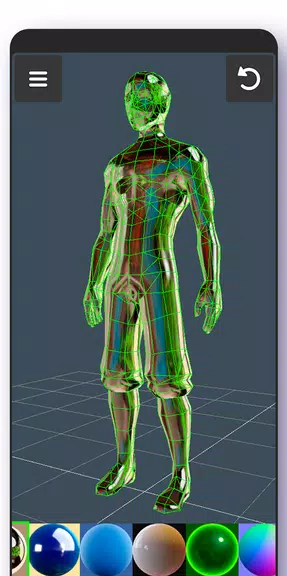
Though not a full desktop renderer, the 3D Modeling App includes a fast physically based preview and baked lighting options to evaluate materials. A simple node-like material editor and basic UV tools make it possible to paint or apply textures, bake maps, and preview normal or roughness maps before exporting to a dedicated painting app or renderer.
Cloud synchronization and project packaging simplify collaboration. Share compressed project files or export model snapshots to popular cloud services. Version history and export logs help teams track revisions, and direct sharing of common formats speeds transfer between phone, tablet, and desktop environments.
Teachers and students appreciate the portability for classroom demonstrations and homework. Hobbyists find the app useful for quick concepting or preparing models for 3D printing. Professionals can use it as a companion tool for rapid prototyping and on-site edits when a laptop isn’t available.
Customize hotkeys and tool palettes to match your preferred workflow, or create and save macro sequences for repetitive tasks. The app supports plugin extensions for additional importers and small utilities that automate baking or decimation, expanding capabilities without bloating the core install.
Organize scenes by naming layers and grouping related meshes early in the process. Use incremental saves and export lightweight preview files when sharing progress. For 3D printing prepare models with manifold checks and printability reports that flag thin geometry or non-manifold edges.
Whether you’re sketching a concept on the go or refining a printable model, the 3D Modeling App aims to shorten the gap between idea and usable asset. Regular updates add stability improvements and tool refinements driven by community feedback, ensuring the app adapts to common workflows and evolving device capabilities.
Dots Live Wallpaper - Battery
Size:8.44M PersonalizationChroma - Icon Pack
Size:51.41M PersonalizationOne UI Fluffy Icon Pack
Size:79.19M PersonalizationPixly Limitless Fluo Icon Pack
Size:110.46M PersonalizationPixly Professional Dark
Size:77.11M PersonalizationPixly Paint - Icon Pack
Size:125.78M PersonalizationWatch Faces by Watch Base
Size:9.40M PersonalizationPixly Dark 3D - Icon Pack
Size:106.58M PersonalizationLena Black - Glyph Icon Pack
Size:17.59M PersonalizationFluffy 3D - Icon Pack
Size:129.39M PersonalizationRad Pack Pro
Size:103.35M PersonalizationBlack Pie - Icon Pack
Size:37.33M PersonalizationApril 2024 Clash of Clans Update: Unveiling a Fresh Companion, Enhanced Levels, Chat Tagging, and Be
2024-04-16Arrival of Genshin Impact 4.6 Update: 'Embers of Two Realms, Twilight of Crimson'
2024-04-16V2.2 of the Farlight 84 update introduces an overhauled Season structure, fresh in-game currency, an
2024-04-16Monster Never Cry is now accessible on both Android and iOS mobile devices.
2024-04-18PUBG Mobile Teams Up with Bentley Motors: Luxury Cars, Exclusive Collectibles, and Beyond
2024-04-18March 2024 Free Redemption Codes for Honkai: Star Rail
2024-04-18