English
Wakey - The Cutest Alarm Clock is a playful, user-friendly alarm app that turns waking up into a pleasant routine with cute visuals, customizable alarms, and gentle nudges to beat snooze fatigue. It balances charming design with practical features to help users wake on time without stress or sudden jolts.
Wakey - The Cutest Alarm Clock pairs minimalist design with personality. The interface emphasizes large icons, soft colors, and animated characters that react to your alarm habits. Instead of abrupt sounds, Wakey uses progressive volume, mood-setting tunes, and optional mini interactions that encourage a calm transition from sleep to activity.
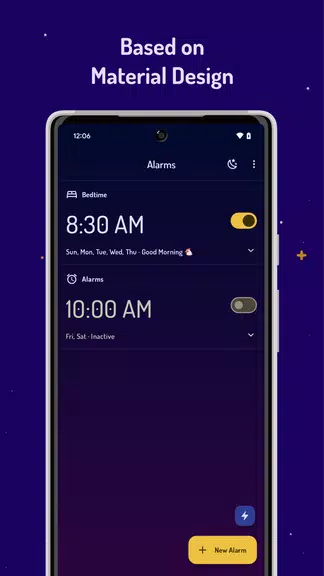
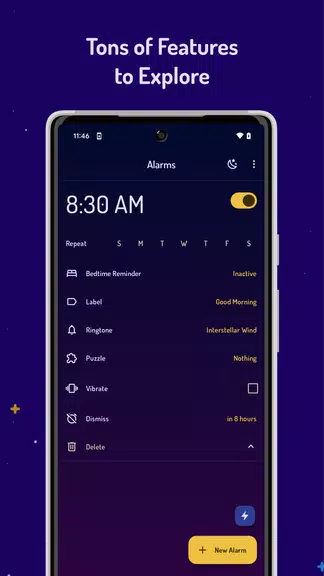
Setting an alarm in Wakey - The Cutest Alarm Clock is straightforward. Tap the plus icon, choose the time and days, and select a wake mode. For users who struggle with habitual snoozing, the app offers optional challenges—small tasks that must be completed to turn off the alarm, which helps reinforce new waking habits without being punitive.
The interface focuses on clarity. Large toggles for active alarms, quick-edit shortcuts, and preview buttons make adjustments fast. Visual feedback is a highlight: friendly expressions and tiny animations show progress as your alarm approaches, making the experience feel less like a tool and more like a gentle assistant.
Beyond waking, Wakey integrates practical utilities aimed at starting your day productively. You can link an alarm to actions—open a to-do list, read a snippet of news, or start a timed routine for stretching. These hooks are useful for users who want a smoother handoff from sleep into a productive morning.
Customization is extensive without being overwhelming. Select alarm tones from curated options, upload your own tracks, or use ambient soundscapes. Adjust volume curves, vibration strength, and the intensity of visual animations. The character system allows cosmetic changes and unlockable expressions tied to usage streaks.
Wakey is engineered to be lightweight and battery-conscious. Background scheduling is optimized to avoid unnecessary wakelocks while ensuring alarms ring accurately even under aggressive power-saving modes. The app also offers a fallback notification option for devices with strict background limits.
Accessibility considerations include large text options, high-contrast themes, and easy-to-reach buttons for one-handed operation. For users with hearing preferences, visual cues and haptic patterns provide alternate wake signals. The onboarding tutorial is short and guides users through key settings in under a minute.
Users pick Wakey - The Cutest Alarm Clock for its blend of charm and usefulness. It softens mornings with personality while supplying robust scheduling and productivity hooks. The app’s playful approach appeals to people who want a kinder wake-up experience without sacrificing reliability.
Installation is quick and setup takes only a minute: install, grant notification permissions, and set your first alarm. Regular updates add new themes, sounds, and small interactive elements, keeping the app feeling fresh while maintaining consistent performance.

AirConsole Hero
Size:8.70M ToolsWakey - The Cutest Alarm Clock
Size:39.40M ToolsPhonk Music - Song Remix Radio
Size:17.58M ToolsVPN Japan
Size:21.00M ToolsSimple Keyboard
Size:18.00M ToolsBatteryOne
Size:10.36M ToolsEdge Gestures
Size:5.36M ToolsFV File Explorer Pro
Size:165.40M ToolsEpic Games
Size:11.00M ToolsMixing Station
Size:27.31M ToolsMulti Run
Size:8.45M ToolsCharge Meter
Size:11.72M ToolsApril 2024 Clash of Clans Update: Unveiling a Fresh Companion, Enhanced Levels, Chat Tagging, and Be
2024-04-16Arrival of Genshin Impact 4.6 Update: 'Embers of Two Realms, Twilight of Crimson'
2024-04-16V2.2 of the Farlight 84 update introduces an overhauled Season structure, fresh in-game currency, an
2024-04-16Monster Never Cry is now accessible on both Android and iOS mobile devices.
2024-04-18PUBG Mobile Teams Up with Bentley Motors: Luxury Cars, Exclusive Collectibles, and Beyond
2024-04-18March 2024 Free Redemption Codes for Honkai: Star Rail
2024-04-18