English
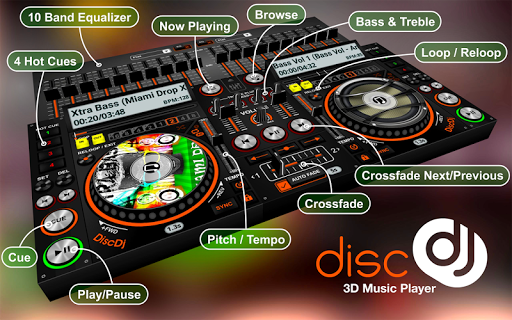
DiscDj 3D Music Player turns your Android device into a compact virtual DJ booth, combining a striking 3D DJ interface with real mixing tools so you can mix, record and perform from your phone or tablet. The app places floating decks, a crossfader, sampler and a multi-band equalizer in an interactive view and lets you browse music by albums, artists, folders, composers, genres and playlists. Casual listeners and aspiring DJs will appreciate automatic crossfade, manual cueing, pitch control and on-board recording for creating smooth transitions, practice mixes or quick remixes whenever and wherever you want.
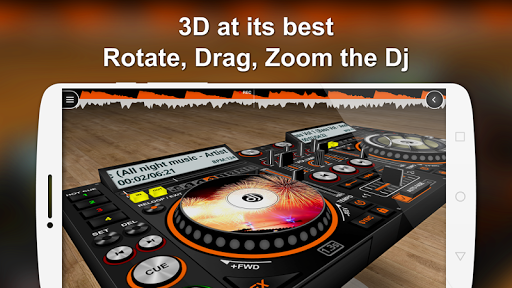
⭐ Immersive 3D DJ interface with floating decks and mixer you can pan and rotate; display lock and reset controls restore the view quickly.
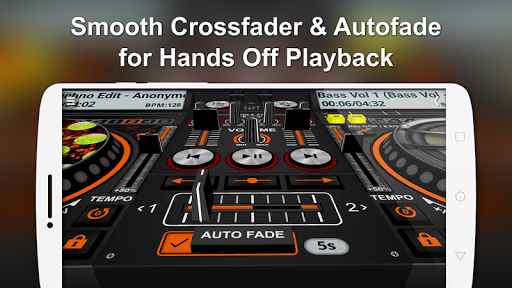
⭐ Autofade (automatic crossfade) with adjustable timing, button-click fade and a manual crossfader for seamless track transitions.
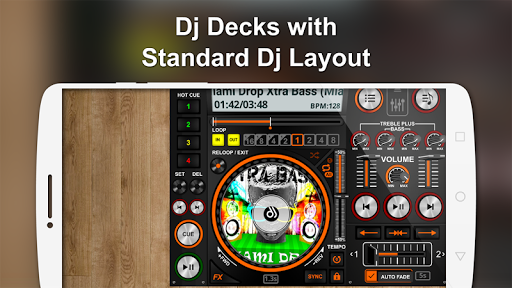
⭐ Discs that show album artwork plus a central control area for play/pause and switching tracks across both turntables or decks.
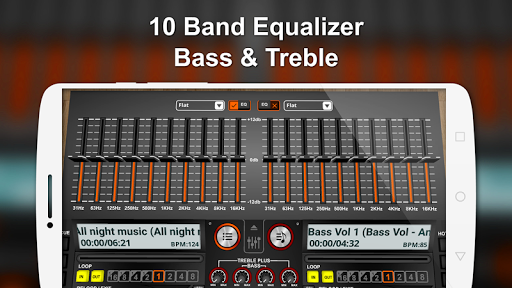
⭐ Built-in 10‑Band Equalizer with 17 presets for detailed tonal shaping (equalizer component noted as compatible with Android 2.3+ in the app).
⭐ Sampler addon with four sample sets (Default, 808 Drum Kit, Drum Kit, Rise n Drop), six samples per set and three playback modes: Play/Cut Play, Loop and Play/Stop.
⭐ Performance tools including recording, pre-cueing/split output, adjustable pitch slider, multiple SFX, low/high-pass filters, BPM measurement, four hot cues per deck and comprehensive loop controls.
✅ DiscDj 3D Music Player delivers an unusually tactile and visually engaging way to mix on a phone, making practice and casual performances feel more immersive.
✅ DiscDj 3D Music Player packs professional features—10‑band EQ, sampler, recording and pre‑cueing—that expand creative possibilities beyond a standard player.
✅ Extensive library browsing (albums, artists, folders, composers, genres, playlists) and deck-level controls let you prepare sets and jump between tracks quickly.
✅ Portable mixing, on-device recording and automatic crossfade make it easy to produce smooth transitions or record ideas whenever inspiration strikes.
❎ Precise cueing, scratching and micro-adjustments can be difficult on small touchscreen displays compared with physical decks.
❎ Some features are demanding on CPU and battery, so performance may vary on older or low‑end devices and the app targets Android 4.4 and above.
❎ The wide range of controls and options creates a learning curve before you can use advanced functions comfortably.
Pixly Vintage - Icon Pack
Size:114.40M LifestyleMap My Fitness
Size:72.60M LifestyleGym Day
Size:33.40M LifestyleVideo.Guru
Size:55.14M LifestyleLyfta: Gym Log Workout Tracker
Size:21.30M LifestyleDiscDj 3D Music Player
Size:14.91M LifestyleKeto Manager Keto Diet Tracker
Size:53.43M LifestyleAmaha (InnerHour)
Size:22.50M LifestyleBetterSleep
Size:114.10M LifestyleMyNetDiary
Size:122.90M LifestyleThe Athletic
Size:71.00M LifestyleViki: Asian Dramas & Movies
Size:20.30M LifestyleApril 2024 Clash of Clans Update: Unveiling a Fresh Companion, Enhanced Levels, Chat Tagging, and Be
2024-04-16Arrival of Genshin Impact 4.6 Update: 'Embers of Two Realms, Twilight of Crimson'
2024-04-16V2.2 of the Farlight 84 update introduces an overhauled Season structure, fresh in-game currency, an
2024-04-16Monster Never Cry is now accessible on both Android and iOS mobile devices.
2024-04-18PUBG Mobile Teams Up with Bentley Motors: Luxury Cars, Exclusive Collectibles, and Beyond
2024-04-18March 2024 Free Redemption Codes for Honkai: Star Rail
2024-04-18