English
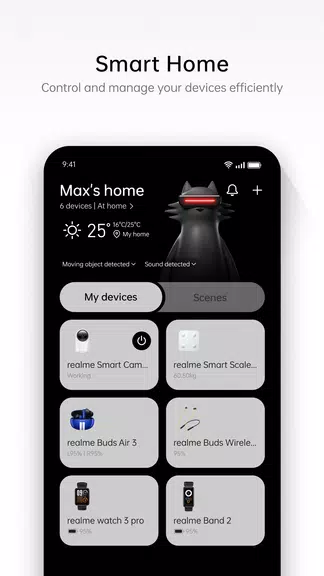
Connect, track, sync, manage: realme Link brings your wearable and phone data together so you can check calls, workouts and sleep without juggling multiple apps. The app acts as the central hub for realme smart bands and watches, displaying activity summaries, delivering notification previews and logging sleep so you can review trends over days or weeks. If you own a compatible realme wearable, realme Link simplifies basic setup and keeps everyday metrics in one place while letting you start workouts directly from the phone when you prefer a larger view of your session.
Pairing devices: Open the app, follow the on-screen prompts to scan or select your realme Watch or Band, and complete the pairing sequence to allow data flow between devices.
Permissions and sync: Grant the app the required permissions so calls, messages and health data can be synced; once permissions are set the app updates automatically whenever the band and phone reconnect.
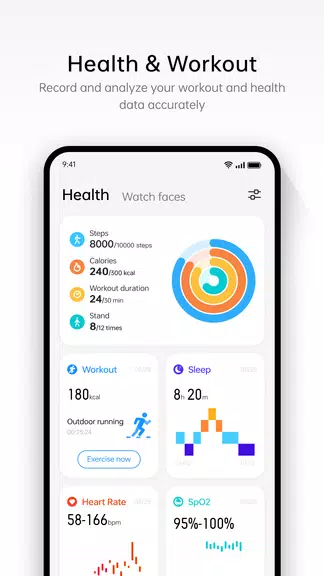
Health dashboard: The home or health page provides a quick view of steps, calories and exercise duration so you can assess daily progress at a glance.
Launching activities: You can start common exercise types from the app, such as outdoor running or indoor running, and watch the session metrics populate in real time on the health page when the wearable is active.
Notification previews: Incoming calls and SMS are forwarded to paired devices so you can see who is calling or read the message preview without fishing your phone out of a pocket.
Activity tracking: Steps, calories burned and exercise time are recorded and displayed on the health page, making it easy to monitor daily movement and weekly trends.
Workout options: The app supports initiating common workouts like outdoor riding, outdoor running and indoor running from the phone, with each session reflected in the activity log.
Sleep reporting: Wear the device overnight and realme Link will display timing for falling asleep, waking up, deep sleep and light sleep, helping you spot patterns across nights.
Keep your wearable charged: Regular charging ensures continuous data capture for steps and sleep so there are fewer gaps in your activity record.
Check connection status: If data looks out of date, open realme Link and confirm your band or watch is still paired and Bluetooth is active on your phone.
Start workouts from the phone when needed: If you prefer a larger interface for route tracking or a clearer readout while exercising, initiate the session in realme Link before you set off.
Use it during daily routines: For example, check the morning step count after your commute or review sleep quality first thing to decide whether you need extra rest that day.
Which devices work with realme Link?
Most recent realme smart bands and watches are supported; check the device compatibility list in the app or the product documentation for specific models.
Can I get call and SMS alerts on my wearable?
Yes, after pairing the watch or band with the app, incoming calls and SMS notifications can be forwarded so you see who is calling or a preview of the message.
Does the app track different exercise types?
realme Link lets you start and record common activities like outdoor running, outdoor riding and indoor running, with the related metrics logged to the health page.
realme Link serves as a clean, focused companion app for realme wearables, combining notifications, activity summaries and sleep data in a single place. It works well if you want a simple way to monitor daily movement and initiate standard workouts, though advanced athletes may look elsewhere for deeper performance analytics. The app remains a practical choice for everyday tracking and is subject to change across updates and device models.
realme Link
Size:71.70M ToolsPDownloader MOD Premium Unlocked
Size:98.95M ToolsMagnetSearch MOD Premium Unlocked
Size:6.80M ToolsTrending Searches MOD Premium Unlocked
Size:4.53M ToolsAdGuard VPN MOD Premium Unlocked
Size:33.50M ToolsEdge VPN – Simple & Fast MOD Premium Unlocked
Size:28.16M ToolsSmart Tools Mini
Size:8.86M ToolsSwift Backup MOD Premium Unlocked
Size:31.06M ToolsStick - Remote Control For TV MOD Premium Unlocked
Size:55.27M ToolsBackground Video Recorder Cam MOD Premium Unlocked
Size:18.60M ToolsTasker MOD Premium Unlocked
Size:35.90M ToolsOrNET: Dark Web Browser MOD Premium Unlocked
Size:25.20M ToolsApril 2024 Clash of Clans Update: Unveiling a Fresh Companion, Enhanced Levels, Chat Tagging, and Be
2024-04-16Arrival of Genshin Impact 4.6 Update: 'Embers of Two Realms, Twilight of Crimson'
2024-04-16V2.2 of the Farlight 84 update introduces an overhauled Season structure, fresh in-game currency, an
2024-04-16Monster Never Cry is now accessible on both Android and iOS mobile devices.
2024-04-18PUBG Mobile Teams Up with Bentley Motors: Luxury Cars, Exclusive Collectibles, and Beyond
2024-04-18March 2024 Free Redemption Codes for Honkai: Star Rail
2024-04-18