English
KLEMU is a companion app built to bring detailed audio and device controls to your Android phone, putting equalization, noise cancellation tuning, and basic hardware management into a single interface. The KLEMU app targets listeners who want more control than the stock audio settings provide: if you own compatible hardware such as the SPHERE100, KLEMU helps you inspect the active audio codec, tweak multi-band equalizer parameters, and adjust sensor and touch behavior so the hardware responds the way you expect in daily use.
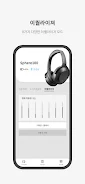
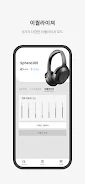
KLEMU combines a multi-band equalizer with a range of preset modes and a customizable profile area where you can save personalized EQ settings; it exposes noise cancellation (NC) controls on supported models, offering both mode switching and incremental strength adjustments; the app shows battery status and notification indicators for connected devices, and it displays which audio codec is active so you can diagnose quality differences quickly. A built-in updater checks for newer app versions and firmware when a network connection is available, and the product notes highlight compatibility with the SPHERE100 while also calling out model-specific limitations.
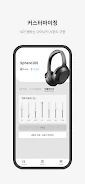
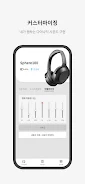
The interface centers on direct controls rather than obscure menus: sliders and band controls let you shape bass, mids, and treble across multiple frequency bands, while a CUSTOMIZE option saves frequently used profiles for different listening environments. Sensor and touch-function management allows you to define what a cover, tap, or in-ear detection will do on supported hardware, and sensitivity options can reduce accidental activations. KLEMU separates global audio routing from device-specific tweaks so you can create and maintain profiles that suit music, podcasts, or hands-free calls without losing the original factory presets.
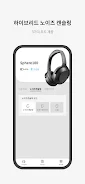
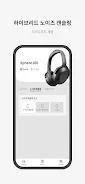
Audio tuning in KLEMU focuses on practical adjustments: besides band-level EQ control, you can make small, precise changes to noise cancellation strength to find a balance between isolation and awareness. Because the app exposes the active codec, you can confirm whether a high-quality codec is in use and correlate codec choice with perceived differences in latency, clarity, and battery drain. NC modes are presented as distinct profiles with fine-grain sliders where supported, so you can switch quickly between full cancellation for travel and ambient modes for commuting or office awareness.
The product management area gives you quick visibility into device battery level and incoming notification routing; these tools reduce the need to jump between multiple utilities to check whether connected hardware needs charging or a firmware patch. The updater component will download and install firmware updates for compatible devices when an internet connection and the proper hardware are available, while core tuning and profile switching remain usable offline once installed. Notes in the app and support documentation make clear which features require a firmware update or specific hardware capabilities.
KLEMU is designed for repeated daily use rather than one-time setup: many users build a library of profiles over time, refine equalizer curves for favorite genres, and experiment with NC strength in different environments, which makes the app a practical part of an audio workflow. The visual style emphasizes clear controls and readable labels rather than flashy animations, with contrast and touch targets that support accessibility for users who prefer larger controls or need simpler layouts. The app aims to be responsive on a broad range of Android devices and to provide sensible defaults so new users can get good results quickly while offering deeper options for those who desire precise control.
Not all features are available on every device: some models do not support advanced noise cancellation, fit sensors, or all codec reporting, and behavior can vary depending on phone manufacturer and Android version. The app will indicate when a particular control is unavailable for the connected hardware and document known limitations for models such as the SPHERE100 and others. Users should expect that exact behavior and supported codecs may differ between hardware revisions and Android implementations, and firmware updates may be required to unlock specific functionality.


Autenticador
Size:33.37M ToolsRustavoil
Size:55.66M ToolsCH Chat Ai
Size:10.53M ToolsOneLiker
Size:28.15M ToolsKLEMU
Size:98.35M ToolsWiFi Commander
Size:63.36M ToolsNezHub
Size:19.30M Tools3D Model Viewer
Size:9.35M ToolsInfinitus App
Size:40.68M ToolsPDFEssence
Size:84.49M ToolsTasky
Size:17.58M ToolsMy Resume Maker
Size:24.97M ToolsApril 2024 Clash of Clans Update: Unveiling a Fresh Companion, Enhanced Levels, Chat Tagging, and Be
2024-04-16Arrival of Genshin Impact 4.6 Update: 'Embers of Two Realms, Twilight of Crimson'
2024-04-16V2.2 of the Farlight 84 update introduces an overhauled Season structure, fresh in-game currency, an
2024-04-16Monster Never Cry is now accessible on both Android and iOS mobile devices.
2024-04-18PUBG Mobile Teams Up with Bentley Motors: Luxury Cars, Exclusive Collectibles, and Beyond
2024-04-18March 2024 Free Redemption Codes for Honkai: Star Rail
2024-04-18