English
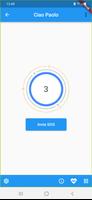
Slc (Securho Local Controller) is a companion app created to manage a Securho security device installed in a home, giving household members a clear and focused way to arm and disarm alarms, assign personalized badges, and call for emergency assistance when needed. Slc (Securho Local Controller) places core control at the fingertips of authorized users, while relying on the paired Securho hardware for actual sensing and response. The app is intended for families and home administrators who already own the compatible Securho unit and want a straightforward interface for day-to-day security tasks.
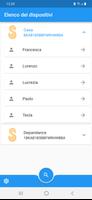
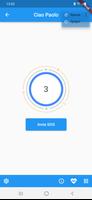
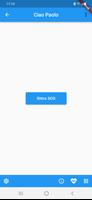
The app provides a simple control surface for primary commands: arming and disarming the system, toggling the device power, and sending an SOS alert. Instead of complex menus, controls are organized around user roles and badges so each person sees only the functions they have permission to use. Touch-based controls are optimized for quick actions; common tasks can be completed in a few taps. For administrators, Slc (Securho Local Controller) supports assigning and editing permissions so you can restrict who can change configuration versus who can only trigger the alarm or view status.
Progression in the app is not game-like but instead refers to setup and scaling: initial installation guides link the app to your Securho unit and then you add users and assign badges. Management supports an unlimited number of accounts, enabling extended families or caretakers to be included without technical limits. Over time, administrators can refine permission sets, revoke access, or adjust badge profiles as household needs evolve, providing a clear path for growth without requiring a complete reconfiguration of the system.
Customization centers on badge profiles and permission levels. Each badge can include a name and a set of allowed actions, which helps households tailor access for adults, teenagers, cleaners, or temporary visitors. Visual customization focuses on a clear, readable interface rather than decorative themes: status indicators, alert histories, and user lists are presented with readable typography and contrast for ease of use in different lighting conditions.
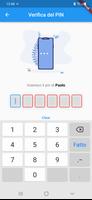
The app emphasizes a calm, utilitarian visual style that prioritizes legibility and quick recognition of state — armed, disarmed, offline, or alert. Buttons and icons use standard mobile affordances to reduce the learning curve for users of all ages. The experience is designed to minimize accidental actions: critical operations like disarming or sending SOS prompts for confirmation and show the target device name so users are confident about the command they are issuing.
Because Slc (Securho Local Controller) is designed to work with a local Securho unit, many basic functions operate over the home network to provide quick responses. This local-first approach reduces latency and helps the system remain functional for routine commands even if internet connectivity is intermittent. However, complete account and permission provisioning is handled through the device maker’s online portal as noted, so initial setup and some administrative changes may require an internet connection.
The interface keeps labels explicit and avoids nested menus, which helps people who prefer a straightforward layout or who have limited experience with smart-home apps. Text sizes are scalable using system accessibility settings, and color choices maintain contrast for users with visual impairments. Clear status messages and simple confirmation dialogs assist users who need extra guidance during critical actions.
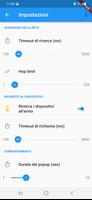
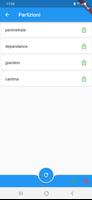
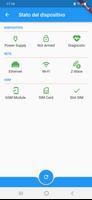
Instead of levels, the app organizes functionality by zones or device states: active monitoring, alarm history, user management, and system settings. Handling challenges — such as resolving a device offline state or addressing a permission conflict — is supported by in-app diagnostic hints that describe likely causes and recommended steps. When more advanced help is needed, the app directs users to the manufacturer’s support resources and online portal.
Slc (Securho Local Controller) is intended as a practical daily tool rather than entertainment. Its long-term value comes from reliable, predictable performance and the ability to adapt access as household membership changes. Regular firmware and app updates (when available through the device maker) keep the system compatible with newer devices and security patches, preserving usefulness over time.
The app is purpose-built for use with Securho hardware and will not provide meaningful control without the compatible device. Some account functions require the device maker’s online portal, and the ecosystem focus means interoperability with other smart-home platforms is limited. These trade-offs result in a concentrated, dependable experience for Securho owners but restrict cross-platform automation.
Slc (Securho Local Controller) focuses on keeping control within the household by using device-linked accounts and permission tiers. Users should follow the device maker’s guidelines for strong account credentials and review permission assignments regularly. For administrative tasks that require internet access, consult the manufacturer’s portal documentation to understand how account data and permissions are managed.
Tracker Detect Pro
Size:10.39M ToolsWiFi Speed Test Pro
Size:8.11M ToolsGG Mouse Pro 2
Size:45.82M ToolsResource Monitor Mini Pro
Size:3.19M ToolsSmart Keyboard Pro
Size:23.22M ToolsMyScript Math: Solve & Plot
Size:108.76M ToolsText Repeater
Size:11.73M Tools3Dcalc+
Size:12.59M ToolsMyScoreTracker
Size:80.28M ToolsPanda Touch Pro
Size:18.13M ToolsDual Space : Multi App
Size:7.23M ToolsSound Recorder Plus: Voice Rec
Size:20.50M ToolsApril 2024 Clash of Clans Update: Unveiling a Fresh Companion, Enhanced Levels, Chat Tagging, and Be
2024-04-16Arrival of Genshin Impact 4.6 Update: 'Embers of Two Realms, Twilight of Crimson'
2024-04-16V2.2 of the Farlight 84 update introduces an overhauled Season structure, fresh in-game currency, an
2024-04-16Monster Never Cry is now accessible on both Android and iOS mobile devices.
2024-04-18PUBG Mobile Teams Up with Bentley Motors: Luxury Cars, Exclusive Collectibles, and Beyond
2024-04-18March 2024 Free Redemption Codes for Honkai: Star Rail
2024-04-18