
English
Keyboard Flow is a modern Android keyboard that blends gesture typing, precision predictions, and extensive customization to speed up everyday typing. Designed for users who want fluid input without sacrificing accuracy, Keyboard Flow provides smart suggestions, configurable layouts, and privacy-focused features suitable for both casual and power users.
Keyboard Flow positions itself as a productivity-focused input method with emphasis on smooth gestures and contextual predictions. It aims to reduce correction time by learning from your writing patterns while keeping a simple interface. Unlike heavy keyboards that crowd the screen, Keyboard Flow keeps essential controls accessible and unobtrusive.
Using Keyboard Flow is intuitive: swipe across characters to produce words, tap for precise input, and rely on the next-word predictions to complete common phrases. The suggestion bar displays alternatives and emoji, and can be toggled off for a minimal experience. Haptic and audio feedback are adjustable so you control sensory cues while typing.
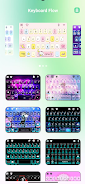
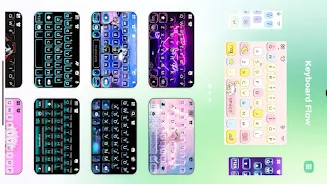
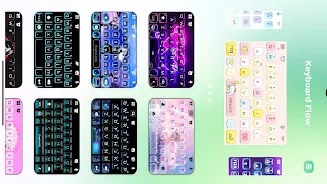
Keyboard Flow provides a comprehensive set of customization options. Themes are available with color presets and background images. You can remap keys, add shortcut keys for frequently used text, and configure long-press actions. For multilingual users, quick language switching is supported without restarting the keyboard service.
Built with efficiency in mind, Keyboard Flow loads quickly and maintains low memory usage even on older devices. Animations are subtle to avoid distracting the user, and the layout adapts to various screen sizes. The UI uses clear icons and labels so settings are easy to find and changes take effect immediately.
Early users report reduced typing time after a short adjustment period. Keyboard Flow’s learning algorithm refines suggestions based on corrections and accepted predictions. The settings include a practice mode for newcomers to get comfortable with swiping gestures and predictive completions before enabling advanced features.
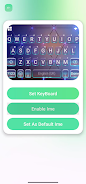
Getting started with Keyboard Flow is straightforward: install from your preferred store, enable the keyboard from system settings, and select it as the default input method. The initial setup wizard walks you through theme selection, language packs, and basic gestures so you're ready to type within minutes.
Keyboard Flow is suitable for anyone who types frequently on mobile devices and values a balance of speed and control. Mobile professionals, writers, and multitaskers will appreciate the text expansion and clipboard features. Casual users benefit from the straightforward design and easy emoji access.
Overall, Keyboard Flow offers a polished alternative to stock keyboards by combining gesture typing, robust customization, and efficiency tools. It’s a practical choice for Android users seeking a responsive, privacy-minded typing experience that adapts to the way they write.

Tracker Detect Pro
Size:10.39M ToolsWiFi Speed Test Pro
Size:8.11M ToolsGG Mouse Pro 2
Size:45.82M ToolsResource Monitor Mini Pro
Size:3.19M ToolsSmart Keyboard Pro
Size:23.22M ToolsMyScript Math: Solve & Plot
Size:108.76M ToolsText Repeater
Size:11.73M Tools3Dcalc+
Size:12.59M ToolsMyScoreTracker
Size:80.28M ToolsPanda Touch Pro
Size:18.13M ToolsDual Space : Multi App
Size:7.23M ToolsSound Recorder Plus: Voice Rec
Size:20.50M ToolsApril 2024 Clash of Clans Update: Unveiling a Fresh Companion, Enhanced Levels, Chat Tagging, and Be
2024-04-16Arrival of Genshin Impact 4.6 Update: 'Embers of Two Realms, Twilight of Crimson'
2024-04-16V2.2 of the Farlight 84 update introduces an overhauled Season structure, fresh in-game currency, an
2024-04-16Monster Never Cry is now accessible on both Android and iOS mobile devices.
2024-04-18PUBG Mobile Teams Up with Bentley Motors: Luxury Cars, Exclusive Collectibles, and Beyond
2024-04-18March 2024 Free Redemption Codes for Honkai: Star Rail
2024-04-18


















