English
X-V Proxy is a lightweight Android proxy app that secures your internet traffic, unlocks blocked content, and improves browsing speed with minimal configuration. It combines encryption, smart routing, and easy server selection to provide private, fast access to websites and apps while preserving battery life and device performance.
X-V Proxy offers a tightly focused toolset designed for reliable everyday protection. Key features include adaptive encryption, multiple proxy protocols, traffic compression to reduce data usage, and selectable server regions. The app supports split tunneling so you can route only specific apps through the proxy while leaving others on the regular connection.
Strong encryption is central to the app: sessions are protected with modern ciphers to prevent eavesdropping on public Wi-Fi. X-V Proxy also includes DNS leak protection and a kill switch option that halts network access if the proxy drops, preventing accidental exposure. Logs are minimal by design; the app focuses on session metadata needed for connection stability rather than storing browsing history.
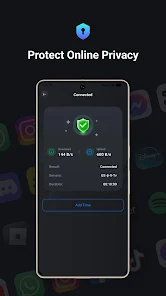
The interface keeps the setup process simple while giving advanced users quick access to configuration details. A clean dashboard displays current server, connection status, and data usage at a glance. One-tap connect and an intelligent server recommendation feature help you get started quickly, while manual profile creation allows technicians to apply custom ports, authentication, and proxy chaining.
Whether you need to bypass geo-restrictions for streaming, access workplace resources while traveling, or add a layer of privacy when using public networks, X-V Proxy adapts. Its split tunneling makes it practical for mixed workflows: send sensitive apps through the proxy and keep latency-sensitive services like gaming on your local route.
Optimized for Android devices, the app balances speed and battery life. Lightweight protocols and packet compression reduce overhead, while automatic server selection steers traffic to nearby nodes for lower latency. Compatibility spans a wide range of Android versions and hardware profiles, including tablets and Chromebooks running Android apps.
Advanced users will appreciate granular controls such as custom DNS entries, per-app rules, and protocol selection (including HTTP, SOCKS5, and secure tunnels). Bandwidth limits and priority settings allow you to shape how the proxy behaves under constrained networks. Profiles can be saved and toggled when switching between home, office, and public environments.
Installing and launching X-V Proxy takes only a few steps. Grant the required network permissions, choose a recommended server or enter credentials for a private endpoint, and tap connect. The dashboard confirms an active session and shows real-time throughput. A short built-in tutorial walks new users through common scenarios such as enabling split tunneling and setting the kill switch.
The app includes a connection log and diagnostic tools for quick problem identification. If a connection fails, helpful error messages point to common issues like blocked ports or incorrect authentication. For persistent issues, exportable logs make it easy to share details with support or a network administrator.
Network professionals value X-V Proxy for its balance of usability and control. It provides enterprise-friendly features without excessive complexity, making it suitable for consultants, remote workers, and privacy-conscious users who need dependable access to internal resources and geographic flexibility.
As with any network tool, evaluate your own security requirements and test performance across the servers you plan to use. X-V Proxy is designed to be a compact, efficient solution that fits into varied workflows—offering selectable privacy features, practical performance enhancements, and the controls necessary to tailor behavior on a per-app or per-profile basis.



Tracker Detect Pro
Size:10.39M ToolsWiFi Speed Test Pro
Size:8.11M ToolsGG Mouse Pro 2
Size:45.82M ToolsResource Monitor Mini Pro
Size:3.19M ToolsSmart Keyboard Pro
Size:23.22M ToolsMyScript Math: Solve & Plot
Size:108.76M ToolsText Repeater
Size:11.73M Tools3Dcalc+
Size:12.59M ToolsMyScoreTracker
Size:80.28M ToolsPanda Touch Pro
Size:18.13M ToolsDual Space : Multi App
Size:7.23M ToolsSound Recorder Plus: Voice Rec
Size:20.50M ToolsApril 2024 Clash of Clans Update: Unveiling a Fresh Companion, Enhanced Levels, Chat Tagging, and Be
2024-04-16Arrival of Genshin Impact 4.6 Update: 'Embers of Two Realms, Twilight of Crimson'
2024-04-16V2.2 of the Farlight 84 update introduces an overhauled Season structure, fresh in-game currency, an
2024-04-16Monster Never Cry is now accessible on both Android and iOS mobile devices.
2024-04-18PUBG Mobile Teams Up with Bentley Motors: Luxury Cars, Exclusive Collectibles, and Beyond
2024-04-18March 2024 Free Redemption Codes for Honkai: Star Rail
2024-04-18