English
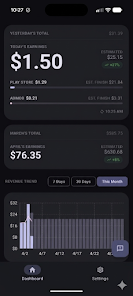
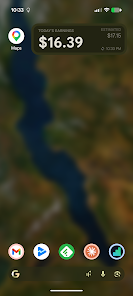
App Revenue Tracker is a lightweight Android app designed for developers who want a fast, focused way to monitor earnings without switching between multiple dashboards. The app surfaces today’s total revenue immediately on launch, breaks income into purchases, subscriptions and ad revenue, and shows an estimated end-of-day projection so you can respond quickly to unexpected shifts. App Revenue Tracker emphasizes clarity and speed: the interface presents the most relevant figures at a glance while preserving easy access to short-term trends and month-to-date performance.
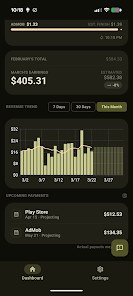
The core workflow centers on three screens: a compact home snapshot, a trends view for short and medium windows, and a detail view for revenue segments. From the home snapshot you see the day-to-day total plus the estimated end-of-day figure computed from live inputs. The trends view offers 7-day, 30-day and monthly windows so you can compare recent performance to prior periods. The detail view separates revenue by purchases, subscriptions and ads so you can rapidly identify which income stream is driving changes.
Navigation is purposefully simple and follows native Android patterns to reduce friction when you check numbers between meetings. Swipe gestures move between time windows, tap targets reveal breakdowns by revenue type, and quick filters let you isolate a single app or a single income stream. The interface uses clear typography and color-coded charts to convey information without clutter; everything is optimized for one-handed checks and fast mental parsing so developers can make decisions on the go.
Rather than a game-like progression, the app builds value through recurring use: daily check-ins create a habit that reveals patterns over weeks and months. As you use App Revenue Tracker more often you’ll see how recurring promotions, price changes or ad adjustments ripple through the short-term forecasts. The app encourages replay value by making the act of checking fast and informative, rewarding users with a clearer picture of revenue momentum that can inform tactical changes.
The visual presentation favors readability and contrast. Clean line and bar charts convey trend direction and magnitude without ornamental effects that obscure data. Chart interactions include pinch-to-zoom on time ranges and tap-to-highlight specific days. Color choices remain consistent so purchases, subscriptions and ads are easily distinguishable across screens. Visual settings allow modest adjustments to chart density and label frequency to suit different screen sizes and viewing preferences.
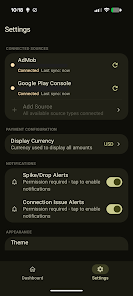
App Revenue Tracker includes configurable thresholds and notifications to help you catch important events quickly. Set simple alerts for day-over-day percentage changes, threshold breaches for daily revenue, or subscription churn indicators; the app then surfaces those alerts in a non-intrusive manner so you can act without being overwhelmed by noise. Basic customization also covers which revenue streams appear on the snapshot and which time windows are shown on startup, letting you tailor the app to how you monitor performance most often.
Accessibility features are built into the interface: high-contrast text options, scalable font sizes and accessible chart descriptions support a wider range of users. The native Android architecture keeps the app responsive on low- and mid-range devices, and a small local cache preserves the most recent snapshot so you can view last known figures when connectivity is intermittent. When a connection resumes, the app updates projections and trend data from live inputs so you always have an up-to-date picture.
App Revenue Tracker is aimed at developers and small teams who need a rapid, no-friction check-in tool rather than a full analytics suite. It deliberately focuses on revenue figures and short-term projections; it does not provide deep user-level analytics, cohort analysis, or a desktop client for other operating systems. If you need a lightweight mobile companion to keep an eye on earnings and react to spikes or dips, App Revenue Tracker provides that focused capability without excess features.
Getting started is straightforward: open the app to view today’s snapshot, tap into the trends view to compare periods, and use filters to isolate individual revenue streams. For day-to-day use, check the estimated end-of-day number in the morning and evening, enable a small set of alerts for meaningful thresholds, and rely on the 7- and 30-day trend views to contextualize short-term movements. Over time this simple routine helps identify patterns and supports quick, data-informed adjustments to pricing, promotions, or ad strategy.
Tracker Detect Pro
Size:10.39M ToolsWiFi Speed Test Pro
Size:8.11M ToolsGG Mouse Pro 2
Size:45.82M ToolsResource Monitor Mini Pro
Size:3.19M ToolsSmart Keyboard Pro
Size:23.22M ToolsMyScript Math: Solve & Plot
Size:108.76M ToolsText Repeater
Size:11.73M Tools3Dcalc+
Size:12.59M ToolsMyScoreTracker
Size:80.28M ToolsPanda Touch Pro
Size:18.13M ToolsDual Space : Multi App
Size:7.23M ToolsSound Recorder Plus: Voice Rec
Size:20.50M ToolsApril 2024 Clash of Clans Update: Unveiling a Fresh Companion, Enhanced Levels, Chat Tagging, and Be
2024-04-16Arrival of Genshin Impact 4.6 Update: 'Embers of Two Realms, Twilight of Crimson'
2024-04-16V2.2 of the Farlight 84 update introduces an overhauled Season structure, fresh in-game currency, an
2024-04-16Monster Never Cry is now accessible on both Android and iOS mobile devices.
2024-04-18PUBG Mobile Teams Up with Bentley Motors: Luxury Cars, Exclusive Collectibles, and Beyond
2024-04-18March 2024 Free Redemption Codes for Honkai: Star Rail
2024-04-18