English
Color Picker from Image is a practical Android tool that extracts accurate color values from photos and screenshots, letting you sample pixels, build palettes, and export color codes. It’s designed for designers, developers, and hobbyists who need quick, reliable color information directly from images or the device camera.
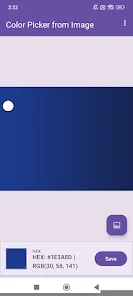
At its heart, Color Picker from Image converts visual tones into usable data. You can open an image from your gallery, snap a photo with the camera, or paste a screenshot and instantly tap to sample a color. The app displays precise color values in multiple formats — HEX, RGB, HSL, and CMYK — and shows a zoomed preview with crosshair targeting to improve accuracy.
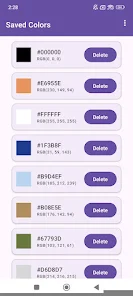
Building a palette is straightforward. After sampling, add selected colors to a temporary or named palette. Palettes can be rearranged, edited, and saved for later use. Color Picker from Image supports exporting palettes in common formats so you can import them into design tools, development environments, or share with teammates.
The interface focuses on minimal steps and visible results. A magnifier overlay helps when selecting tiny details, while real-time readouts update as you move the reticle. Menus are organized into tabs for sampling, saved palettes, recent images, and settings. Dark and light themes are available to match your workflow and reduce eye strain.
Colors are presented in multiple industry-standard formats to suit different tasks. Copy a HEX code for CSS, switch to RGB for digital art tools, or use CMYK values for print previews. Color Picker from Image also supports copying and sharing multiple color codes at once, and it recognizes named colors for quick identification.
Designed to fit into professional workflows, the app offers quick copy buttons, long-press actions for batch operations, and integration points that let you export palette files or send codes via email and messaging apps. A clipboard manager stores recent color copies so you can paste between apps without losing context.
For precision work, the app includes average sampling (to reduce noise across a selection area), tolerance settings to group similar tones, and a color difference meter to quantify how closely two samples match. The magnifier can zoom up to several hundred percent and provides pixel grid overlays to make pinpoint selection simple.
Color Picker from Image is useful for user interface designers matching brand colors, web developers extracting CSS-ready values, artists finding inspiration in photographs, and interior decorators testing palette combinations from room photos. For best results, use well-lit images and crop around the region you want to sample to minimize stray hues.
The app is optimized for modern Android devices and runs smoothly on phones and tablets. Image processing is lightweight and works offline so you won’t need an internet connection to sample and save colors. Memory usage scales with image size, but built-in compression options let you work with very large files without slowdowns.
Color Picker from Image requests only necessary permissions such as camera and storage access. Images are processed locally on your device unless you choose to share them. Settings let you clear stored images and palettes at any time to maintain control over your data.
Regular updates add support for additional color models, improved accuracy, and new export formats. Built-in help guides walk through common tasks and troubleshooting tips. If you encounter issues, check the settings for diagnostic tools or use the in-app feedback option to report bugs or suggest features.
With its focused feature set and clean interface, Color Picker from Image simplifies the process of extracting and organizing colors from any photo. Whether you need a single HEX value or a full palette for a project, the app streamlines the steps between visual inspiration and implementable color data.
Tracker Detect Pro
Size:10.39M ToolsWiFi Speed Test Pro
Size:8.11M ToolsGG Mouse Pro 2
Size:45.82M ToolsResource Monitor Mini Pro
Size:3.19M ToolsSmart Keyboard Pro
Size:23.22M ToolsMyScript Math: Solve & Plot
Size:108.76M ToolsText Repeater
Size:11.73M Tools3Dcalc+
Size:12.59M ToolsMyScoreTracker
Size:80.28M ToolsPanda Touch Pro
Size:18.13M ToolsDual Space : Multi App
Size:7.23M ToolsSound Recorder Plus: Voice Rec
Size:20.50M ToolsApril 2024 Clash of Clans Update: Unveiling a Fresh Companion, Enhanced Levels, Chat Tagging, and Be
2024-04-16Arrival of Genshin Impact 4.6 Update: 'Embers of Two Realms, Twilight of Crimson'
2024-04-16V2.2 of the Farlight 84 update introduces an overhauled Season structure, fresh in-game currency, an
2024-04-16Monster Never Cry is now accessible on both Android and iOS mobile devices.
2024-04-18PUBG Mobile Teams Up with Bentley Motors: Luxury Cars, Exclusive Collectibles, and Beyond
2024-04-18March 2024 Free Redemption Codes for Honkai: Star Rail
2024-04-18