English
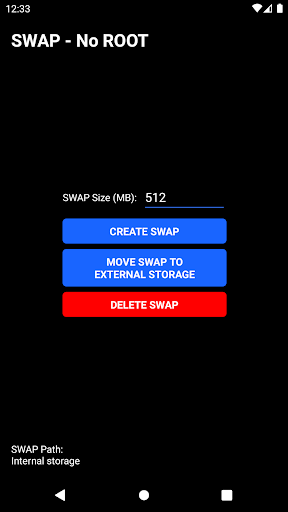
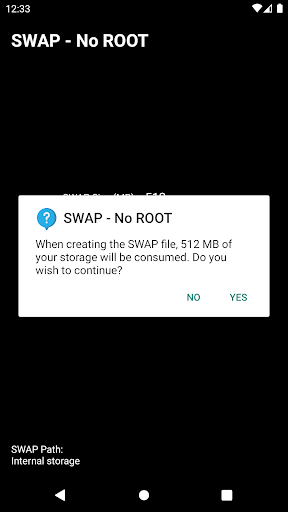
SWAP - No ROOT lets Android users move apps and manage storage without rooting their device, providing straightforward transfers between internal memory and external SD cards. It simplifies relocating, cloning, or backing up apps while preserving data and permissions, offering a safer alternative to system-level modifications for everyday device maintenance.
SWAP - No ROOT bundles a compact set of tools designed for practical storage management. Core features include app relocation to removable media, batch move operations, APK cloning for testing, and quick backups. The app shows storage usage per application and suggests candidates for transfer, helping you reclaim internal space efficiently.
The app operates by leveraging Android’s package management and safe file handling APIs, avoiding root-level changes. When you initiate a transfer, SWAP - No ROOT copies application files and associated OBB/data folders to the chosen target and creates secure links to maintain functionality. This approach keeps app behavior intact while freeing internal storage.
Design emphasizes clarity: a main list of installed apps sorted by size, quick filters for movable items, and a detailed panel with permissions and data size. Selecting multiple apps and executing a batch move is a single tap process. Status indicators and progress bars keep actions transparent so you can pause or cancel moves without losing data.
Performance is tuned for typical midrange and flagship devices. Transfers are performed in the background with minimal CPU spikes and intelligent throttling to avoid overheating or battery drain. SWAP - No ROOT supports most Android versions that allow app storage redirection, and it detects incompatible apps (for example, system or highly integrated apps) to prevent failed operations.
For best outcomes, use a high-speed SD card and confirm write permissions when prompted. Avoid moving critical system apps and keep important data backed up externally. If an app depends on background services, test functionality after moving; SWAP - No ROOT provides restore controls to revert changes if needed.
SWAP - No ROOT requests only the permissions necessary to move and access app files. It does not require root access, which reduces risk compared to apps that modify system partitions. Still, review permission dialogs and back up essential data before large-scale operations to guard against unexpected compatibility issues.
Installation is straightforward: download from a trusted source, grant storage and package permissions, and run the initial scan to populate the app list. A short guided tour explains the main screens and how to perform transfers. New users benefit from trying one small app transfer first to become familiar with the workflow.
Some apps cannot be moved due to restrictions set by developers or the Android system itself. Performance-sensitive apps or services may not operate correctly from external storage on certain devices. If a transfer fails, check card health and file system format; reformatting to a compatible filesystem or replacing an old SD card often resolves issues.
This utility is useful for people who need to manage limited internal storage, IT technicians who prepare devices, and anyone wanting a reversible method to reallocate app storage without altering system integrity. The app’s lightweight design and safety-first approach make it suitable for everyday maintenance and temporary storage adjustments.
SWAP - No ROOT combines practical functionality with an accessible interface, delivering a dependable way to move apps and manage storage without the risks of rooting. With sensible usage and proper backups, it can extend device usefulness and simplify app management on Android phones and tablets.
Tracker Detect Pro
Size:10.39M ToolsWiFi Speed Test Pro
Size:8.11M ToolsGG Mouse Pro 2
Size:45.82M ToolsResource Monitor Mini Pro
Size:3.19M ToolsSmart Keyboard Pro
Size:23.22M ToolsMyScript Math: Solve & Plot
Size:108.76M ToolsText Repeater
Size:11.73M Tools3Dcalc+
Size:12.59M ToolsMyScoreTracker
Size:80.28M ToolsPanda Touch Pro
Size:18.13M ToolsDual Space : Multi App
Size:7.23M ToolsSound Recorder Plus: Voice Rec
Size:20.50M ToolsApril 2024 Clash of Clans Update: Unveiling a Fresh Companion, Enhanced Levels, Chat Tagging, and Be
2024-04-16Arrival of Genshin Impact 4.6 Update: 'Embers of Two Realms, Twilight of Crimson'
2024-04-16V2.2 of the Farlight 84 update introduces an overhauled Season structure, fresh in-game currency, an
2024-04-16Monster Never Cry is now accessible on both Android and iOS mobile devices.
2024-04-18PUBG Mobile Teams Up with Bentley Motors: Luxury Cars, Exclusive Collectibles, and Beyond
2024-04-18March 2024 Free Redemption Codes for Honkai: Star Rail
2024-04-18