English
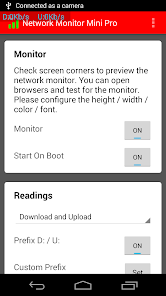
Network Monitor Mini Pro provides a compact, precise way to watch your device's network traffic in real time. It displays per-app data usage, live upload/download counters and connection details, while keeping a small footprint so you can monitor Wi‑Fi or mobile networks without draining battery or cluttering the screen.
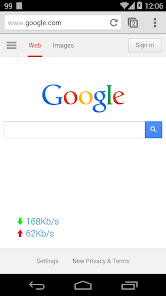
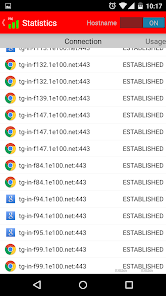
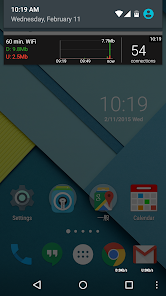
Network Monitor Mini Pro acts as a continuous network dashboard that sits in your notification area or as a small overlay. It captures current throughput, shows active connections, and breaks down data consumption by application. The app is designed for users who need quick diagnostics or ongoing visibility into how their phone or tablet uses network resources.
Under the hood, Network Monitor Mini Pro hooks into Android's networking APIs to collect traffic statistics without requiring root access. It continuously polls counters for the device and for individual packages, then visualizes them using minimal resources. You can choose sampling intervals from aggressive for near-instant feedback to conservative for reduced battery use.
The interface focuses on clarity: small numeric readouts, optional history graphs and color-coded indicators. Settings let you switch between dark and light themes, adjust text size, and hide the overlay on full-screen apps. Performance is tuned to avoid heavy background processing; when not visible the app can pause polling to conserve CPU and battery.
Whether you're troubleshooting flaky Wi‑Fi, verifying a data-hungry app, or simply keeping an eye on background activity, Network Monitor Mini Pro adapts to different workflows. Network administrators can use it for quick checks during field testing, while privacy-conscious users appreciate seeing which apps access the network unexpectedly.
Start with the overlay in a corner and watch how speeds change while opening apps or streaming video. Use the per-app list to spot unusually high background usage and enable alerts for sudden spikes. If you need longer records, turn on session logging before reproducing a problem so the data is available for later review.
Network Monitor Mini Pro asks only for the permissions necessary to read network stats and optionally to access storage for saving logs. No remote servers are required to use the core features, making it suitable for users who prefer local-only tools.
Install the app, grant the requested permissions, and position the mini overlay where it’s least intrusive. Adjust polling frequency based on whether you need real-time detail or extended battery life. Custom notification settings let you keep a compact summary in the status bar for always-on visibility.
For anyone who wants a reliable, unobtrusive way to observe network behavior, Network Monitor Mini Pro combines useful diagnostics, flexible display options and sensible performance tuning. It’s a practical companion for troubleshooting and daily monitoring on Android devices.

Tracker Detect Pro
Size:10.39M ToolsWiFi Speed Test Pro
Size:8.11M ToolsGG Mouse Pro 2
Size:45.82M ToolsResource Monitor Mini Pro
Size:3.19M ToolsSmart Keyboard Pro
Size:23.22M ToolsMyScript Math: Solve & Plot
Size:108.76M ToolsText Repeater
Size:11.73M Tools3Dcalc+
Size:12.59M ToolsMyScoreTracker
Size:80.28M ToolsPanda Touch Pro
Size:18.13M ToolsDual Space : Multi App
Size:7.23M ToolsSound Recorder Plus: Voice Rec
Size:20.50M ToolsApril 2024 Clash of Clans Update: Unveiling a Fresh Companion, Enhanced Levels, Chat Tagging, and Be
2024-04-16Arrival of Genshin Impact 4.6 Update: 'Embers of Two Realms, Twilight of Crimson'
2024-04-16V2.2 of the Farlight 84 update introduces an overhauled Season structure, fresh in-game currency, an
2024-04-16Monster Never Cry is now accessible on both Android and iOS mobile devices.
2024-04-18PUBG Mobile Teams Up with Bentley Motors: Luxury Cars, Exclusive Collectibles, and Beyond
2024-04-18March 2024 Free Redemption Codes for Honkai: Star Rail
2024-04-18