English
Video Compressor makes it simple to reduce large video files for sharing, storage, or faster uploads. This lightweight Android tool compresses clips without stripping essential quality, provides format and bitrate controls, and supports batch processing so you can shrink multiple files quickly while keeping them ready for social apps or cloud backup.
The app focuses on practical tools that speed up routine tasks. Video Compressor offers adjustable bitrate and resolution sliders, multiple output formats, and ready-to-use presets for popular social platforms. Built-in preview and size estimation help you balance quality and file size before you commit. Batch conversion and folder processing let you compress dozens of clips in one session.
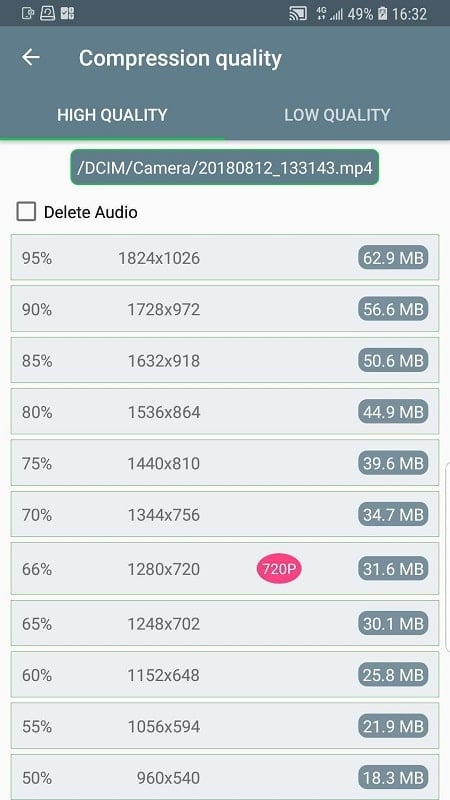
Custom settings are where the app shines: choose target resolution (720p, 480p, custom), tweak the codec selection, set a maximum file size, or lock the frame rate to preserve motion smoothness. A quality slider ranges from high fidelity to aggressive compression, and separate audio controls let you reduce audio bitrate independently to save space without degrading the picture.
Video Compressor processes files locally on your device, using streamlined encoding routines to achieve a fast turnaround. When you import a clip, the app analyzes duration, resolution, and current bitrate, then suggests a recommended compression profile. You can accept a suggestion or build a profile from scratch. The preview function renders a short segment at the chosen settings so you can inspect visual quality and estimated output size before exporting.
To maximize efficiency, organize footage into folders and apply batch profiles. Create one profile for chatting apps (small size, modest quality) and another for archives (higher quality, smaller compression). Use the preview to compare presets side-by-side; a small change in bitrate often yields a big file-size difference with negligible visual impact. For repeated tasks, save custom presets so you can run automated batches without reconfiguring settings each time.
The app balances speed and resource usage. Hardware-accelerated encoding is available on many devices to reduce processing time and energy consumption, while software encoding remains an option when more precise control is needed. For long batches, the app can pause processing if the device heats up, then resume once temperatures stabilize. A progress indicator, per-file logs, and estimated completion time keep you informed during long operations.
Video Compressor handles common formats such as MP4 (H.264), HEVC, MOV, and AVI for input, and can export to widely supported formats that play on most phones and web platforms. The app is compatible with a broad range of Android versions and works alongside file managers and cloud apps; you can send compressed results directly to messaging apps, upload to cloud storage, or save to a specific folder for later use.
All processing happens on your device, so clips never leave your phone unless you choose to share them. There are no automatic uploads or cloud dependencies required to use the compression engine. For sensitive content, local-only mode ensures files stay offline until you decide to export or upload them manually.
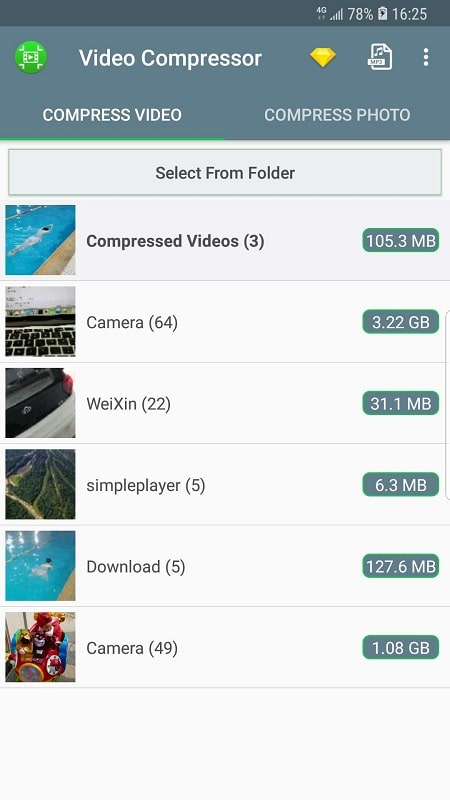
Installing Video Compressor is straightforward. Open the app, grant file access permissions, and tap the add button to pick video files or an entire folder. Select a preset or create a custom profile, run a quick preview, then start compression. Batch jobs run in the background and notify you when done, so you can continue other tasks while files are processed.
With straightforward controls, local processing, and flexible presets, Video Compressor is a practical utility for anyone who works with video on Android. It streamlines storage management and sharing, letting you keep high-value footage while freeing up space and bandwidth.
Tracker Detect Pro
Size:10.39M ToolsWiFi Speed Test Pro
Size:8.11M ToolsGG Mouse Pro 2
Size:45.82M ToolsResource Monitor Mini Pro
Size:3.19M ToolsSmart Keyboard Pro
Size:23.22M ToolsMyScript Math: Solve & Plot
Size:108.76M ToolsText Repeater
Size:11.73M Tools3Dcalc+
Size:12.59M ToolsMyScoreTracker
Size:80.28M ToolsPanda Touch Pro
Size:18.13M ToolsDual Space : Multi App
Size:7.23M ToolsSound Recorder Plus: Voice Rec
Size:20.50M ToolsApril 2024 Clash of Clans Update: Unveiling a Fresh Companion, Enhanced Levels, Chat Tagging, and Be
2024-04-16Arrival of Genshin Impact 4.6 Update: 'Embers of Two Realms, Twilight of Crimson'
2024-04-16V2.2 of the Farlight 84 update introduces an overhauled Season structure, fresh in-game currency, an
2024-04-16Monster Never Cry is now accessible on both Android and iOS mobile devices.
2024-04-18PUBG Mobile Teams Up with Bentley Motors: Luxury Cars, Exclusive Collectibles, and Beyond
2024-04-18March 2024 Free Redemption Codes for Honkai: Star Rail
2024-04-18