English
Through strumming and tweaking, MuseLead Synthesizer turns a phone or tablet into a responsive music tool that blends guitar-like playability with a flexible synth engine. The app gives you a touch-sensitive surface for playing chords and single-note lines while offering an effects chain and preset editing for tone shaping. Whether you want a realistic electric-guitar feel for practice or a compact sketchpad for new ideas, MuseLead Synthesizer bridges tactile interaction and digital sound design in a way that feels immediate and expressive.
Install and grant permissions: Download the APK, install on a compatible Android device and allow any audio or storage permissions so the app can save presets and handle audio routing.
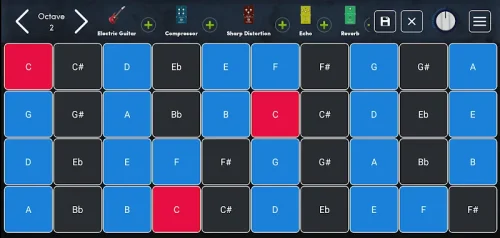
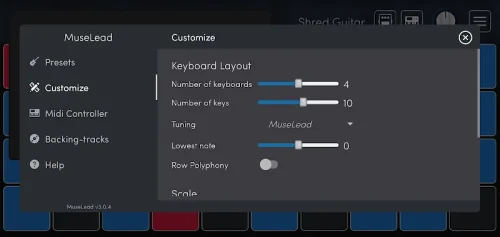
Explore the main interface: The central fretboard and touch zones respond to multiple fingers; try short taps, sustained pressure and sliding gestures to learn how notes and bends behave.
Connect external gear: If you use USB audio or MIDI hardware, enable the appropriate input in settings to use MuseLead as a controller for a DAW or external sound module.
Save your work: Create and name presets, then back them up to local storage or export banks if you plan to move patches to another device.
Multi-touch expressive surface: Play chords and individual notes at once; the app detects simultaneous touches so you can perform tapping and polyphonic passages.
Continuous bending and sweep controls: Use sliding gestures to bend notes smoothly and perform sweep-style transitions that mimic real guitar techniques.
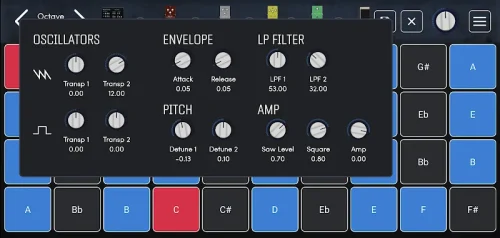
Built-in synthesizer with preset editing: Tweak oscillators, envelopes and filters directly in the app to build tones that range from familiar guitar timbres to more experimental textures.
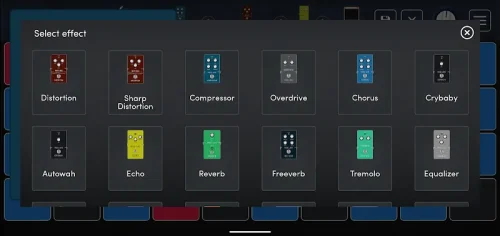
Effects chain and pedal-style modules: Stack effects like distortion, reverb and delay and adjust parameters in real time to shape ambience and grit.
Expandable sound libraries and MIDI output: Add downloadable sound banks and use MuseLead as a MIDI controller to trigger software instruments and automate parameters in music software.
Warm up and practice routines: Use the app for focused technique work—practice alternate picking patterns, tapping runs and controlled bends without hauling an instrument.
Sketch arrangements quickly: Patch together rhythm and lead parts, record short loops and export MIDI to a DAW when you want to develop an idea into a full track.
Stage preparation and quick edits: Open MuseLead before a rehearsal for a fast warm-up or to dial in a preset that approximates a live tone; it can be handy for last-minute adjustments.
Does the app work with my MIDI software?
The app can send MIDI data and map controls to external software, so you can use it alongside most DAWs that accept MIDI input.
Can I customize the effect chain?
Yes. Effects are modular and editable, letting you reorder modules and change parameters to craft a specific sound palette.
Is MuseLead suitable for beginners?
Beginners can enjoy the tactile interface for basic playing and experimentation, while intermediate players will appreciate the deeper synth editing and MIDI features.
MuseLead Synthesizer offers a compact, touch-first approach to guitar-like playing and synth sound design, useful for practice, quick sketching and as a MIDI controller; it brings expressive control to mobile devices while some advanced studio workflows may still benefit from desktop tools, and feature sets can change between releases so check the latest version for additions and compatibility notes.
MuseLead Synthesizer
Size:54.00M Media & VideoASR Voice Recorder
Size:36.50M Media & VideoAudio Cues
Size:18.49M Media & Video432 Radio: 432hz/528hz Radio
Size:23.02M Media & VideoCompress Video - Resize Video
Size:48.75M Media & VideoMEME Maker: MEME Creator
Size:49.65M Media & VideoInstory Story Video Maker
Size:31.79M Media & VideoDrum Pads 24 - Beats and Music
Size:31.00M Media & VideoRadioTunes
Size:25.30M Media & VideoWiseplay
Size:38.13M Media & VideojetAudio HD Music Player Plus
Size:22.60M Media & VideoTABLA: India Mystical Drums
Size:27.35M Media & VideoApril 2024 Clash of Clans Update: Unveiling a Fresh Companion, Enhanced Levels, Chat Tagging, and Be
2024-04-16Arrival of Genshin Impact 4.6 Update: 'Embers of Two Realms, Twilight of Crimson'
2024-04-16V2.2 of the Farlight 84 update introduces an overhauled Season structure, fresh in-game currency, an
2024-04-16Monster Never Cry is now accessible on both Android and iOS mobile devices.
2024-04-18PUBG Mobile Teams Up with Bentley Motors: Luxury Cars, Exclusive Collectibles, and Beyond
2024-04-18March 2024 Free Redemption Codes for Honkai: Star Rail
2024-04-18