English
While waiting for a server to load or during a long building session, a clear little map can save you time and headaches. Xaeros Minimap Minecraft brings an in-game mapping overlay to the Android edition, letting you mark locations, follow your tracks and keep important points visible no matter how far you roam. This review covers how the tool fits into your workflow, what to expect from its waypoint system and overlays, and how to set it up so it feels like a native part of Minecraft rather than an intrusive add-on.
Installation: Add the minimap module to your Minecraft setup following the mod loader or APK instructions for your device, then launch the game to let the map initialize.
Basic controls: Open the minimap menu from the game interface to create waypoints, toggle overlays and adjust rendering distance; most keybindings can be remapped in the standard controls screen.
Creating waypoints: Tap a spot on the minimap or use the in-game menu to drop a marker, give it a label and choose whether it should be local or global for easy management.
Death handling: By default a waypoint marked with a skull is generated on death so you can return to where you fell, and older death markers can be kept or converted into regular waypoints depending on your preference.
Tiered waypoint system: Manage short-range local waypoints alongside global markers that remain visible irrespective of distance, helping you plan both close-in tunnels and long-distance travel.
Automatic death markers: The mod records your last death location with a distinct icon, and optionally preserves previous death points so you can study dangerous areas or learn from past mistakes.
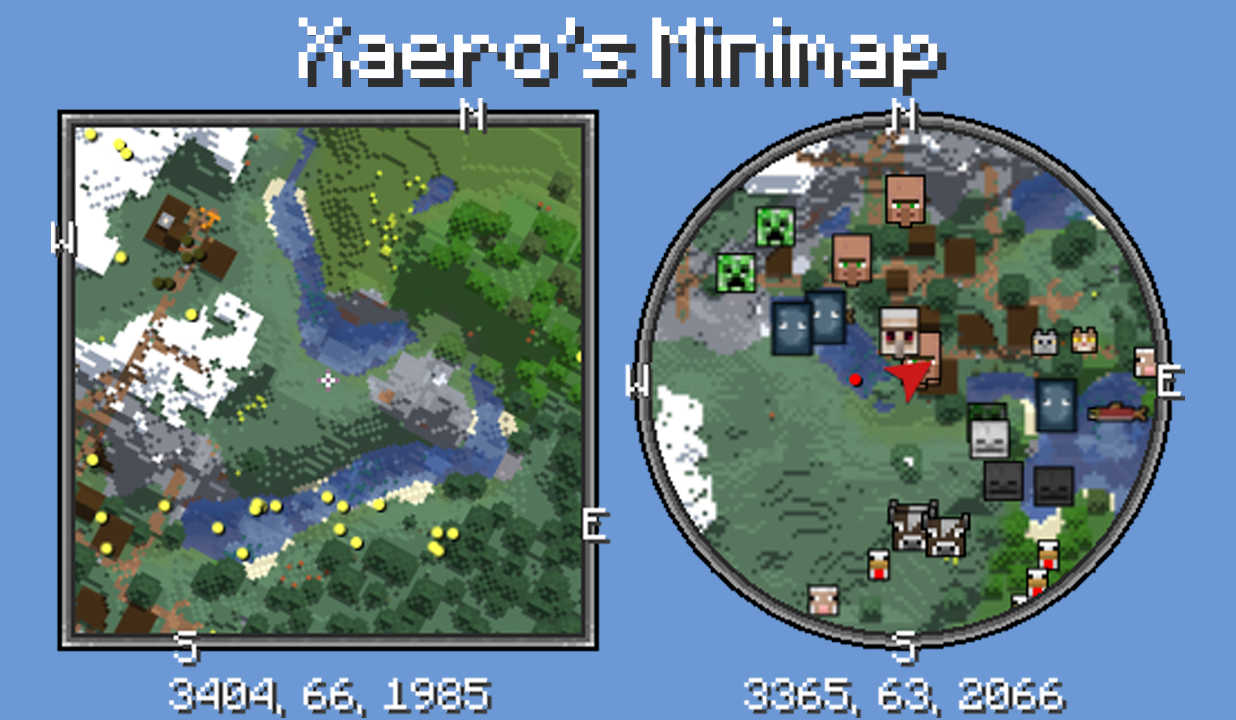
Interactive, live minimap: The overlay shows terrain, biomes and nearby structures as you move, letting you spot caves, cliffs and biomes at a glance without opening the full map each time.
Detailed overlays and paths: Xaeros Minimap Minecraft traces exploration paths and lays terrain detail on the map so you can visualize explored vs unexplored regions and plan next moves.
Customizable visuals: Resize the minimap, adjust icons and toggle layers so the display blends with Minecraft's aesthetic rather than standing out as an unrelated HUD element.
Use sets to organize projects: Group waypoints into sets for building projects, mining runs or multiplayer hubs and switch between them quickly to keep each task uncluttered.
Plan long trips with global markers: Drop a global waypoint near your destination before you depart and add local markers along the route to mark rest points, bridges or vulnerable chokepoints.
Protect your progress: Note important coordinates in a separate log before resetting a world map or switching servers so you can recover waypoints if the map data is cleared.
Practical scenarios: If you’re mapping an underwater temple or hunting ocean ruins, mark entry and exit points to avoid getting lost; when laying a rail across multiple biomes, tag junctions and depot locations to speed later expansion.
Xaeros Minimap Minecraft is a practical, unobtrusive mapping tool that makes navigation and project planning easier for explorers and builders alike; it’s ideal if you value preserved aesthetics and clear waypoint control, though it won’t replace server-side map features or built-in sharing on servers that don’t permit client-side markers.
Bluestacks Emulator Launcher
Size:12.52M ToolsOKOK International
Size:98.34M ToolsPerfect Viewer
Size:12.70M ToolsdynamicSpot
Size:9.80M ToolsPhoto Lab PRO Picture Editor
Size:40.51M ToolsFloating Apps
Size:65.25M Tools112 India
Size:29.24M ToolsBaba: English & Hindi Typing
Size:7.87M ToolsGame Controller Tester
Size:2.83M ToolsXaeros Minimap Minecraft
Size:2.08M ToolsRawBT
Size:8.70M ToolsBAT BMS
Size:11.55M ToolsApril 2024 Clash of Clans Update: Unveiling a Fresh Companion, Enhanced Levels, Chat Tagging, and Be
2024-04-16Arrival of Genshin Impact 4.6 Update: 'Embers of Two Realms, Twilight of Crimson'
2024-04-16V2.2 of the Farlight 84 update introduces an overhauled Season structure, fresh in-game currency, an
2024-04-16Monster Never Cry is now accessible on both Android and iOS mobile devices.
2024-04-18PUBG Mobile Teams Up with Bentley Motors: Luxury Cars, Exclusive Collectibles, and Beyond
2024-04-18March 2024 Free Redemption Codes for Honkai: Star Rail
2024-04-18