English
KF Lounge is a focused technical discussions and Q&A platform designed for developers, engineers, and technology enthusiasts who need a searchable, organized space for problem solving and knowledge sharing. The app brings threads and structured question-and-answer sections together, helping users locate practical solutions, follow ongoing conversations, and manage notifications for topics they care about.
This application is intended for people who regularly troubleshoot code, infrastructure, hardware, or tooling and prefer an environment that separates direct questions from broader discussion. KF Lounge works well for users who want an uncluttered forum experience that emphasizes clear answers, thread context, and archived knowledge rather than transient posts on social feeds.
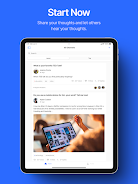
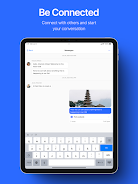
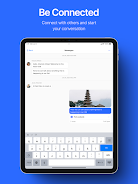
The platform supports threaded discussions that allow for nested replies and follow-up clarifications; this structure helps preserve the flow of technical reasoning and makes it easier to review complex problem-solving steps. Structured Q&A areas keep initial questions and accepted answers prominent while enabling conversation under the same topic when more context is needed. Searchable archives let you find previous solutions by keyword, tag, or author, reducing duplicated effort and surfacing historical fixes. Topic subscriptions and granular notification controls help you stay informed without being overwhelmed, and community moderation tools are included to report, flag, or organize content to maintain on-topic discussions.
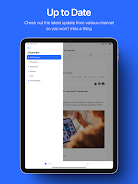
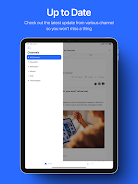
Navigation relies on a simple, mobile-friendly interface with a clear hierarchy of categories and threads; tapping a topic opens recent activity, and inline controls let you reply, quote, or edit your contributions. The composer supports basic formatting for code blocks, inline links, and plain-text attachments so technical content remains readable. In-app preferences allow you to adjust notification frequency, choose compact or expanded thread views, and set default sorting for answers and comments.
Participation is visible through profile activity, post counts, and discussion history, which makes it easier to track your contributions and follow the people whose answers you find reliable. Accepted answers and well-referenced replies become easier to locate over time, creating a practical progression where experienced contributors are more easily recognized and newcomers can learn by reviewing past threads and curated Q&A entries.
The visual design emphasizes readability with a clean layout, consistent typography for code and prose, and spacing that reduces visual clutter during long technical threads. Users can customize display settings such as text size and list density to suit their reading preferences, and profile settings allow basic personalization including display name and a short bio to explain areas of expertise.
Community moderation features help keep conversations focused: moderators and trusted contributors can flag off-topic posts, merge duplicate threads, and pin canonical answers to important questions. Clear posting guidelines and reporting options are part of the workflow so the community can maintain signal-to-noise balance while protecting constructive exchanges and factual accuracy.
The app is designed to be usable on a range of devices and includes support for accessibility options such as adjustable text sizes and contrast-friendly display modes. Previously viewed threads are cached so you can read recently opened pages when network access is unavailable, which is useful for reference in low-connectivity scenarios.
A combination of full-text search, tagging, and category filters helps you drill down to relevant answers quickly and rediscover solutions you or others have posted. Because technical problems and their fixes are often reusable, returning to KF Lounge to consult archived threads or follow a long-running discussion provides high replay value for anyone troubleshooting similar issues over time.
Effectiveness depends on active participation: threads may take time to attract experienced responders, and beginners should expect a short learning curve to understand community norms and search techniques. Content quality can vary by topic and contributor, so verification and testing of suggested solutions remain important before applying changes in production environments.
To begin, create a profile, subscribe to categories that match your interests, and use the search function to locate existing answers before posting a new question. KF Lounge rewards clear, reproducible problem descriptions and well-formatted examples, so taking a moment to outline steps to reproduce an issue or paste minimal code snippets improves the likelihood of receiving helpful, timely responses.


Stikko
Size:57.00M CommunicationSoltiana
Size:57.00M CommunicationKF Lounge
Size:10.22M Communicationl18: Test app update02
Size:19.00M CommunicationCREWLINE
Size:59.94M CommunicationVast Reach
Size:62.78M CommunicationCadde - Chat, Friend
Size:50.00M CommunicationIgreja IPRC
Size:31.07M CommunicationFriendsbook
Size:176.63M CommunicationPh Polo Club
Size:31.20M CommunicationCream Bucket
Size:20.03M CommunicationNampelka
Size:132.39M CommunicationApril 2024 Clash of Clans Update: Unveiling a Fresh Companion, Enhanced Levels, Chat Tagging, and Be
2024-04-16Arrival of Genshin Impact 4.6 Update: 'Embers of Two Realms, Twilight of Crimson'
2024-04-16V2.2 of the Farlight 84 update introduces an overhauled Season structure, fresh in-game currency, an
2024-04-16Monster Never Cry is now accessible on both Android and iOS mobile devices.
2024-04-18PUBG Mobile Teams Up with Bentley Motors: Luxury Cars, Exclusive Collectibles, and Beyond
2024-04-18March 2024 Free Redemption Codes for Honkai: Star Rail
2024-04-18